HubSpot web design that connects campaigns, content and CRM
Design
•
X min
•
Published on
07.08.2026
•
Updated on
24.08.2026
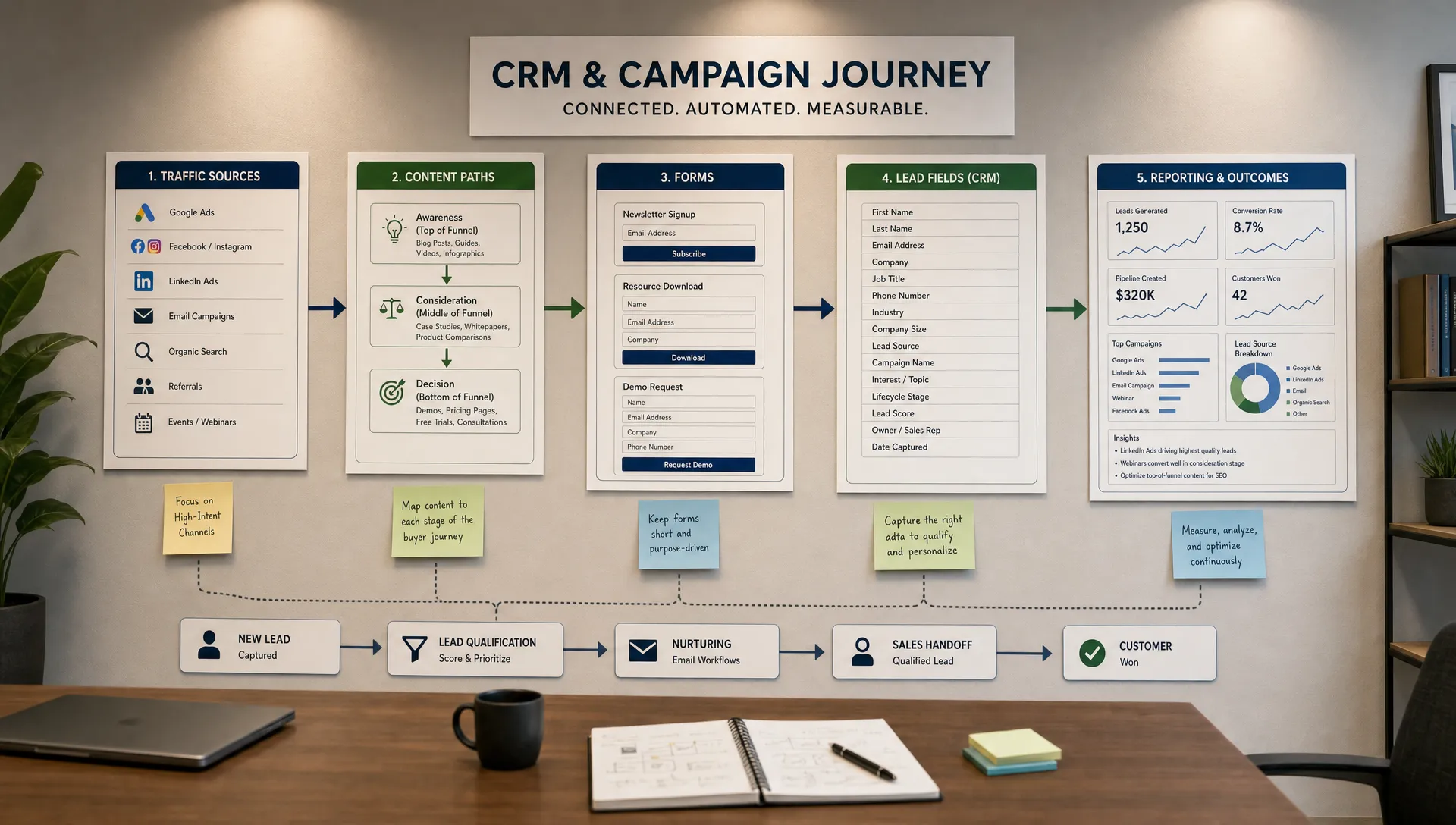
HubSpot web design can fail when the site is treated as a set of pages instead of a connected marketing and sales system. The design may look polished, but campaigns still take too long to launch, content is hard to manage, and sales teams receive incomplete lead context.
The goal of HubSpot web design is not only to build a website inside HubSpot. It is to connect campaign execution, content operations and CRM data so the website supports how your team actually acquires, qualifies and follows up with leads.
This guide gives you a practical framework for planning that connection before design starts.
HubSpot web design is the process of designing and building a website, landing page system or content experience that works with HubSpot’s CMS, marketing tools and CRM.
A strong HubSpot website connects three layers. Campaigns bring visitors in. Content helps them understand and evaluate. CRM data captures what happened, who engaged and what sales or marketing should do next.
That connection matters because HubSpot is not only a page builder. It can support forms, CTAs, landing pages, contact records, lifecycle stages, marketing lists and reporting. If your team wants HubSpot to act as an operational layer, BeBranded’s overview of how HubSpot can centralize marketing, sales and operations is a useful starting point.
The design challenge is to make those tools usable inside a clear site structure. That means page templates, modules, forms, content categories and CRM fields need to be planned together, not patched together after launch.
A HubSpot website is usually a good fit when marketing and sales already rely on HubSpot for campaigns, lead capture or pipeline visibility.
If your team runs email campaigns, paid acquisition, inbound content and sales follow-up through HubSpot, building the website or key landing pages there can reduce handoffs. The website becomes closer to the CRM, which makes campaign tracking and lead management easier to govern.
It is not always the only option. Some teams prefer Webflow or Framer for brand expression, custom interactions or a separate marketing site, while still using HubSpot for forms, CRM and automation. The right decision depends on who will manage the site, how complex the design system needs to be, and how much of the customer journey already lives in HubSpot. If ownership and maintenance are the deciding factor, how to choose a web design agency that fits your growth stage covers the same trade-off from a staffing angle.
For the technical side, HubSpot’s own documentation on creating and customizing website pages is helpful, but platform documentation will not define your content strategy or CRM model. That planning has to come from your business goals.
The comparison below summarizes the main trade-offs so marketing, sales and design can align faster on a starting point before scoping the project.
| Criteria | HubSpot website | Webflow or Framer with HubSpot CRM |
|---|---|---|
| Best fit when | Campaigns, forms and CRM already run in HubSpot | Brand expression, custom interactions or a separate marketing site matter most |
| CRM proximity | Native, forms and pages write directly to CRM records | Requires an integration or connector to sync form data |
| Design flexibility | Good for standard layouts and marketing modules | Stronger for custom visual systems and interactions |
| Team ownership | Marketing can often update pages and modules directly | Usually needs a designer or developer for structural changes |
| Typical use case | Lead generation sites, landing page systems, sales enablement pages | Brand sites, product marketing sites, complex design systems |
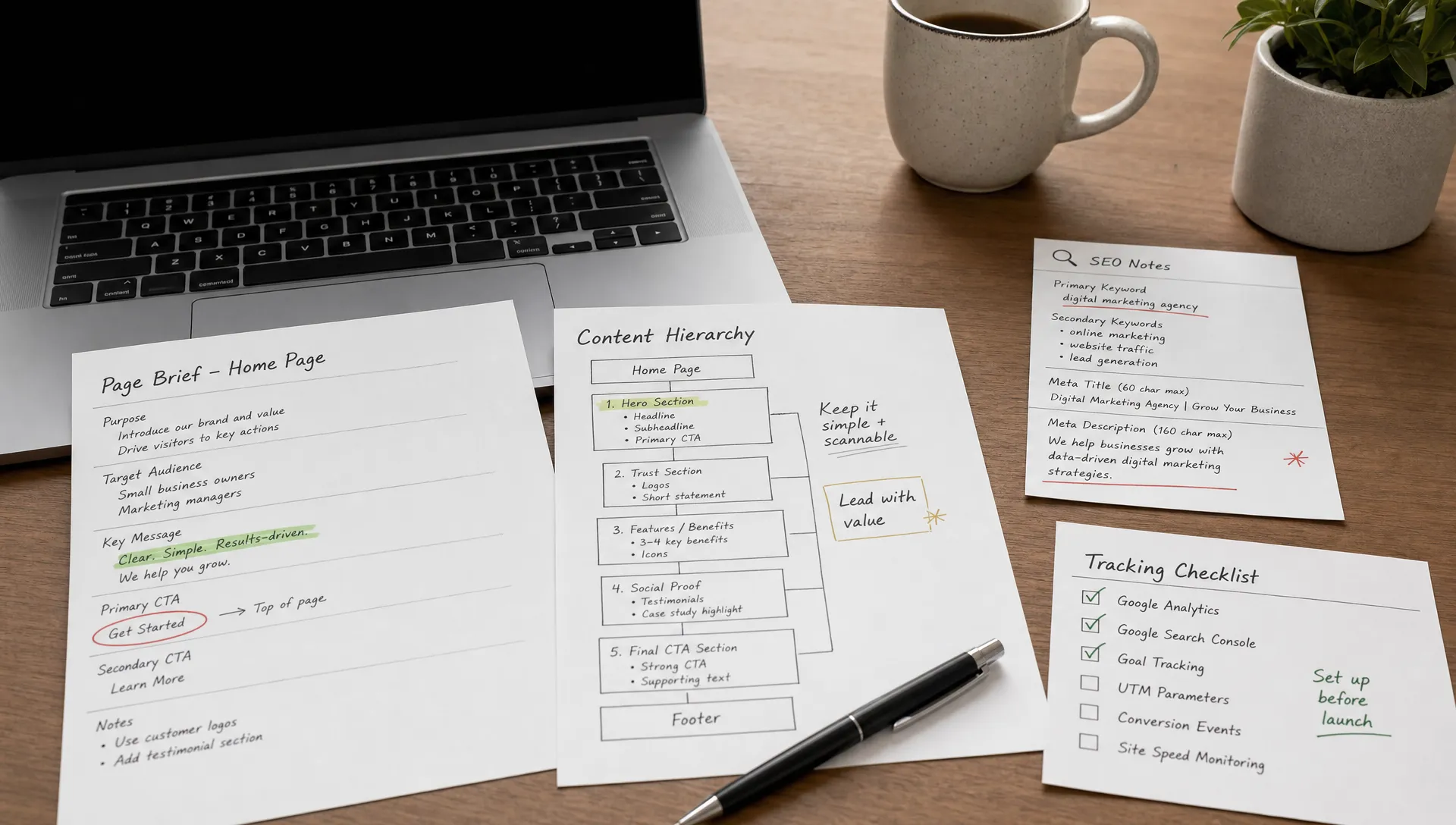
Use this framework before wireframes, visual design or development. It keeps the website tied to measurable work instead of isolated page production.
This framework avoids a common problem: designing pages first, then asking marketing operations to make the data work later. In HubSpot web development, the page and the CRM record should be designed as two sides of the same journey.
Campaign landing pages need more than a headline, a form and a branded layout. They need a clear relationship between the visitor’s source, motivation and next action.
Start with the campaign promise. If the ad or email promotes a specific pain point, the page should continue that exact thread. Avoid sending targeted campaign traffic to generic service pages unless the offer is simple and the visitor already has enough context.
Then define the minimum proof needed for action. For a low-friction content offer, that might be a short explanation, a few credibility signals and a concise form. For a sales conversation, the page may need use cases, qualification cues, implementation details and a clear explanation of what happens after submission. The structural patterns in this landing page conversion guide apply whether the page is built in HubSpot or connected to it through a form.
Tracking should be part of the page plan. UTM parameters, hidden fields, campaign naming and form routing need to be documented before launch. A campaign page that converts without clean attribution still creates work for the team reviewing performance.
If you are also trying to improve organic visibility and conversion quality, the broader principles in web design services that improve conversion and SEO apply directly to HubSpot landing pages.
Content architecture is the structure that helps visitors and teams find, manage and connect content. In HubSpot, it should cover both the public website and the internal content management workflow.
A useful architecture starts with buyer questions, not with internal departments. Instead of creating disconnected blog posts, resources and service pages, group content around problems, use cases, industries, comparisons and decision stages.
For HubSpot CMS design, this usually means defining reusable templates and fields for content types such as articles, guides, case studies, events, resource pages and product pages. The goal is to make content scalable without turning every new page into a one-off design task.
Content distribution is also a design decision. If resources are meant to circulate through LinkedIn, email or team messages, a lightweight social sharing module can make that behavior easier without distracting from the primary conversion path.
Scope matters here. A redesign that includes content architecture, technical SEO, integrations and launch support is different from a visual refresh. If you are defining what belongs in the project, this guide on what website development and design services should include gives a useful checklist of core workstreams, and how to compare web design packages beyond the page count helps evaluate proposals that quote very different scopes for the same brief.
Once campaign structure and content architecture are defined, the remaining variable is integration complexity. Content migration, custom modules and third-party connections rarely take the same amount of time on two projects, even when the page count looks similar.
Setting expectations here early avoids the most common source of timeline slippage: integration and migration work that only becomes visible once development starts. The table below summarizes how common factors typically affect a HubSpot website project.
| Project factor | Typical impact on timeline | What to plan for |
|---|---|---|
| Content migration volume | Adds two to six weeks depending on page count and content cleanup | Content audit and mapping before development starts |
| Custom HubSpot modules | Adds one to three weeks per complex module | Clear specifications and a reusable field structure |
| Third-party integrations | Adds one to four weeks depending on the system | API access, data mapping and testing time |
| Lifecycle stage and property cleanup | Runs in parallel but needs sign-off from sales | Early alignment meeting with marketing and sales leadership |
| Multi-language content | Adds translation and QA time per locale | Translated copy ready before template build begins |
These factors also drive cost. If a proposal seems unusually fast or unusually cheap, check which of these items it actually includes. This overview of website redesign costs and how to compare web development services without wasting budget both walk through the line items that separate a realistic quote from an optimistic one.
CRM website integration is the planned connection between visitor actions on the website and contact, company or deal records in the CRM.
For HubSpot, this handoff often starts with forms. Each form should have a clear purpose, field logic and destination. A demo form should not collect the same information as a newsletter form. A partner inquiry should not follow the same process as a sales-qualified inbound request. Defining that logic is also where design and development need to work from the same brief, which is the core argument in how web design and development should work together.
The table below gives a starting point for the fields and routing logic each form type typically needs, before it is refined against your actual sales process.
| Form type | Core fields to capture | Primary routing goal |
|---|---|---|
| Demo request | Company size, role, use case, timeline | Route to sales for a qualified follow-up |
| Newsletter signup | Email, topic interest | Add to nurture list, no sales alert |
| Content offer download | Email, company, role | Score and segment for lifecycle nurture |
| Partner inquiry | Company type, partnership goal, region | Route to the partnerships team, not the sales queue |
| Support or contact request | Issue type, account status | Route to the support workflow, separate from the sales pipeline |
Lifecycle stages are also important. HubSpot’s guidance on using lifecycle stages can help teams align around contact progression, but your definitions still need to reflect your sales process. Marketing, sales and leadership should agree on what makes someone a subscriber, lead, marketing qualified lead or sales qualified lead.
The design should also show visitors what happens next. If someone submits a high-intent form, confirm the next step clearly. If the request goes to sales, make that expectation visible. This reduces confusion for the visitor and helps internal teams follow up with the right context.
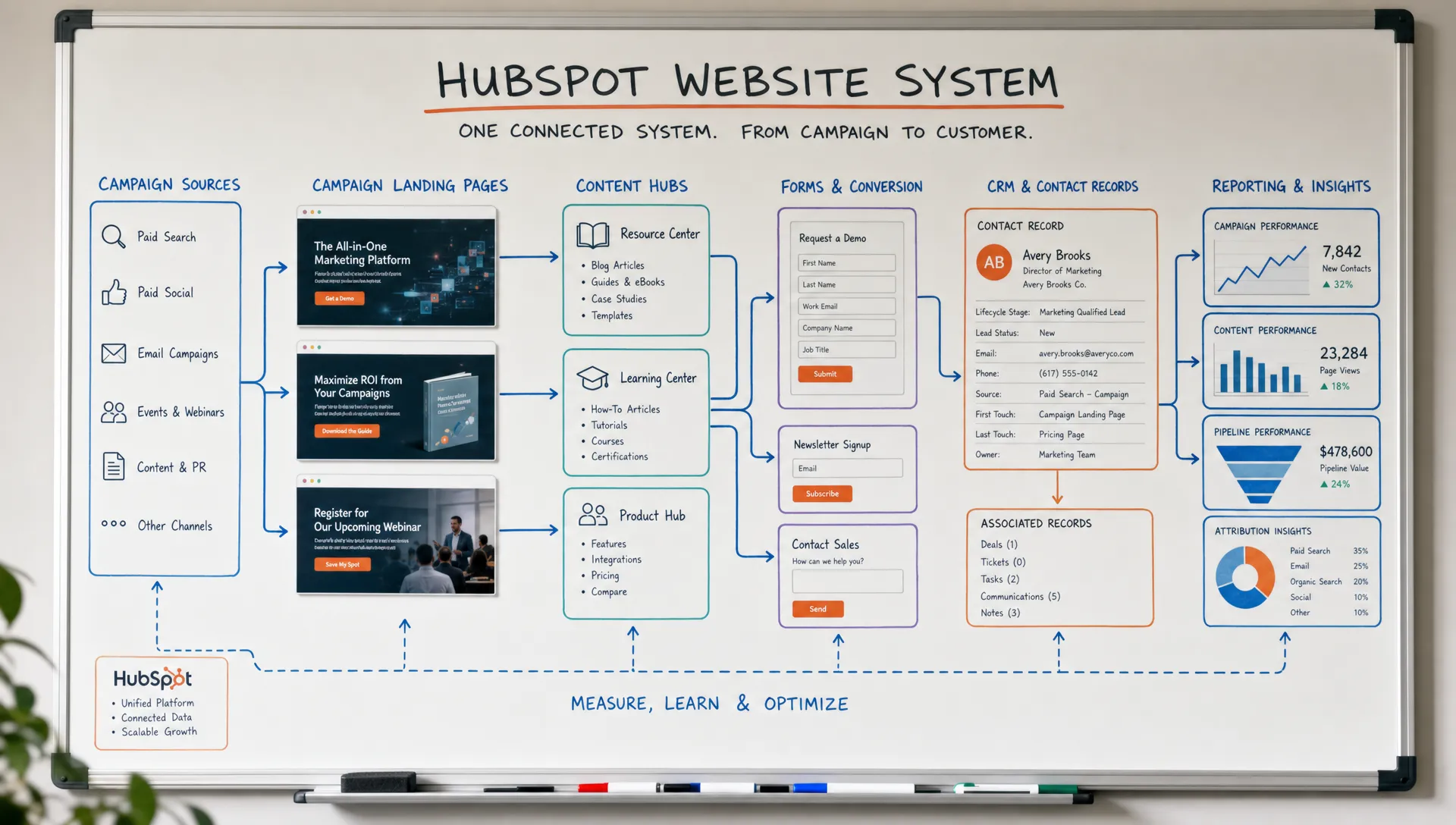
Most HubSpot website issues come from sequencing problems. Teams design too much before they define how the site will be managed, measured and connected to CRM.
Use this checklist to align marketing, sales and leadership before the first page is designed. It is also a useful reference if the project is a full website revamp planned around business outcomes rather than a first build.
This checklist is intentionally operational. A HubSpot website is only useful if the team can launch, update and measure it without rebuilding the process every time.
Post-launch measurement should connect website behavior with CRM outcomes. Traffic alone is not enough. A useful reporting routine reviews each layer on its own terms rather than collapsing everything into one traffic number, as summarized in the table below.
| Layer | Metrics to review | What it tells you |
|---|---|---|
| Campaign | Sessions, landing page engagement, form submissions, cost per lead | Whether traffic quality matches the campaign’s intended audience |
| Content | Assisted conversions, qualified visitors by topic, content type performance | What to update, expand or retire |
| CRM | Source accuracy, lifecycle progression, sales acceptance rate, pipeline contribution | Whether the handoff from web to sales is actually working |
At the campaign level, review sessions, landing page engagement, form submissions, cost context if paid media is involved, and conversion quality. The question is not only whether a page generated leads, but whether those leads matched the campaign’s intended audience.
At the content level, look at which pages assist conversion, which topics attract qualified visitors, and which content types support sales conversations. This helps decide what to update, expand or retire. The same logic applies to broader site structure, covered in website structure that helps users and Google find the right pages.
At the CRM level, review source accuracy, lifecycle progression, sales acceptance, meeting creation and pipeline contribution where that data is available. If the CRM record does not tell a clear story, revisit the form structure and property mapping.
For teams building a broader no-code and SEO operating model around their site, the BeBranded blog covers related decisions on CMS operations, technical SEO and marketing website execution.
What is HubSpot web design? HubSpot web design is the planning, design and development of website pages, templates and conversion paths that work with HubSpot’s CMS, marketing tools and CRM.
Should our entire website be built in HubSpot? Not always. HubSpot is a strong fit when your campaigns, forms, content management and CRM workflows already rely on HubSpot. Some teams use HubSpot for landing pages and CRM while keeping the main site on another platform.
How does HubSpot web design support campaigns? It helps teams create landing pages, forms and content paths that match campaign intent, capture clean attribution and pass useful data into the CRM for follow-up.
What CRM fields should be planned before design starts? Common fields include lead source, campaign name, lifecycle stage, product interest, company size, role, region and qualification details. The right fields depend on your sales process.
Do we need developers for a HubSpot website? You may need developers for custom modules, complex templates, migrations or integrations. Even when HubSpot reduces technical dependency, the project still needs clear UX, content and CRM planning.
How long does a HubSpot website redesign take? Timeline depends on scope, content volume, migration complexity, integrations and approval speed. A focused landing page system is very different from a full website rebuild with CRM cleanup.
HubSpot web design works when the website is planned as part of your campaign and CRM system, not as a separate design asset. The key is to define the journey before production: campaign source, page intent, content support, form logic, CRM fields and follow-up process.
The next step is simple: map one important campaign from first click to CRM record and identify where the handoff breaks. If you want a partner to structure and build that system with a pragmatic no-code approach, start with a focused website discussion with BeBranded.