Website structure that helps users and Google find the right pages
SEO
•
X min
•
Published on
11.06.2026
•
Updated on
21.08.2026
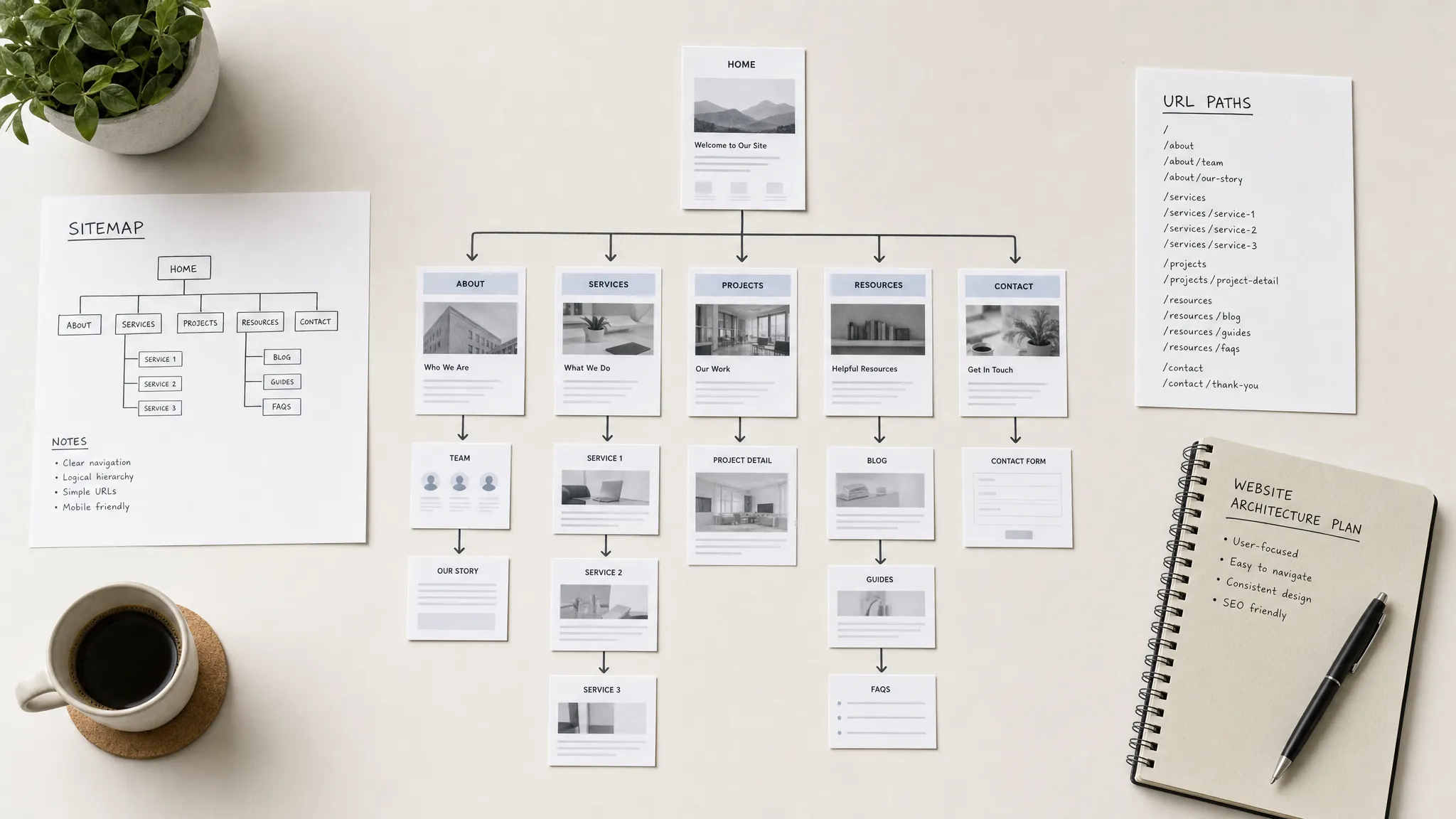
A website can look polished and still fail because users cannot find the right page, and Google cannot understand which pages matter most. Website structure solves that problem by organizing pages, links, navigation, URLs, and content hierarchy around clear intent.
For CEOs, CMOs, founders, and marketing managers, structure is not a technical detail left until the end. It affects SEO, conversion paths, campaign scalability, CMS maintenance, and how quickly your team can publish without creating a messy site.
This guide gives you a practical framework to plan a website structure that helps both people and search engines reach the right pages with less friction.
Website structure is the way your pages are organized, connected, named, and prioritized across your site. It includes navigation, page hierarchy, URL structure, internal links, CMS collections, and the relationship between commercial and informational content.
For users, structure answers simple questions quickly: where am I, what can I do here, and where should I go next? If those answers are unclear, users rely on guesswork, bounce back, or contact your team with questions your site should have solved.
For Google, structure helps discovery and interpretation. Google Search Central explains that search engines discover pages through links and sitemaps, then use page content and signals to understand relevance. A well-structured site makes that process easier.
Good website structure also supports AI search visibility. Clear pages, descriptive headings, contextual links, and well-defined content hubs make your site easier to parse, summarize, and cite. This is one of the practical overlaps between SEO and GEO, which we cover in our guide to GEO vs SEO.
A useful website structure is not built by listing every page your company wants. It is built by connecting business goals, user intent, and search demand into a hierarchy that can scale.
Use this five-layer framework before design or development starts.
Start with the decisions your website needs to support. A B2B service website might need users to understand the offer, compare solutions, trust the team, and book a call. A SaaS website might need visitors to explore use cases, compare plans, and start a trial.
Your structure should reflect those decisions. If pricing is a frequent sales question, hiding it three levels deep creates friction. If industry pages drive qualified demand, they should not be buried in a blog category.
Ask these questions before creating the sitemap:
Once goals are clear, define your page types. Most business websites need a mix of commercial pages, proof pages, resource pages, and operational pages such as legal or support content.
The hierarchy should make important pages easy to reach. Your homepage should not be the only gateway to your services, use cases, or resources. Parent pages should introduce a topic clearly, while child pages should answer specific intent in more depth.
This is where a sitemap and wireframes help. Before design work starts, a structured planning phase like the one described in our website mockup guide can prevent expensive changes later.
Navigation is not a full sitemap. It is a curated set of entry points for the most important user decisions.
A good main navigation usually shows your core offer, who it is for, proof, resources, and one primary conversion action. Secondary pages can live in footer navigation, contextual sections, or resource hubs.
From a CRO perspective, navigation should reduce uncertainty, not expose every internal category. If users need to think too much about where to click, the structure is doing too much work in the wrong place. For conversion-focused thinking, our guide to CRO on Webflow explains how to connect page structure with measurable actions.
Internal links connect related pages and help users continue their journey. They also help search engines understand which pages are related and which pages are more important.
Contextual internal links are often more useful than footer links because they appear at the moment of need. A service page can link to a related case study, a comparison page, a pricing explanation, or a relevant guide. A blog article can link to the commercial page that solves the problem discussed.
Think of internal links as pathways, not SEO decoration. Every link should help the reader move to a page that answers the next logical question.
Technical structure includes URL paths, canonical tags, redirects, indexation rules, sitemap generation, and CMS templates. These details matter because they turn your structure into something search engines can crawl consistently.
In Webflow, CMS collections can make this cleaner when they are planned properly. Categories, authors, case studies, services, locations, and resources should not be improvised as content grows. Our Webflow CMS guide explains how collections can support a scalable content architecture.
The key is consistency. If every new page uses a different naming logic, URL pattern, and internal linking approach, the site becomes harder to manage and harder to understand.
The best moment to fix structure is before visual design. Once pages are designed and built, structural changes affect copy, CMS fields, redirects, components, and analytics.
Use this process to plan your structure before production starts.
This process is especially important during a redesign. Changing structure without a migration plan can create SEO risk, broken links, and lost context for users. If you are restructuring an existing site, our guide to SEO redesign and migration covers the safeguards to put in place.
Most SMB and scale-up websites do not need hundreds of pages at the start. They need the right pages, organized around how buyers evaluate the offer.
A practical structure usually includes these page groups.
For a small service business, this may be enough. For a content-led company, the resource section may grow into multiple hubs. For a simple corporate presence, a leaner approach may work better, as explained in our brochure website guide.
The decision is not how many pages you can create. The decision is whether each page has a distinct purpose and a clear place in the hierarchy.
Google does not see your internal strategy documents. It sees crawlable pages, links, content, metadata, URLs, and technical signals.
Your structure should make priority visible through the site itself.
Key commercial pages should be reachable in a few clicks from the homepage and navigation. They should also receive contextual internal links from related content.
If a service page only has one footer link and no internal links from relevant articles, it sends a weak signal. If every relevant article links naturally to that service page, the relationship is clearer for both users and search engines.
URLs should be short, descriptive, and consistent. A URL such as /services/webflow-development/ is easier to interpret than a vague or auto-generated path.
Avoid changing URLs unless there is a clear reason. If you do change them, plan redirects before launch. URL consistency is part of structure, not just a technical SEO task.
A content hub groups related pages around a central topic. For example, a Webflow SEO hub might include articles on metadata, CMS SEO, redirects, Core Web Vitals, internal linking, and technical setup.
This is stronger than publishing disconnected articles with no hierarchy. Our SEO Webflow guide is an example of a central resource that can connect to more specific articles.
Structure is easier to maintain when page sections, components, and content patterns are standardized. If every service page is built from scratch, teams often create inconsistent layouts, CTA placement, and heading patterns.
A design system helps teams reuse tested patterns while keeping pages flexible. Our guide to creating a design system for your site explains how this supports consistency across design and development.
Most structure problems come from decisions made too late. Teams design pages first, then try to connect them afterward.
Avoid these common mistakes.
The goal is not to make the structure complex. The goal is to make the next step obvious.
Use this checklist before launching a new site, redesigning an existing one, or expanding your CMS.
This checklist is intentionally practical. If one item is unclear, fix it before adding more pages.
The platform does not replace strategy, but it does influence how structure is implemented and maintained.
Webflow is strong for structured, content-rich websites because it gives teams control over CMS collections, templates, SEO fields, redirects, and page-level design. This makes it suitable for service sites, resource hubs, case study libraries, and SEO-focused marketing websites.
Framer is often faster for design-first websites with lighter content needs. It can work well for landing pages, startup sites, and smaller marketing sites, but the structure still needs to be planned before build. We compare the practical differences in our guide to Webflow vs Framer.
The important point is simple: do not choose a platform first and force the structure into it later. Define the site architecture, content model, and marketing needs, then choose the tool that supports them with the least operational friction.
What is website structure? Website structure is the way pages are organized, linked, named, and prioritized across a website. It includes navigation, URLs, internal links, page hierarchy, and CMS organization.
Why does website structure matter for SEO? Website structure helps search engines discover pages, understand relationships between topics, and identify which pages are important. It also helps users find the right content faster, which supports engagement and conversions.
How many levels should a website structure have? Most business websites should keep important pages within a few clicks from the homepage. Deep structures can work for large sites, but only when categories, internal links, and templates are clearly planned.
Should every service have its own page? Each core service should usually have its own page if it targets a distinct problem, audience, or search intent. If two services are too similar, one stronger combined page may be better than two thin pages.
How often should we review website structure? Review structure before a redesign, before launching new content hubs, after major positioning changes, and whenever analytics show users are not reaching key pages. For active marketing sites, a quarterly structure review is usually practical.
Can good website structure improve conversions? Yes. A clear structure reduces friction by helping users understand the offer, compare options, find proof, and reach the right conversion page. It does not replace strong copy or design, but it makes both more effective.
A clear website structure helps users make decisions and helps Google understand which pages deserve attention. It also gives your team a stable foundation for SEO, content publishing, landing pages, and future redesign work.
The next step is to audit your current sitemap and identify pages that are missing, duplicated, buried, or disconnected from key user journeys.
If you want an external review, BeBranded can help you plan, design, and build a Webflow or Framer website with a clear structure, clean CMS architecture, and SEO-ready foundations.