
The essentials · 30-second read
Screaming Frog SEO Spider is a desktop SEO crawler. Free up to 500 URLs. Paid licence €245 (£199) a year per user, cheaper from 5 licences. No monthly plan.
- Screaming Frog SEO Spider is a desktop crawler (Windows, macOS, Linux) that finds broken links, redirects, metadata issues, duplicates, hreflang and structured data problems, with JavaScript rendering.
- Free version limited to 500 URLs per crawl. Paid licence: €245 or £199 per user and per year, falling to €235, €219 and €209 per licence from 5, 10 and 20 licences.
- Version 25.1 adds AI integrations (OpenAI, Gemini, Anthropic, Ollama), semantic similarity, an MCP server and command line automation on top of the classic audits.
- Our verdict: the reference crawler for one-off deep audits and migrations; for continuous monitoring a cloud audit such as Ahrefs Site Audit plus Search Console is easier to run.
Summarize this page with AI
Screaming Frog SEO Spider is the crawler most SEO specialists open first when a site has a problem nobody can explain. It runs on your own computer, visits every URL it can reach and shows the site the way a search engine bot sees it. This guide explains what the SEO Spider does in 2026, what the free version really allows, what a licence costs, which features the latest versions added (AI integrations, semantic similarity, an MCP server) and when we recommend it to clients rather than a cloud audit tool.
01What is Screaming Frog?
Screaming Frog is a UK search marketing agency, and the SEO Spider is the desktop software it publishes for technical SEO audits. You enter a start URL, the Spider follows links, images, scripts and stylesheets, and it records for each URL the status code, the response headers, the title, the meta description, the headings, the canonical tag, robots directives, hreflang and much more. The result is a full inventory of the site with filters for every known issue. The product page listed version 25.1 of the SEO Spider in November 2026, alongside a separate Log File Analyser (version 7.2).
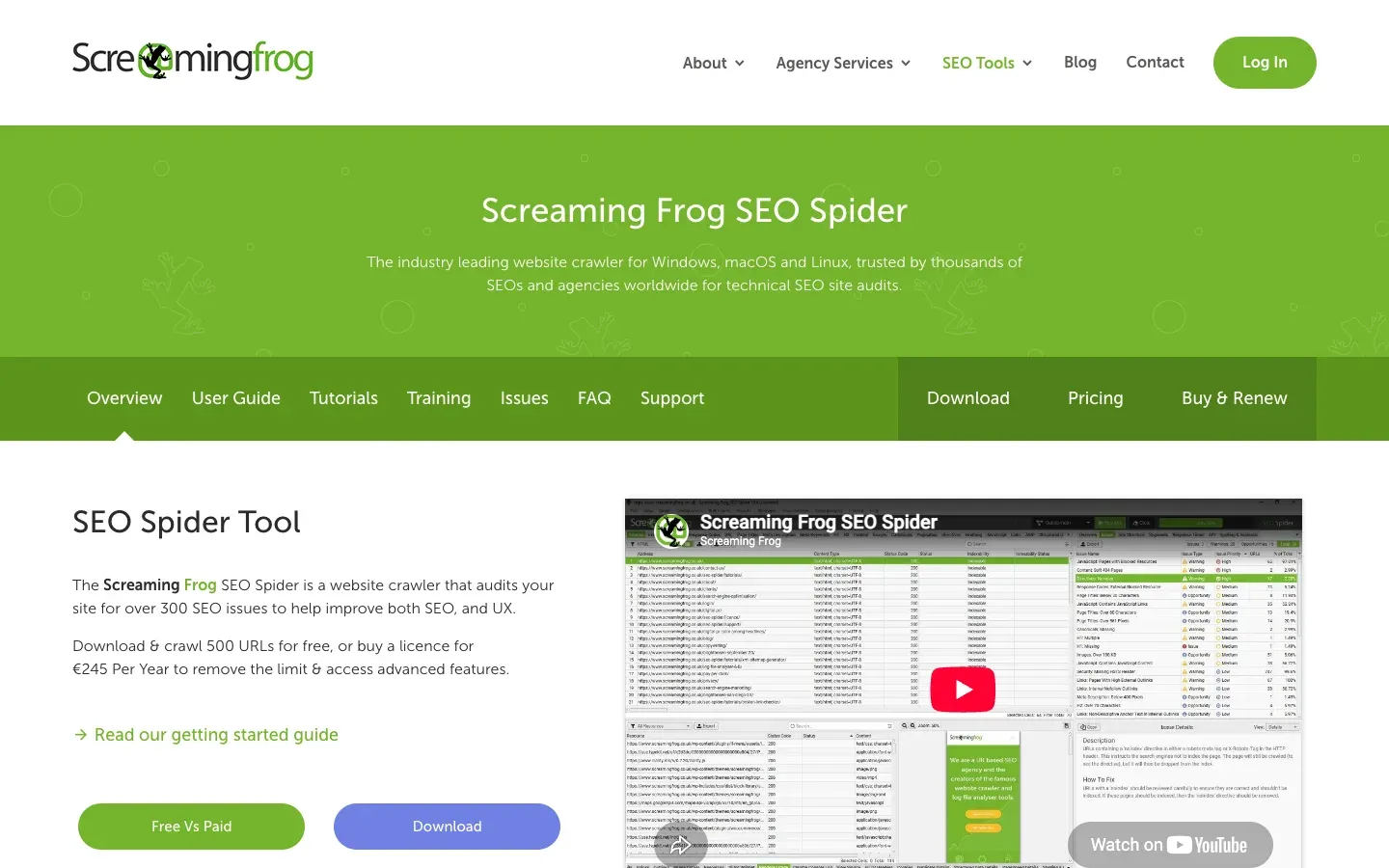
What sets Screaming Frog apart is control. You decide exactly what to crawl (a subfolder, a list of URLs, a sitemap, a staging site behind a password), with which user agent, at what speed and with or without JavaScript rendering. Every data point can be exported, filtered and compared with a previous crawl. The trade-off is that the tool is dense: it gives you data, not a ready-made action plan.
02When we recommend Screaming Frog at BeBranded
We run technical SEO audits and on-page SEO work for clients, and our own daily SEO monitoring relies on Google Search Console and Ahrefs. Screaming Frog is not part of our daily stack, so this section describes when we point clients and their teams towards it, and when we suggest something else.
- We recommend Screaming Frog to in-house SEO specialists and developers who need to investigate a site in depth: redirect chains after a redesign, canonical errors, orphan pages, hreflang mistakes or JavaScript content that search engines may not see.
- We recommend it before a migration or a website redesign: crawling the old site gives the complete list of URLs to map to the new ones, which is the backbone of a redirect plan. Our guide on migrating without losing traffic explains the method.
- We suggest a cloud audit instead when the team wants scheduled checks, alerts and history without installing software, for example Ahrefs Site Audit or Semrush, combined with Google Search Console.
- We advise against it for a marketing team with no SEO specialist: the raw data is hard to prioritise, and a short site audit with a clear list of fixes is usually more useful than a crawl export nobody reads.
03Key features
- Broken links, errors and redirects: 4xx and 5xx responses, redirect chains and loops, with the pages that link to them.
- Titles, meta descriptions and headings: missing, duplicate, too long or too short, page by page.
- Directives: meta robots, X-Robots-Tag, canonical tags, pagination and robots.txt rules.
- Hreflang audit: missing return links, wrong language codes and non-canonical targets on multilingual sites.
- Duplicate and near duplicate content, plus semantic similarity and content clustering based on embeddings.
- JavaScript rendering with a Chromium-based renderer, to compare raw and rendered HTML.
- Structured data extraction and validation against Schema.org and Google rich result rules.
- XML sitemap generation and sitemap audits.
- Custom search, extraction and custom JavaScript: pull any element with XPath, CSS selectors or regex, or run your own scripts during the crawl.
- Crawl comparison and scheduling: compare two crawls or staging against production, schedule crawls and export to Google Sheets automatically.
- Accessibility, spelling and grammar checks, and mobile usability reports.
- AI integration and MCP server: connect OpenAI, Gemini, Anthropic or Ollama to run prompts on crawled pages, and expose crawl data to AI assistants.
04Use cases
Inventory URLs before a site migration
A company is moving from WordPress or Webflow to a new platform. Before anything else, the team needs the list of every URL that exists, receives links or traffic. A full crawl, combined with URLs from Search Console and analytics, gives that list. Each URL is then mapped to its new address. What to know: crawl the old site before it changes, and keep the export, because you will need it again after launch to check that every redirect works.
Check a staging site before launch
Developers often launch with a few blocking mistakes: a noindex left from staging, canonical tags pointing to the wrong domain, internal links to the preview URL. Screaming Frog can crawl a password-protected staging site and compare it with production through URL mapping. What to know: run the same check again on the live site on launch day, as explained in our article on launching without last-minute SEO issues.
Audit a multilingual site
Hreflang errors are common and hard to spot by hand. The Spider lists pages with missing return links, wrong language codes or hreflang pointing to redirected URLs. What to know: fix the structure first (one URL per language, consistent paths), then the tags; the structure of a website matters as much as the markup.
Find content issues at scale
Content and SEO teams export every title, description and H1 to fix duplicates, empty fields and pages that compete for the same query. Near duplicate detection and semantic similarity help find thin or overlapping pages. What to know: the crawl tells you what is on the page, not how it performs; pair it with clicks and impressions from Search Console before you merge or delete anything.
Check what AI and search engines can actually read
Sites built with heavy JavaScript can hide content from crawlers that do not render it. Comparing raw HTML with rendered HTML shows what depends on scripts. This matters for search engines and for AI crawlers, which do not all execute JavaScript. What to know: our guide to AI-friendly technical SEO lists the basics that help both.
05Integrations
The paid SEO Spider connects to Google Analytics, Google Search Console and PageSpeed Insights through their APIs, so clicks, impressions and Core Web Vitals appear next to each crawled URL. It can also pull link metrics from Ahrefs, Majestic and Moz. Recent versions add an AI integration with OpenAI, Gemini, Anthropic and Ollama to run custom prompts on each page (for example to classify pages or generate alt text suggestions), and an MCP server to expose crawl data to AI assistants. For automation, scheduled crawls can export to Google Sheets, a Data Studio crawl report is available, and the command line interface lets you run crawls from scripts or a server.
06Screaming Frog pricing in 2026
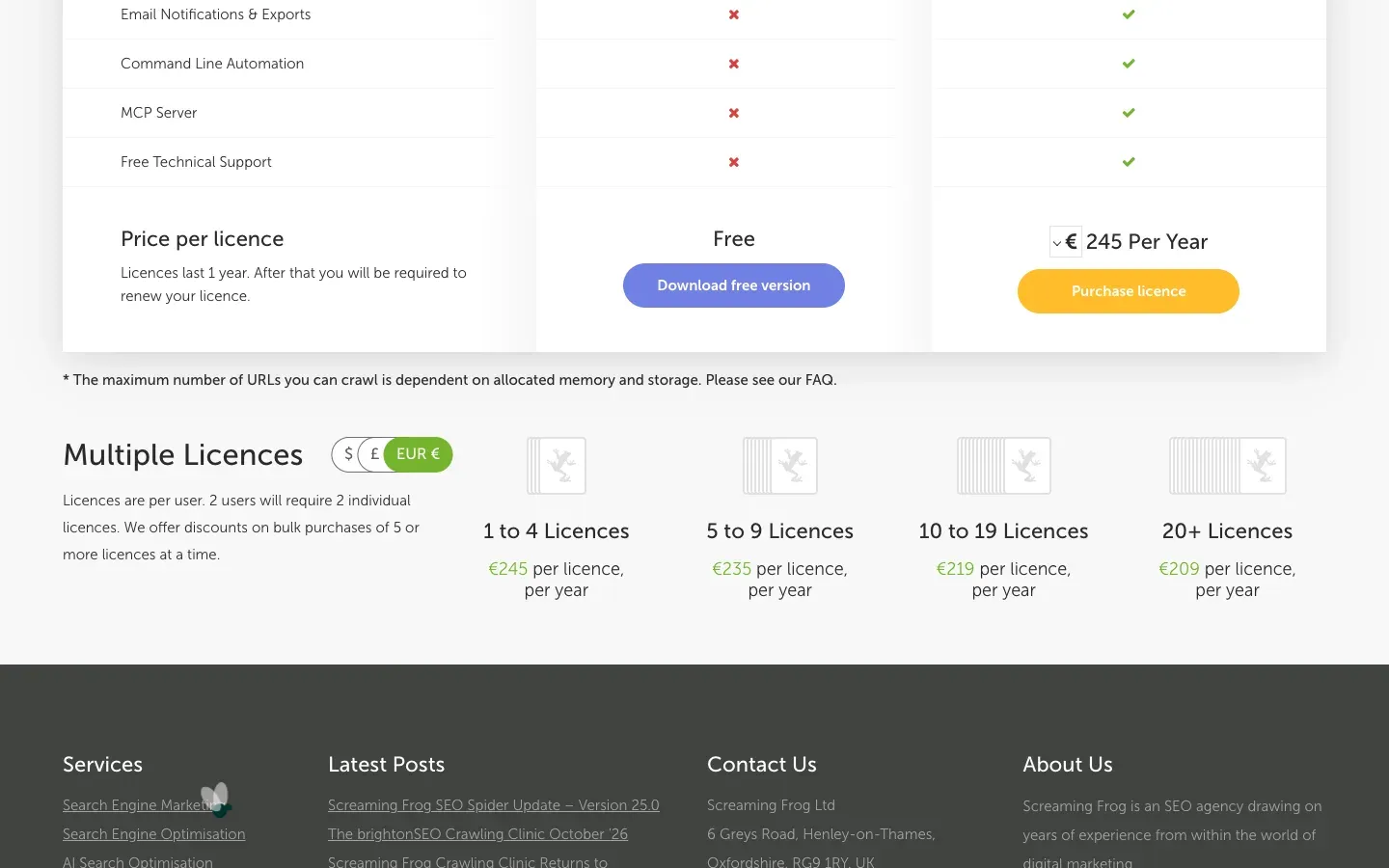
Prices checked on screamingfrog.co.uk/seo-spider/pricing on 18 November 2026. The pricing page showed a yearly price per licence in euros; the product page also showed the UK price in pounds. The page does not say whether VAT is included.
| Version | |||
|---|---|---|---|
| Free | Price €0 | Crawl limit 500 URLs per crawl | What it includes Broken links and redirects, titles and meta data, directives, hreflang, exact duplicates, XML sitemaps, site visualisations |
| Paid, 1 to 4 licences | Price €245 (£199) per licence a year | Crawl limit Unlimited (depends on memory and storage) | What it includes Adds saving crawls, configuration, JavaScript rendering, structured data, custom extraction, integrations, AI, MCP, scheduling, support |
| Paid, 5 to 9 licences | Price €235 per licence a year | Crawl limit Unlimited | What it includes Same features |
| Paid, 10 to 19 licences | Price €219 per licence a year | Crawl limit Unlimited | What it includes Same features |
| Paid, 20 licences or more | Price €209 per licence a year | Crawl limit Unlimited | What it includes Same features |
Licences are per user: two people who crawl need two licences. A licence lasts one year and must be renewed to keep using the paid features. The comparison table on the pricing page is clear about the split. The free version includes broken links, errors and redirects, titles and meta data, meta robots and directives, hreflang, exact duplicates, XML sitemaps and site visualisations. Everything else is paid: scheduling, crawl configuration, saving crawls, password-protected sites, JavaScript rendering, crawl comparison, near duplicates and semantic similarity, mobile usability, structured data, spelling and grammar, custom extraction and JavaScript, the Google Analytics, Search Console, PageSpeed Insights and AI integrations, accessibility, segmentation, the Data Studio report, exports by email, the command line, the MCP server and technical support.
Is Screaming Frog free? Yes, for small sites and quick checks: the free version crawls up to 500 URLs and shows the main technical issues. For a real audit of a company site, a migration or a JavaScript site, you will need the paid licence at €245 (or £199) per user and per year, which is modest compared with monthly cloud subscriptions.
07Pros and cons
Advantages
- Very fine control over what is crawled and how.
- A one-off yearly licence, cheaper than most cloud audit subscriptions.
- Data stays on your machine, which suits sensitive or staging sites.
- JavaScript rendering, custom extraction and custom JavaScript for advanced audits.
- Integrations with Search Console, Analytics, PageSpeed Insights and link tools.
- A product that keeps evolving: AI integrations, semantic similarity, MCP server.
Drawbacks
- A dense interface and a real learning curve.
- Large crawls depend on your computer's memory and storage.
- No backlink database, rank tracking or keyword research: it is a crawler, not a suite.
- No built-in collaboration: crawls are files you share.
- Turning exports into a prioritised action plan still takes expert work.
- The free version stops at 500 URLs per crawl.
08Our verdict
Who it's for
- SEO specialists and consultants who run technical audits.
- Agencies preparing redesigns and migrations.
- Developers who want to check a staging site before launch.
- Content teams that need to fix metadata and duplicates at scale.
Who it's not for
- Marketing teams without SEO skills, who need a short list of priorities rather than raw data.
- Teams that want continuous monitoring with alerts in the browser: Ahrefs or Semrush site audits are easier to run.
- Small sites that only need Google Search Console reports.
- Anyone looking for keyword research or backlink analysis.
09Screaming Frog alternatives
| Tool | ||
|---|---|---|
| Screaming Frog SEO Spider | Best for Deep one-off technical audits, migrations | Approach Desktop crawler, yearly licence |
| Ahrefs Site Audit | Best for Scheduled audits next to backlinks and keywords | Approach Cloud crawler inside an SEO suite |
| Semrush Site Audit | Best for Teams already on Semrush | Approach Cloud crawler inside an SEO suite |
| Moz Pro | Best for Site crawl with Moz metrics | Approach Cloud SEO suite |
| Google Search Console | Best for Indexing and performance data from Google | Approach Free reports, no full crawl |
| Sitebulb | Best for Visual audits with explained priorities | Approach Desktop or cloud crawler |
Our rule: use Google Search Console for every site, add a cloud audit from Ahrefs or Semrush when you want continuous monitoring, and keep Screaming Frog for deep investigations, migrations and JavaScript sites. Our Webflow SEO checklist lists the points to check whatever the crawler.
10Screaming Frog vs Ahrefs Site Audit
These two are the crawlers most teams compare. Screaming Frog runs on your computer when you launch it. You configure every detail, you can crawl staging sites and lists of URLs, and you pay a yearly licence per user. It shines on one-off, deep investigations: a migration, a sudden drop in indexed pages, a JavaScript rendering issue.
Ahrefs Site Audit runs in the cloud. It crawls on a schedule, keeps a history, sends alerts and sits next to backlink, keyword and ranking data in the same account, so a broken page can be linked directly to the traffic or links it loses. It is easier for a team to share, but offers less fine-grained configuration and is billed as part of a monthly subscription.
In practice, the two complement each other. A cloud audit catches regressions week after week; Screaming Frog answers the specific question when something goes wrong or before a big change. If you can only have one and you do not have an SEO specialist, start with the cloud audit and Search Console.
11Getting started with Screaming Frog
- Download the free version for your system and crawl your site with default settings to see the main issues.
- Read the overview tab first: response codes, then titles and meta descriptions, then directives and canonicals.
- Exclude what does not matter (filters, parameters, admin areas) before a large crawl, to save time and memory.
- Buy a licence when you hit 500 URLs or need saved crawls, JavaScript rendering or integrations, and switch to database storage for big sites.
- Connect Search Console and Analytics so that each issue comes with traffic data, and fix pages that matter first.
- Save the crawl before any redesign or migration, and compare it with a new crawl after launch. If you would rather have the audit done for you, our technical SEO audit delivers a prioritised list of fixes.