


The essentials · 30-second read
A services page does not need a public rate card, but it must explain the pricing logic behind the offer.
- Answer four questions: what is included, what changes the fee, what sits outside it and how a quote is confirmed.
- Pick a price signal your delivery model can support: fixed fee, range, starting price, sample project or custom quote.
- Keep assumptions and exclusions beside the price they qualify, in real text that works on mobile and with a keyboard.
- Keep the services page and the pricing page consistent, and link them to each other.
- Judge the page on inquiry quality and recurring sales questions, not on form volume alone.
Summarize this article with AI
A services page answers B2B pricing questions when it shows what is included, what changes the fee, what costs sit outside the engagement and how an estimate becomes a confirmed quote. You do not need a public rate card for work that genuinely varies, but you do need to explain the pricing logic.
A page that lists capabilities and hides every commercial detail leaves buyers to guess. This guide gives you a framework for presenting scope, price signals and quote conditions without turning your service page into a proposal.
Why B2B buyers look for pricing on a services page
Price is usually the first filter, not the last. In its research on B2B websites, Nielsen Norman Group reports that business customers name pricing as the information they most need online, and that participants in its usability studies left sites that did not show prices and went to competitors that did.
Buyers use even a rough price to answer three early questions:
- Am I in the right category? A price signal tells them whether the offer fits their size and ambition.
- Can I compare providers? Without a pricing basis, a shortlist is built on impressions.
- Is a call worth my time? Most buyers research alone before they contact anyone.
A service page is therefore a commercial evaluation page, not only a description of your expertise. Its job is to connect a buyer’s problem to a defined engagement: what you deliver, what the buyer must contribute and how the commercial relationship works. That distinguishes services page design from service design, which concerns how the service itself operates.
Before choosing a layout, identify the decision the reader needs to make. A marketing manager might need to establish budget fit, while a founder needs to know whether implementation is included. The principle behind designing around buyer decisions applies directly: organize information around unresolved questions, not your internal department structure. “Strategy, design and development” names activities. It does not yet explain what someone is buying.
How to design a services page around four pricing questions
Use four questions to turn commercial knowledge into page content.
| Buyer question | What the page should show | Example wording |
|---|---|---|
| What exactly is included? | Deliverables, intended outcome, engagement boundary | “Design and build of up to five page templates, CMS setup and launch.” |
| What changes the fee? | The few variables that materially affect effort or risk | “Each additional language adds translation review and testing.” |
| What sits outside the fee? | Subscriptions, licenses, support, client-side work | “Hosting and platform plans are billed by the provider, not by us.” |
| How is the quote confirmed? | Information needed, review step, what the buyer receives next | “After an introductory call, you receive a written scope and quote.” |
What exactly is included?
Define the purchasable scope before attaching a price signal. Name the deliverables, the intended outcome and the boundary of the engagement. For a website project, distinguish page design from development, content preparation, CMS setup and migration. For a consulting engagement, distinguish recommendations from implementation.
Avoid describing everything as “custom.” Buyers still need a baseline they can evaluate. Our guide to comparing web design packages beyond page count explains why deliverables and dependencies reveal more than a simple quantity.
What changes the fee?
Identify the variables that materially affect effort or delivery risk. For a website engagement, these often include:
- the number of unique page templates;
- content migration from an existing site;
- language versions;
- integrations with a CRM or other tools;
- the number of approval rounds and stakeholders.
Explain the consequence of each relevant variable rather than presenting an exhaustive capabilities list. “Existing content can be reused after review” is clearer than “content-dependent pricing.” If a requirement needs discovery before it can be priced, say what must be investigated and why.
What sits outside the quoted fee?
Separate the engagement fee from the buyer’s total cost of ownership. Disclose relevant exclusions such as platform subscriptions, third-party licenses, ongoing support or client-side content production, and say whether each one is optional, required or dependent on the chosen implementation.
The same principle applies to taxes, payment schedules and minimum commitments where relevant. Buyers should not discover a necessary recurring expense only after accepting the project. These distinctions also make website package pricing easier to evaluate without implying that every provider includes the same things.
How does an estimate become a confirmed quote?
Describe the information and decisions required to establish a firm scope: what the buyer should provide, what you review and what they receive next. Depending on your actual process, that could mean reviewing a brief, clarifying requirements or completing a separate discovery engagement. Do not promise a response time your team cannot consistently meet.
If the next step is an introductory discussion rather than a firm quotation, label it accurately. A button saying “Get an instant quote” should not lead to a generic contact form.
Choose a price signal your delivery model can support
The right pricing format depends on how reliably you can define the engagement before speaking to the buyer.
| Price signal | When it fits | What the page must explain |
|---|---|---|
| Fixed fee | The deliverables and delivery conditions are repeatable. | Included scope, exclusions and how additional work is handled. |
| Price range | Projects share a recognizable baseline but vary in complexity. | The scope represented by the range and what moves the fee within or beyond it. |
| Starting price | A genuine entry-level engagement is available. | Exactly what the starting scope includes and which requirements increase the fee. |
| Sample project price | Every engagement is configured, but typical cases recur. | The assumptions behind each example and how a real project may differ. |
| Custom quote | Material requirements need investigation before pricing. | Cost drivers, engagement boundaries and the process for confirming a quote. |
The sample project option comes from Nielsen Norman Group’s advice for complex B2B offers: when exact prices depend on configuration, show prices for a few typical scenarios rather than a complicated calculator. Early in their research, buyers only need a general idea of cost levels to build a shortlist.
A starting price is misleading if almost no suitable buyer can purchase the stated scope. A range is equally unhelpful when its endpoints represent completely different services. Publish figures only when your delivery history and current commercial model support them. If you publish no figures, compensate with specific scope boundaries and quote requirements, not “contact us for details.”
Services page or pricing page: which one answers what?
A dedicated pricing page and a services page share information but serve different moments. Keep them consistent and link them to each other.
| Services page | Pricing page | |
|---|---|---|
| Main question | Is this the right service for my problem? | How do the offers compare and what do they cost? |
| Pricing content | Price signal for one service, with its scope and assumptions | All packages or plans side by side |
| Typical reader | A buyer evaluating one need | A buyer comparing options or confirming budget |
| Link to the other | “See all packages and prices” | “What this service includes” |
For the pricing page itself, see what the best business websites show on pricing pages.
Place pricing where buyers can evaluate it
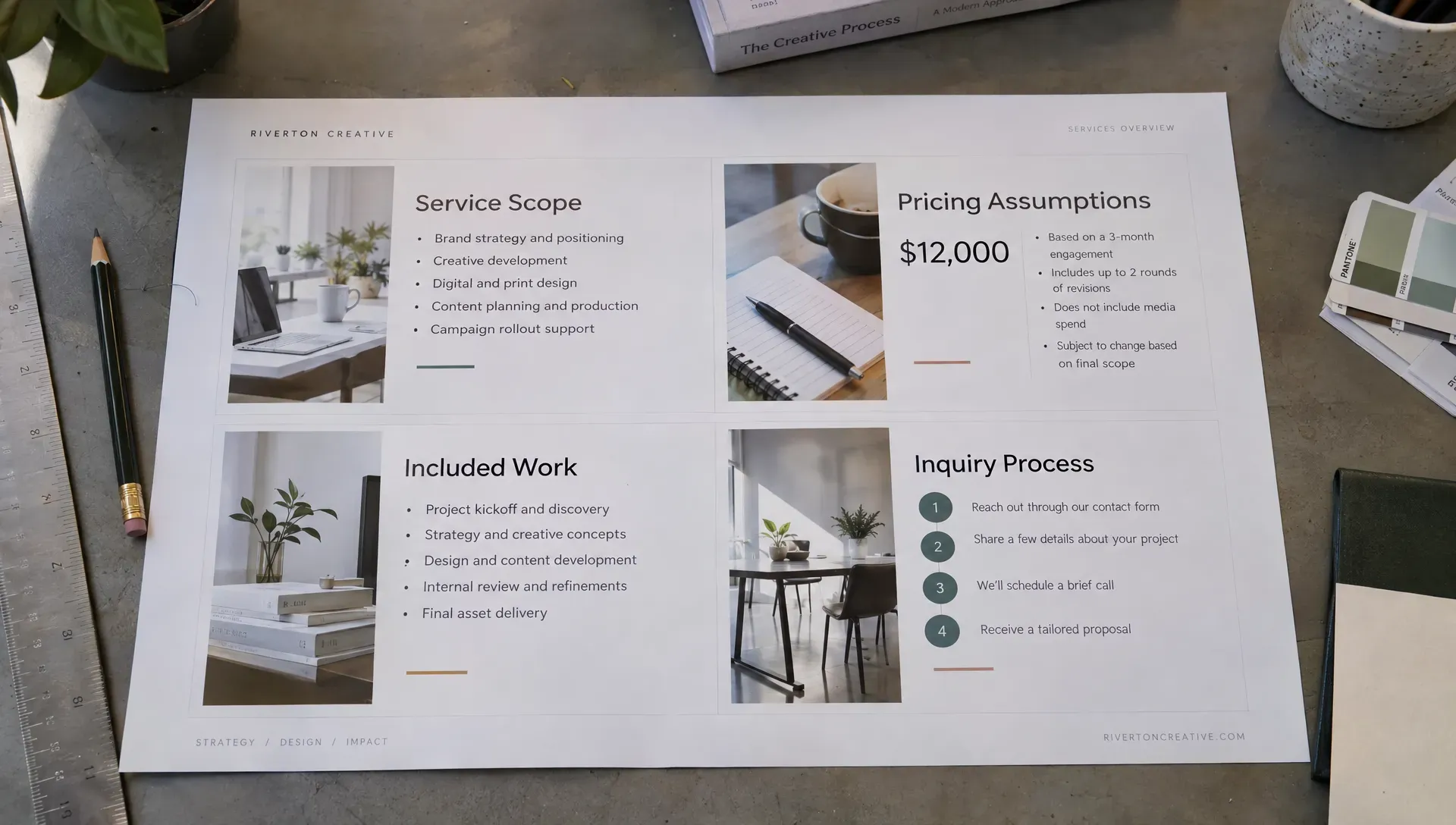
Keep each commercial claim close to the information needed to interpret it. A practical page sequence is:
- Service and fit: explain the outcome, intended buyer and situations the service addresses.
- Scope and delivery: describe what the engagement produces and what the client contributes.
- Price signal and assumptions: present the fee, range or quote basis alongside its conditions.
- Relevant evidence: show work or documented results that support the scope being sold.
- Next step: explain what happens after an inquiry and what information is needed, with a call to action that matches it.
This sequence gives the price context without burying it beneath a long company introduction. Buyers who arrive ready to evaluate cost should also reach the pricing section through a descriptive in-page link.
Make pricing readable on mobile and accessible
Commercial clarity has to survive small screens and assistive technology. Three WCAG 2.2 success criteria are directly relevant:
- Real text, not images of text. Success criterion 1.4.5 asks for text rather than images of text when the technology can achieve the presentation. A pricing card exported as an image cannot be resized, translated or read by a screen reader.
- Keyboard access. Success criterion 2.1.1 requires all functionality to be operable through a keyboard. Tabs, toggles and expandable sections that hold conditions must work without a mouse.
- Reflow. Success criterion 1.4.10 asks that content be readable without scrolling in two dimensions at a width equivalent to 320 CSS pixels. Data tables are an accepted exception, but keep exclusions beside the price they qualify rather than in a wide column that disappears off screen.
An expandable section can hold detail, but it should not conceal a mandatory fee.
Avoid choices that make pricing less credible
Most pricing problems come from missing context, not a lack of visual polish.
| Mistake | Why it hurts | Better choice |
|---|---|---|
| A low starting price with essential requirements elsewhere | The buyer budgets on a scope they cannot actually buy | Show the conditions of the starting price beside it |
| Packages with identical descriptions and different names | Buyers cannot defend a budget decision internally | Describe each package by what actually differs |
| Generic testimonials as the only proof beside the price | Proof does not support the scope being sold | Match evidence to the purchase: a deliverable, a documented outcome, a process |
| An inquiry form that repeats the whole discovery | Good prospects drop out before the conversation | Collect enough context to route and prepare the call |
| A mandatory budget field with no guidance | Buyers who need advice guess or leave | Explain the ranges and allow “not sure yet” |
When discussing value, distinguish work that affects the buyer’s objective from optional polish, as outlined in which website design services are worth paying for.
Keep commercial content consistent across the site
Treat pricing information as maintained business content rather than decorative copy. Assign an owner for fees, scope descriptions and exclusions. Establish what triggers a review, such as a revised delivery process, a changed subscription requirement or a new minimum engagement, and check related landing pages and proposal templates when those details change.
If several service pages share content, a structured CMS can hold consistent fields for pricing basis, inclusions and conditions. It cannot resolve an unclear commercial model. Settle those decisions before building components, following the same order used in planning a B2B website before production.
Use this pre-launch pricing checklist
Review the page with someone who did not write it, using a realistic buyer requirement rather than internal knowledge.
- Define the purchase: can the reviewer explain the deliverables and intended outcome?
- Check the price signal: is any published fee or range supported by an actual available scope?
- Test the assumptions: are the conditions behind that price visible beside it?
- Identify cost drivers: can the reviewer name the requirements that would change the quote?
- Check additional costs: are required subscriptions, exclusions and ongoing charges explained where relevant?
- Verify the evidence: does the proof support this service rather than a different offer?
- Test the inquiry: does the form ask useful questions and accurately describe the next step?
- Review mobile access: can someone read all essential commercial information at 320 CSS pixels and with a keyboard?
The test is not whether the page contains every detail. It is whether a suitable buyer can explain what they are considering, what remains uncertain and how that uncertainty will be resolved.
Measure qualification, not just form submissions
Assess whether the page improves commercial understanding as well as generating inquiries. Track recurring pricing questions during sales conversations, and note when prospects misunderstand the baseline scope, overlook required costs or expect a different engagement model. Those patterns identify content gaps more directly than scroll depth alone.
Then assess inquiry quality alongside volume: scope fit, budget alignment and progression to a useful conversation. Pricing clarity may discourage unsuitable inquiries, so fewer submissions are not automatically a negative result. Connect the page to your wider B2B lead-generation features rather than evaluating its form in isolation, and avoid claiming a conversion improvement from a handful of visits or inquiries.
How BeBranded approaches pricing on service pages
We apply the same logic to our own site. Our pricing page publishes fixed packages where a fixed price is honest, and states that when the scope varies too much, we scope first and quote after. Every website package includes a scoping phase, so the fee rests on a defined scope rather than an assumption.
When a client needs to settle that groundwork before writing or redesigning their own service pages, our project scoping service defines what is being built, what it costs, how long it takes and where the line between in scope and out of scope sits. If your service pages generate the wrong inquiries, book a call and we will look at the commercial questions they leave open.
Sources
- 1. Nielsen Norman Group: B2B websites should show prices · nngroup.com/articles/show-price/
- 2. Nielsen Norman Group: show prices for common scenarios · nngroup.com/articles/show-prices-for-common-scenarios/
- 3. W3C, Understanding WCAG 2.2: 1.4.5 Images of Text · w3.org/WAI/WCAG22/Understanding/images-of-text.html
- 4. W3C, Understanding WCAG 2.2: 2.1.1 Keyboard · w3.org/WAI/WCAG22/Understanding/keyboard.html
- 5. W3C, Understanding WCAG 2.2: 1.4.10 Reflow · w3.org/WAI/WCAG22/Understanding/reflow.html