Web creation for B2B teams: start with these decisions
Development
•
X min
•
Published on
22.09.2026
•
Updated on
17.10.2026

Web creation for a B2B team is not a design task first. It is a sequence of business decisions that define what the website must prove, who it must support and how the team will operate it after launch.
For CEOs, CMOs, founders and marketing managers, the risk is not only building a site that looks dated. The bigger risk is building a site that is difficult to update, unclear for buyers, weak for SEO or disconnected from sales priorities.
This guide gives you a practical way to start before wireframes, visual references or platform discussions. The goal is to help your team make the decisions that reduce rework and lead to a website that supports growth.
A B2B website has more constraints than a simple brochure site.
It usually needs to explain complex offers, support multiple buyer roles, publish content regularly, integrate with marketing tools and make sales conversations easier. If those needs are not clarified early, the project becomes subjective. People debate layouts before agreeing on what the site is supposed to do.
Good web creation starts by replacing opinion with decisions. Before asking whether the homepage should have a video, a gradient or a long scroll, decide what buyers must understand, what actions matter and what your team must be able to manage without developer dependency.
This is also where internal alignment matters. A founder may care about positioning, a CMO may care about pipeline quality and a marketing manager may care about CMS speed. A useful website brief should connect those priorities instead of treating them as separate requests.
Use this framework to structure the project before production starts.
The point is not to create a long strategy document. It is to make a small number of decisions that guide design, copy, CMS structure, SEO and development choices. The table below lists the five decisions that matter most and what each one protects you from.
| Decision | What to clarify | Why it matters |
|---|---|---|
| Business outcome | Lead generation, sales enablement, hiring, brand credibility or content growth | Prevents the project from optimizing for appearance alone |
| Buyer decisions | What prospects need to believe before they contact you | Shapes navigation, page structure and proof points |
| Content model | Which pages and CMS collections the team must update | Controls long-term maintainability |
| Conversion paths | Primary and secondary actions across the site | Turns traffic into qualified conversations |
| Operating model | Who owns updates, SEO, analytics and iteration after launch | Protects the site from becoming static after delivery |
This framework helps teams avoid a common trap: starting with pages instead of decisions. Pages are only useful when each one has a role in helping buyers move forward.
Start by defining what the new website must change for the business.
A B2B website can support several goals, but one should lead the project. If the main goal is demand generation, your priorities will include service pages, landing pages, technical SEO, analytics and clear calls to action. If the main goal is enterprise credibility, you may need stronger proof, sharper positioning and clearer industry relevance.
In web creation, the business outcome should be specific enough to guide tradeoffs. “We need a better website” is not a decision. “We need a website that helps enterprise buyers understand our offer and book qualified calls” is a decision.
The table below shows how the main outcome changes which pages come first and which signal tells you the site is working. Use it as a starting point, then adapt it to your sales cycle.
| Main outcome | Pages to prioritize | Signal to track |
|---|---|---|
| Demand generation | Service pages, landing pages, contact page | Qualified form submissions and booked calls |
| Enterprise credibility | Case studies, industry pages, about page | Share of leads from target accounts and sales feedback |
| Sales enablement | Process pages, comparison content, FAQ | Fewer repeated questions in first calls |
| Hiring | Careers page, team and culture content | Quality and volume of applications |
| Content growth | Blog, resource hub, CMS templates | Organic traffic to key pages and newsletter signups |
Once the outcome is clear, it becomes easier to decide what to cut. Not every animation, section, integration or page type deserves a place in the first version. A focused first version is often better than a broad site that launches late and becomes hard to maintain.
If the project is a redesign rather than a first build, the same logic applies. BeBranded explains how to plan a website revamp around business outcomes so that the new site is judged on results and not only on look and feel.
Your website should be structured around the questions buyers need answered.
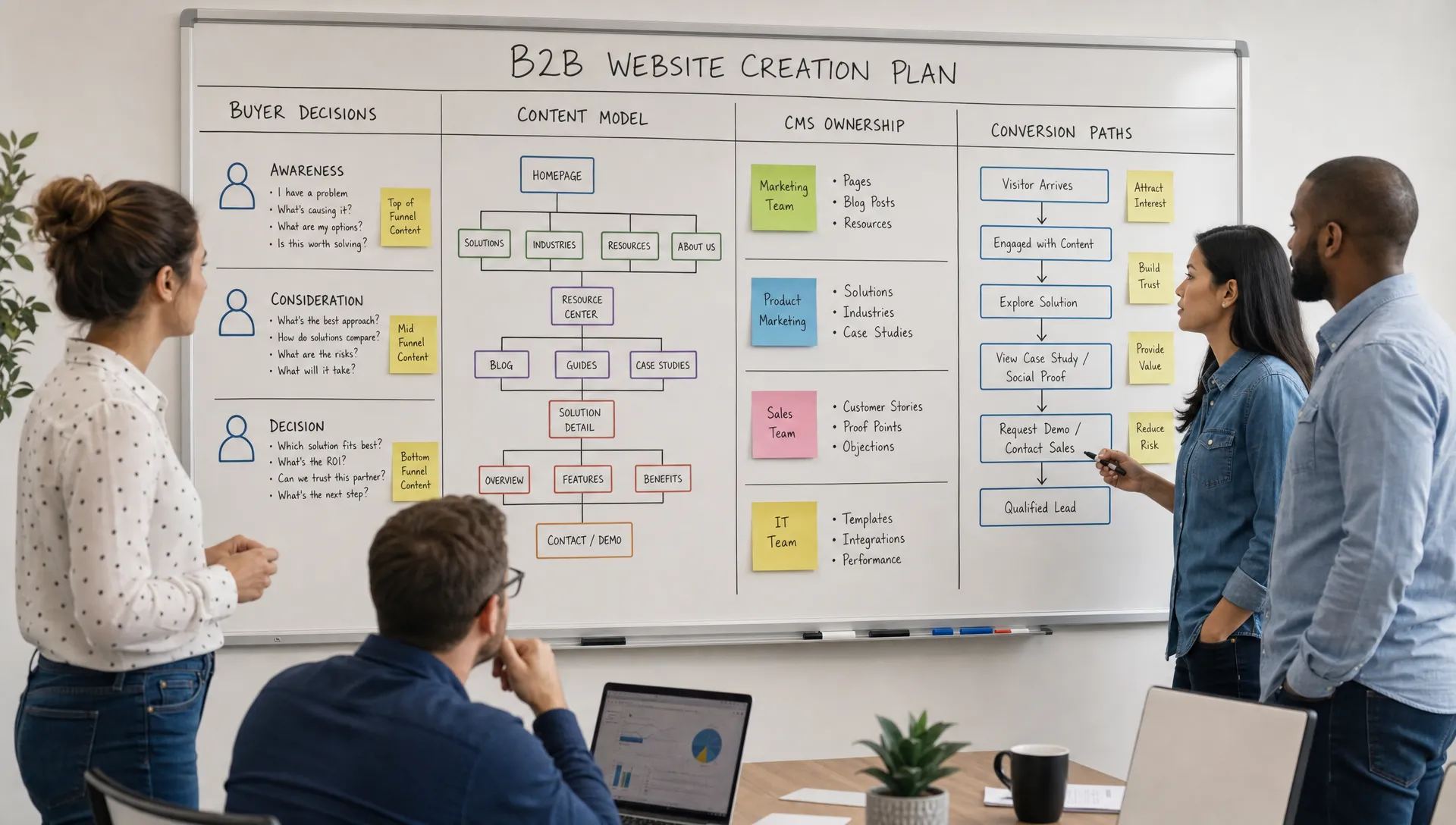
Most B2B buyers arrive with a mix of doubts. They want to know what you do, who you serve, whether you understand their problem, how your offer works, what makes you credible and what happens if they reach out. If the website does not answer those questions in the right order, visitors may leave even if the design is polished.
A practical way to plan web creation is to map each important buyer decision to a page or section. Your homepage may establish relevance, service pages may explain fit and outcomes, case studies may reduce risk and contact pages may clarify the next step. A clear page hierarchy also helps search engines understand which page answers which question, which is covered in this guide to starting a website with the right structure.
If you want to go deeper on this approach, BeBranded has a separate guide on how to build your business website around buyer decisions. Use that thinking before sitemap approval, not after the visual design is already finished.
A website platform is not just a technical preference.
For B2B teams, the platform affects how fast marketing can publish, how easily pages can be edited, how SEO is managed and how much support is needed for small changes. Webflow, Framer, WordPress and custom builds can all be valid depending on the team, but the wrong fit creates friction after launch.
For web creation projects, the key question is not “Which platform is popular?” It is “Which platform matches our content, design, SEO and maintenance needs for the next stage of growth?”
The table below turns that question into five criteria you can check with any vendor or internal developer, along with the warning sign that usually shows a poor fit.
| Criterion | Question to ask | Warning sign |
|---|---|---|
| Editing speed | Can marketing publish and edit pages without a developer? | Every small change becomes a ticket |
| SEO control | Can the team edit titles, metadata, redirects and structured data? | SEO settings are hidden or locked |
| Design flexibility | Can the design system grow without workarounds? | New layouts require custom code each time |
| Integrations | Do CRM, forms and analytics connect cleanly? | Manual exports between tools |
| Cost over time | What do licences, plugins and support cost over 24 months? | Only the first year is priced |
Marketing teams should clarify who will create landing pages, update CMS content, adjust metadata, publish blog posts and connect forms to CRM or automation tools. If the answer is always “ask a developer,” the site may slow down the team over time. Planning collections early also matters, and this complete guide to the Webflow CMS shows how to structure content so it stays easy to manage.
For a more detailed platform evaluation, this guide on choosing website development platforms for B2B growth explains the tradeoffs to consider before committing.
A website should make the next step clear without forcing every visitor into the same action.
Some visitors are ready to book a call. Others need to compare services, read proof, understand pricing logic or share the site internally. Strong conversion architecture gives each type of visitor a reasonable next step.
For B2B web creation, this usually means defining primary actions, secondary actions and page-level intent before design starts. A primary action may be “book a call.” A secondary action may be “view services,” “read case studies” or “download a resource.” The right mix depends on the buying cycle and offer complexity.
Conversion also depends on trust. Clear positioning, specific service pages, relevant proof, fast page loading and simple forms all contribute to whether a visitor feels safe enough to take action. BeBranded covers these elements in more detail in its article on B2B website features that drive lead generation.
A controlled scope is one of the strongest predictors of a smooth launch.
Many B2B website projects become slow because the first version tries to include every future idea. The team adds new audience pages, a resource center, complex animations, comparison pages, partner pages and multiple integrations before the core buyer journey is clear.
A better approach is to define a launch version and an iteration backlog. The launch version should include what is necessary to communicate the offer, build trust, capture demand and support basic SEO. The backlog can hold lower-priority pages, advanced integrations and experiments that do not block launch.
The table below gives an example split for a typical B2B marketing site. Adjust the lines to your own offer, but keep the principle: launch with what buyers need to decide, and schedule the rest.
| Area | Launch version | Iteration backlog |
|---|---|---|
| Core pages | Home, services, about, contact | Audience pages, partner pages |
| Proof | Two or three case studies, client logos | Full case study library |
| Conversion | One primary action and one secondary action | A/B tests, interactive tools |
| SEO | Page structure, metadata, redirects, indexation | Content clusters, comparison pages |
| Integrations | Forms connected to CRM, analytics | Advanced automation, personalization |
| Motion | Light and purposeful effects | Advanced animations |
This is where a practical web creation process protects the team. By separating “needed for launch” from “useful later,” you reduce decision fatigue and keep the project moving. For a reference list of what the launch version should cover, see what a professional website for a business should include.
A website without agreed measures is judged on opinion again after launch.
Before production starts, choose a small set of indicators tied to the business outcome. These can include qualified form submissions, booked calls, the quality of leads reported by sales and organic visibility for the pages that matter most. Two or three indicators are enough if the whole team reads them the same way.
Also decide who reviews them and how often. A monthly review is usually enough to feed the iteration backlog, and a clear owner prevents the data from being collected but never used. Ongoing care is part of this loop, as explained in the guide to website maintenance.
Most website issues come from early decisions that were skipped or made too late.
The following mistakes are common in B2B projects because teams often begin with visuals, platform selection or competitor references before agreeing on strategy.
Avoiding these mistakes does not require a larger budget. It requires clearer decisions before execution starts.
Use this checklist before briefing an internal team, freelancer or agency.
It will not replace strategy work, but it will make the first conversation more productive. If several answers are missing, pause before moving into design.
This checklist keeps web creation grounded in execution. It also helps decision-makers see where uncertainty still exists before the project becomes expensive to change.
A good brief should make priorities clear without prescribing every detail.
Instead of sending a long list of design preferences, give the team context on the business, offer, buyer journey, current website issues and operational constraints. Include examples if they clarify direction, but explain what you like about them.
For example, “we like this site because the service pages are easy to scan” is more useful than “make it look like this.” The first statement gives a functional reason. The second creates imitation without strategy.
For web creation work, the most useful brief usually includes the outcome, target audiences, key offers, required pages, CMS needs, SEO goals, integrations, timeline and approval process. If those inputs are clear, the team can make better recommendations and move faster.
What does web creation mean for a B2B company? Web creation means planning, designing, developing and launching a website that supports business goals. For a B2B company, it should include positioning, buyer journey structure, conversion paths, CMS planning, SEO setup and a clear maintenance model.
Should we choose the platform before planning the website? No. Choose the platform after clarifying your business goals, content needs, internal resources and technical requirements. The platform should support the operating model, not dictate it.
How long should a B2B website project take? The timeline depends on scope, content readiness, approval speed and technical complexity. A focused marketing website can move quickly when decisions are made early, but large content migrations or complex integrations require more planning.
Who should be involved in the early decisions? At minimum, involve the business owner or CEO, marketing lead and someone close to sales. If the site depends on integrations or analytics, include the technical owner early enough to prevent late blockers.
What should we prepare before contacting an agency? Prepare the business goal, target audiences, current website issues, required pages, brand assets, content status, integration needs and launch constraints. You do not need every answer, but you should know where decisions are still open.
How do we know if the new website is working? Compare results with the business outcome you defined at the start. Track qualified form submissions, booked calls, lead quality reported by sales and organic visibility for key pages, then review them monthly and feed the findings into your iteration backlog.
B2B web creation works better when the team starts with outcomes, buyers, content ownership, conversion paths and operating needs. Design and development are easier to execute when those decisions are already clear.
If you are planning a Webflow or Framer website and want a focused process from strategy to launch, review your project with BeBranded and clarify the first decisions before production starts.