Web design solutions for complex B2B buying journeys
Development
•
X min
•
Published on
29.08.2026
•
Updated on
23.09.2026
A complex B2B website has to do more than explain what the company sells. It has to help several people understand the problem, compare options, justify the investment and reduce perceived risk before they speak to sales.
That is why generic web design solutions often underperform for B2B teams with longer sales cycles. A polished homepage, a few service pages and a contact form are not enough when buyers arrive with different questions at different stages of the journey.
This guide gives you a practical framework for designing a website around real B2B buying behavior, with page structure, messaging, CMS planning, conversion paths and common mistakes to avoid.
Complex B2B buyers need clarity before they need persuasion.
In a simple purchase, one person may compare two options and decide quickly. In a complex B2B sale, the website must support founders, CMOs, finance leads, technical evaluators, operators and sometimes procurement. Each stakeholder is looking for a different form of confidence.
Gartner's B2B buying journey research describes B2B buying as a set of jobs buyers complete rather than a clean linear funnel. Your website should reflect that reality. Visitors may jump from a use case page to pricing signals, then to proof, then back to technical details.
For this context, web design solutions are not just visual treatments. They are the combination of information architecture, messaging, UX patterns, content systems, technical implementation, SEO foundations and conversion flows that help buyers move from uncertainty to action.
Use the website to answer buying jobs, not only to present pages.
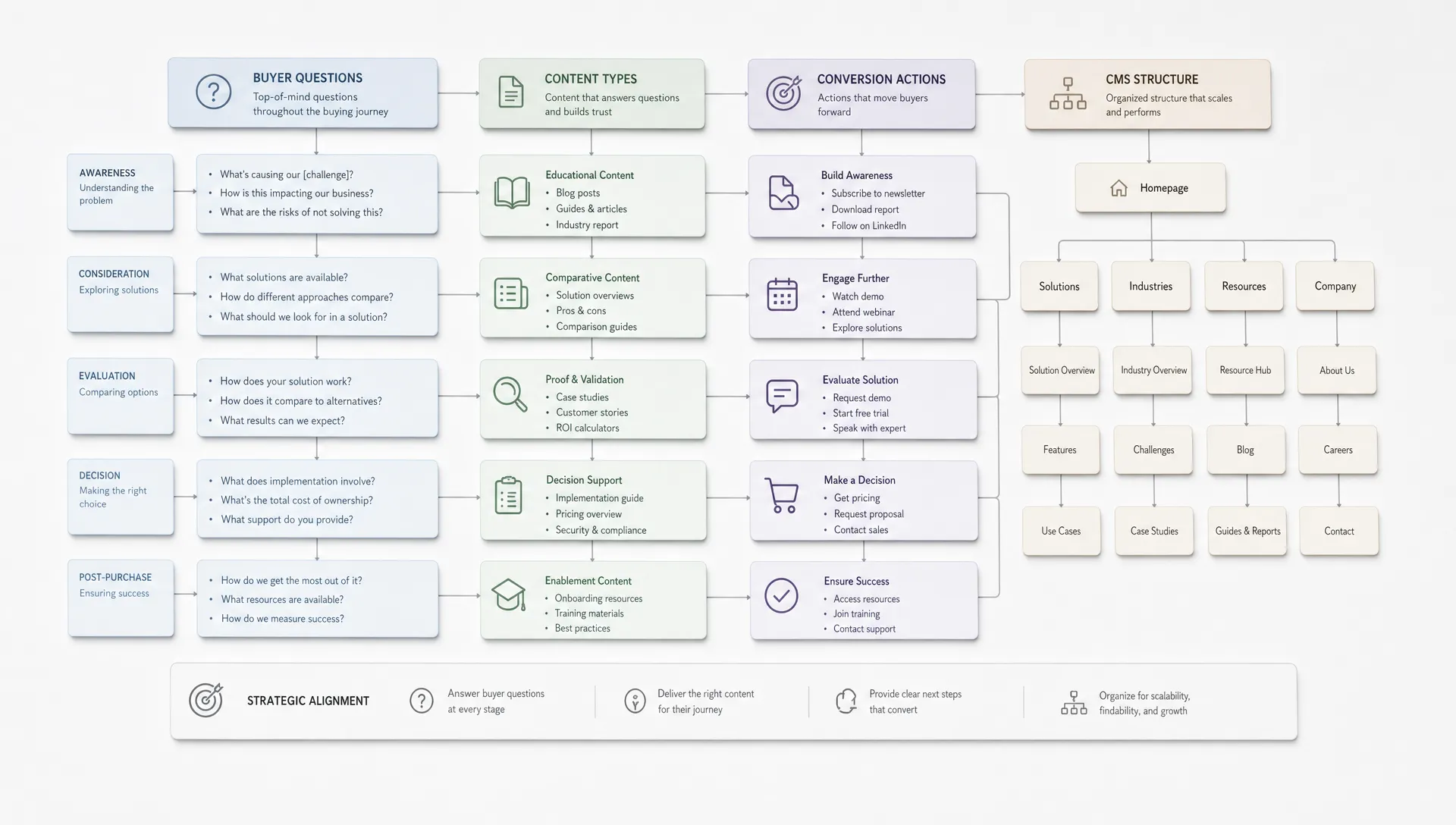
Before wireframes, map the decisions your buyers need to make. This keeps the website focused on progress instead of internal preferences.
For most complex B2B journeys, the main buying jobs are:
This map becomes the website brief. It informs navigation, page hierarchy, copy, proof placement, CMS structure and calls to action.
For a closer look at prioritizing pages around what buyers actually decide, see this guide on designing a website around the decisions buyers need to make.
Each important buyer question should have a clear place to live. If the answer is buried in a paragraph on the homepage, it will not support the buying committee well.
For example, a CMO may need positioning, outcomes and differentiation. A technical evaluator may need platform details, integrations and maintainability. A founder may need speed, commercial clarity and confidence that the site can scale after launch.
Teams planning a broader rebuild can use these website design and development priorities to keep the project tied to business impact rather than visual novelty.
Not every visitor is ready to book a call. A complex B2B website should offer actions for different levels of commitment.
High intent visitors may need a consultation form, demo request or audit request. Mid intent visitors may prefer a relevant case study, service page, comparison page or implementation guide. Early stage visitors may need educational content that helps them define the problem.
The goal is not to add more CTAs everywhere. The goal is to match the action to the context of the page and the confidence level of the visitor.
A strong CMS is not just a place to publish blog posts. For B2B websites, it should make proof reusable and easy to maintain.
Consider structuring the CMS around case studies, industries, use cases, service pages, team expertise, FAQs and comparison content. This allows marketing teams to update buyer-facing content without rebuilding layouts every time a new proof point is needed.
In Webflow or Framer projects, this decision should happen before design is finalized. Otherwise the site may look clean at launch but become hard to update as campaigns, offers and sales priorities evolve.
If you want a structured walkthrough of collections, fields and templates before committing to an information architecture, this complete guide to the Webflow CMS covers the planning steps in more detail.
Complex B2B websites need strategy, design, development and SEO to work together from the start. Separating them too late creates avoidable rework.
Information architecture affects crawlability. Design affects page speed and mobile usability. Development affects CMS flexibility and conversion tracking. SEO affects page templates, headings, metadata and internal linking. The workflow matters as much as the final interface.
If your team is structuring a project across several roles, this guide on how web design and development should work together explains why collaboration should start before visual design.
A buying committee needs more than one path through the site.
| Buyer need | Website response | Decision support |
|---|---|---|
| Economic confidence | Outcome focused service pages, commercial context and clear scope signals | Helps leadership understand why the investment is worth considering |
| Operational fit | Use case pages, process sections and examples of implementation | Shows how the solution would work inside the buyer's team |
| Technical trust | Platform details, integrations, performance considerations and maintenance information | Reduces concern about feasibility, handover and scalability |
| Proof | Case studies, testimonials, before and after context and specific examples | Connects claims to evidence that buyers can share internally |
| Next step clarity | Contextual CTAs, short forms and clear expectations after submission | Makes it easier to move from research to conversation |
This structure prevents the website from becoming a one-size-fits-all sales deck. It gives each stakeholder enough information to keep the buying process moving.
The table should not become a rigid template. Use it as a planning tool, then adapt page depth based on your offer complexity, sales cycle, average deal size and how much education the market needs.
The right solution is usually a set of practical decisions, not one large visual concept.
The first screen should answer what you do, who it is for and why it matters. Avoid clever statements that only make sense after reading the rest of the page.
For complex B2B, the first section should also create routing. If you serve different segments, industries or use cases, help visitors find the path that matches their situation quickly.
Navigation should reflect how buyers think, not only how the company is organized. A menu built around internal departments can create friction for visitors who are trying to solve a problem.
Useful navigation patterns include solution pages by use case, pages by audience, resource hubs, proof sections and a clear route to contact. Keep labels specific and avoid vague items that require interpretation.
Proof works better when it appears close to the claim it supports. If a page says the company can deliver fast implementation, show process detail, client context or an example nearby.
This is especially important for B2B websites where buyers are collecting evidence for an internal discussion. A testimonials page alone is not enough if the rest of the website makes unsupported claims.
A high friction form can block qualified leads, but a form that is too vague can create poor sales conversations. The right balance depends on intent.
For bottom-funnel pages, ask for enough context to route the inquiry properly. For mid-funnel pages, consider lighter actions such as requesting an audit, downloading a resource or viewing a relevant proof asset. The same logic applies to broader web design services that improve conversion and SEO, where UX and visibility need to support the same commercial goal.
Most B2B website problems come from unclear decisions made early.
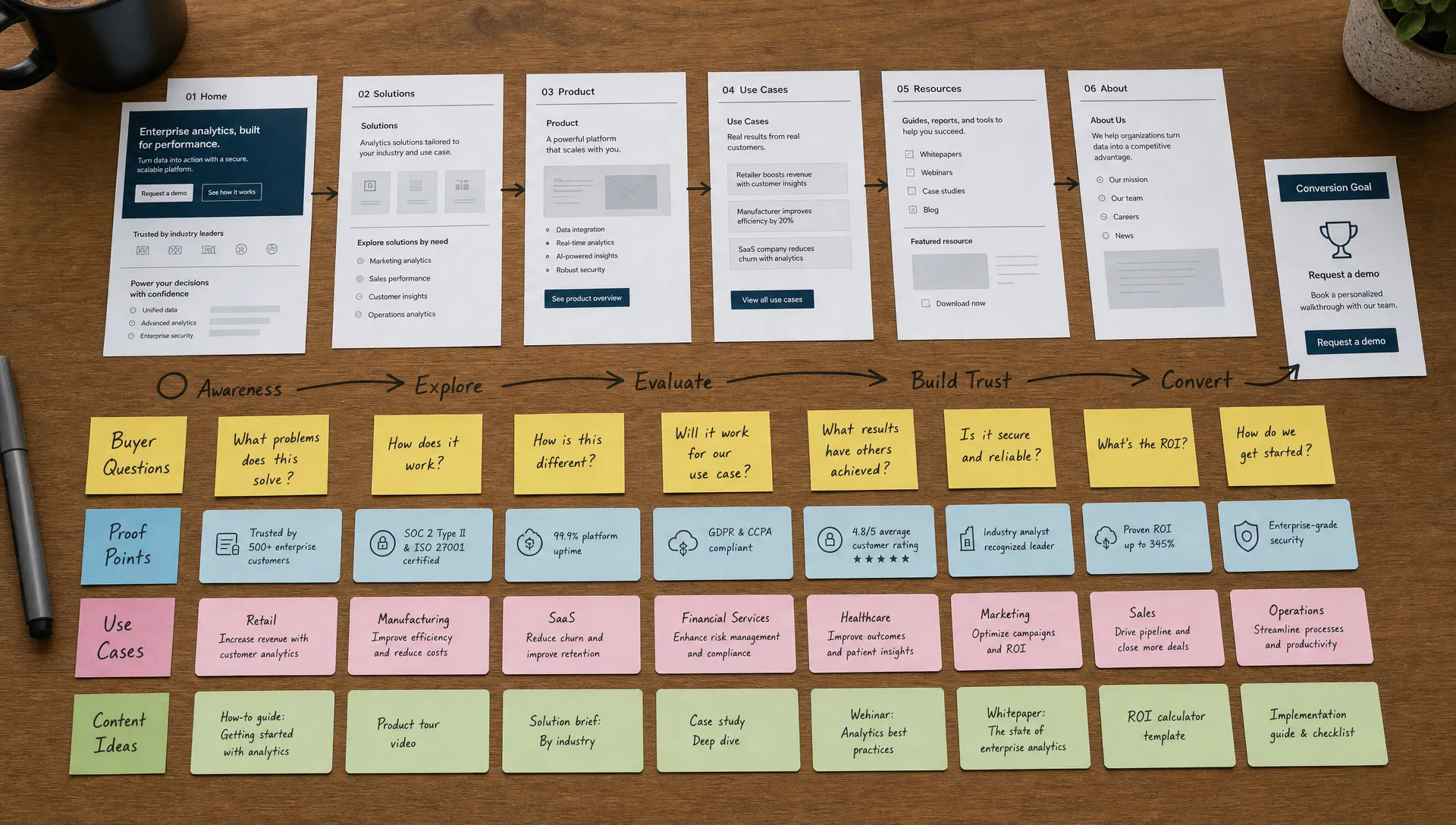
Use this checklist before committing to a redesign, rebuild or optimization project.
| Action | Why it matters |
|---|---|
| Define the primary buyer segments | Names the roles, company types and use cases the website must support |
| Map the buying jobs | Documents what buyers need to understand, compare, validate and share internally |
| Audit current pages against those jobs | Identifies missing answers, weak proof and pages that create confusion |
| Clarify the main conversion paths | Decides which pages should drive calls, audits, demos, resources or softer engagement |
| Review the navigation structure | Checks whether visitors can find solutions by use case, audience, industry or problem |
| Plan the CMS before design approval | Defines the collections, fields and templates the marketing team will need after launch |
| Set technical SEO requirements early | Covers page hierarchy, headings, metadata, redirects, performance and schema where relevant |
| Align design and development decisions | Confirms visual ideas can be implemented cleanly without slowing the site or updates |
| Define launch acceptance criteria | Decides what must be tested before launch: forms, tracking, responsiveness, speed, CMS editing |
| Plan the first optimization cycle | Sets up improvement after launch based on search data, analytics, sales feedback and content gaps |
A checklist will not replace strategy, but it keeps the project grounded. It also gives CMOs, founders and marketing managers a shared way to evaluate proposals without focusing only on the number of pages.
Buying committees often need a reference point before committing to a direction. Budgets and timelines vary by scope, market and agency, so the ranges below describe common patterns rather than fixed quotes.
| Project type | Typical budget range | Typical timeline | Best suited for |
|---|---|---|---|
| Landing page or campaign page | $1,500 to $4,000 | 1 to 2 weeks | Testing a new offer or launching a paid campaign quickly |
| Website optimization | $3,000 to $8,000 | 2 to 6 weeks | Sites with a solid structure but weak conversion or technical SEO gaps |
| Website redesign | $8,000 to $20,000 | 4 to 8 weeks | Companies whose positioning, market or services have changed |
| Full rebuild with a new CMS | $15,000 to $40,000+ | 6 to 12 weeks | Teams blocked by an outdated platform or an unmanageable CMS |
These ranges assume design, development and basic SEO are handled by one team. Complex integrations, a large content migration or an extended approval process can push a project above the upper end. If your team wants an estimate specific to the current site, a website audit or a redesign engagement can turn these ranges into a scoped proposal.
The right path depends on whether the current website has a strategic problem, a design problem or a technical problem.
Before reading the detail below, use this comparison to see where your situation is most likely to land.
| Approach | Best when | Typical scope | Typical timeline |
|---|---|---|---|
| Optimize | Positioning, CMS and structure are solid but conversion is inconsistent | Copy, CTAs, proof placement, technical SEO cleanup, page performance | 2 to 6 weeks |
| Redesign | The message, positioning or target market has changed | New messaging hierarchy, updated page structure, new proof and conversion paths | 4 to 8 weeks |
| Rebuild | The platform, CMS or technical setup blocks the team | Platform migration, new CMS structure, SEO foundation, new component system | 6 to 12 weeks |
Optimization is enough when the positioning is clear, the CMS works, the brand still fits and the site structure supports the buyer journey. In this case, focus on copy, CTAs, proof placement, technical SEO cleanup and page performance.
This route is often useful when traffic exists but conversion quality is inconsistent.
A redesign makes sense when the company has changed positioning, moved upmarket, added new services or shifted from founder-led sales to a more scalable go-to-market motion.
In this case, design is not only a visual refresh. It should translate the new strategy into page structure, messaging hierarchy, proof and conversion paths. This guide on planning a website revamp around business outcomes walks through sequencing that work.
A rebuild is the right choice when the current platform, templates, CMS or technical setup prevents the team from moving quickly.
This may involve migrating to Webflow or Framer, rebuilding the CMS, improving performance, cleaning up SEO foundations and creating a system the marketing team can manage without constant developer support.
A launch is a milestone, not an endpoint. The site should keep improving based on what visitors and search engines actually do, not on assumptions made during the project.
| KPI | What it shows | Where to check it |
|---|---|---|
| Organic sessions to key pages | Whether the new structure and SEO foundation are gaining visibility | Search Console, analytics |
| Form completion rate | Whether CTAs and forms match visitor intent | Analytics, form tool |
| Time to first response after a lead | Whether the sales process keeps up with a better funnel | CRM |
| Bounce rate on solution and pricing pages | Whether messaging matches what visitors expected | Analytics |
| Ranking movement for target queries | Whether technical SEO and content are working together | Rank tracker, Search Console |
Review these signals on a monthly cadence for the first quarter after launch, then fold them into a regular reporting rhythm alongside sales feedback and content gaps.
What are web design solutions for complex B2B buying journeys? Web design solutions for complex B2B buying journeys combine strategy, information architecture, messaging, UX, CMS planning, technical implementation, SEO and conversion paths. The goal is to help multiple stakeholders understand the offer, reduce risk and take the next step.
How should a B2B website support multiple stakeholders? A B2B website should answer different stakeholder questions through clear page architecture. Leadership may need commercial confidence, technical teams may need feasibility details and end users may need practical use cases. The site should make these paths easy to find.
Should we redesign our website or optimize the current one? Optimize if the current structure, CMS and positioning are still strong. Redesign if the brand, message or buyer journey has changed. Rebuild if the platform or technical setup prevents the marketing team from scaling content and campaigns.
What role does SEO play in B2B web design? SEO helps align pages with buyer intent. It should influence information architecture, page templates, headings, metadata, internal linking and technical performance before launch, not only after the design is complete.
Is Webflow suitable for complex B2B websites? Webflow can be suitable for complex B2B websites when the CMS, templates, SEO structure and component system are planned correctly. It is especially useful for marketing teams that need control over content without relying on developers for every update.
How long should a B2B website project take? The timeline depends on scope, content readiness, stakeholder availability and technical complexity. A focused Webflow or Framer build can often move faster than a traditional custom development project, but planning and content decisions still need proper attention.
Complex B2B buying journeys require websites that help people make decisions, not just browse pages. The strongest projects start by mapping buying jobs, then turn those jobs into page architecture, proof, CMS structure, conversion paths and technical requirements.
If your current website does not support the way your buyers actually evaluate solutions, start with a focused audit of the buyer journey, page structure and conversion paths. For an external view on what to fix first, book a website audit with BeBranded.