


The essentials · 30-second read
Claude Code is Anthropic's coding agent. Not on the Free plan: from Claude Pro ($20 a month, $17 billed yearly), Max $100, Ultra $200, Team seats, or API usage.
- An agent that reads a whole repository, edits several files, runs commands and tests, and works with Git, from the terminal, VS Code, JetBrains, the desktop app or the web.
- Not included in the Free plan. Pro: $20 a month ($17 billed yearly). Max: $100. Ultra: $200. Team: from $20 per standard seat billed yearly. Or pay per use with an Anthropic Console account.
- Installation takes one command on macOS, Linux or Windows; you then log in with a paid Claude account or a Console account.
- Our verdict: the tool we build our own site and client projects with. Pro is a test; daily development starts on Max or premium Team seats.
Summarize this page with AI
Claude Code is the tool we build with every day. Our own site was rebuilt with it in 2026, and our client projects in custom code go through it. This page answers the questions people actually ask: what Claude Code is, whether it is free, how much it costs in 2026, how to install it, what it is good at, how it compares with Cursor, and how a two-founder agency uses it in production. Prices and features were checked on the official sources on 24 November 2026.
01What is Claude Code?
Claude Code is the coding agent made by Anthropic, the company behind Claude. Its documentation calls it "an agentic coding tool": it reads your codebase, edits files, runs commands and integrates with your development tools. You do not type code with it line by line. You describe a task in plain language ("add a pricing page with these three plans and a test for the price formatting"), and Claude Code plans the approach, changes the files concerned, runs the commands it needs and checks the result.
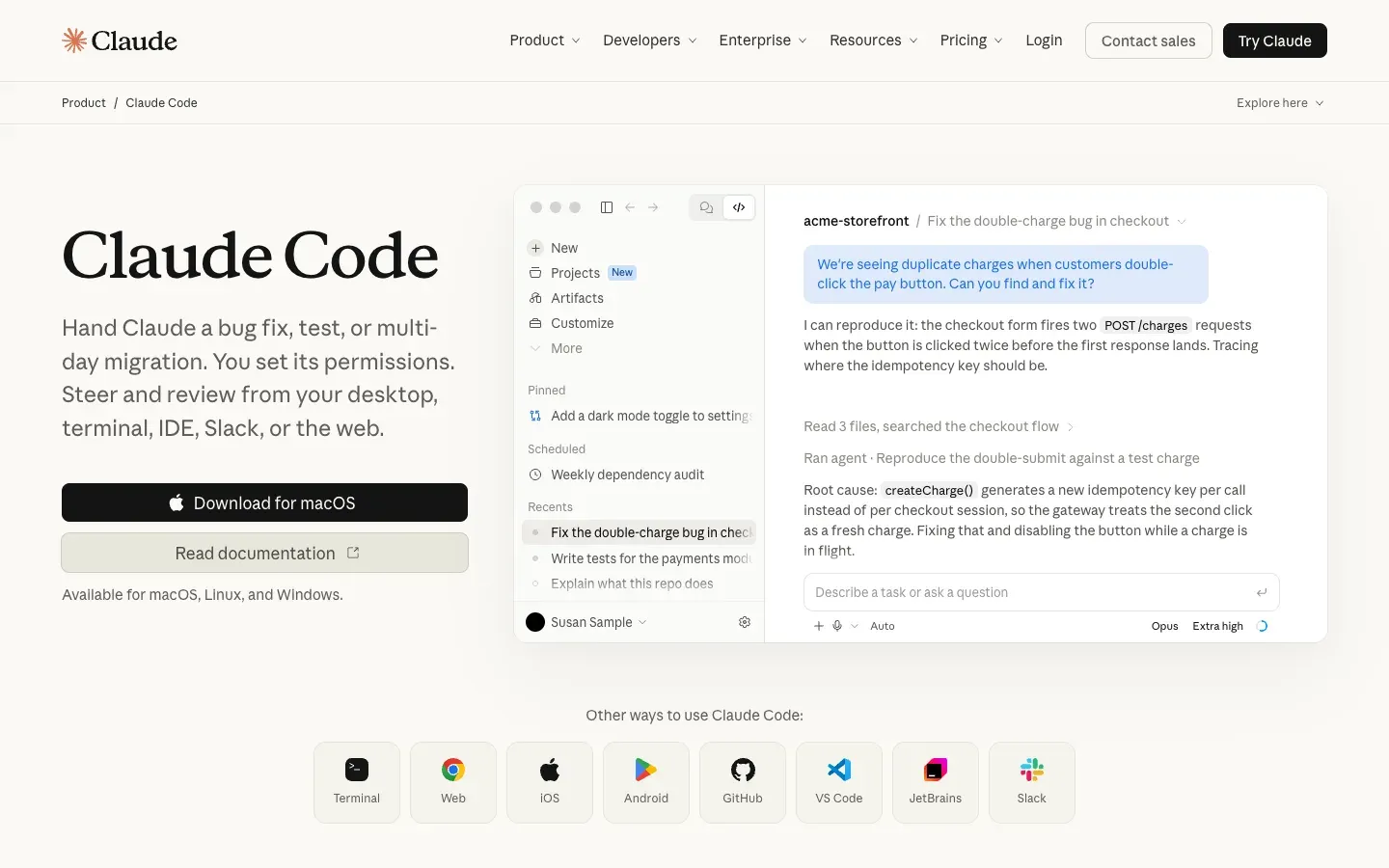
The difference with a chat assistant is access. A chatbot sees what you paste into it. Claude Code works inside the project folder: it can search the whole repository, open the files it needs, run the build and the tests, read the errors and try again. It asks for permission before sensitive actions, and you decide how much freedom it gets.
Claude Code is not a separate subscription. It is included in the paid Claude plans (Pro, Max, Ultra, Team and Enterprise) and shares their usage limits with the chat. It can also run on an Anthropic Console account, billed per use, or through Amazon Bedrock, Google Cloud and Microsoft Foundry.
02How Claude Code works
A typical session follows the same loop:
- You open Claude Code in a project and describe the task, with any constraint that matters (a framework, a file not to touch, a test command).
- It explores the code to understand the structure, the conventions and where the change belongs.
- It proposes a plan for larger tasks, which you can read and correct before anything changes.
- It edits the files and shows the changes.
- It runs commands (build, tests, linter) and fixes what fails.
- It works with Git: stages the changes, writes the commit message, creates a branch and can open a pull request.
The same engine runs on several surfaces, and the project settings follow you from one to the other:
- Terminal: the complete version, launched with the
claudecommand in any project. - VS Code and JetBrains IDEs: an extension with inline diffs, plan review and conversation history. It also installs in Cursor.
- Desktop app: Claude Code without the terminal, with visual diff review, several sessions side by side and scheduled tasks.
- Web and mobile: long tasks that run in the cloud on a repository, started from claude.ai/code or the Claude app on iOS and Android.
- Slack, GitHub Actions and GitLab CI/CD: mention Claude in a channel with a bug report, or automate code review and issue triage in your pipeline.
03Is Claude Code free?
No. The software itself costs nothing to install, but you need an account to use it. According to the Claude Code documentation checked on 24 November 2026, it "requires a Pro, Max, Ultra, Team, Enterprise, or Console account", and the free Claude plan "does not include Claude Code access".
There are three ways to pay:
- A Claude subscription (Pro, Max or Ultra): a fixed monthly price, with usage limits reset every five hours and every week.
- A Team or Enterprise plan for companies, with centralised billing and administration.
- An Anthropic Console account, billed per use at API rates. It suits occasional use or automation; heavy daily use usually costs more than a subscription.
What is free: Anthropic's Claude Academy offers free self-paced courses, including Claude Code 101 and Claude Code in Action, which are useful before paying for a plan.
04Claude Code pricing in 2026
Prices checked on claude.com/pricing on 24 November 2026, in US dollars per month, before tax. Viewed from France, the same page shows euro prices: Pro at €15 a month billed yearly (€180) or €18 monthly, Max at €90, Ultra at €180, Team standard seats at €18 billed yearly and premium seats at €90.
| Plan | |||
|---|---|---|---|
| Free | Price $0 | Usage Limited, every 5 hours and every week | Claude Code Not included |
| Pro | Price $20 a month, or $17 a month billed yearly ($200) | Usage 1x | Claude Code Included |
| Max | Price $100 a month | Usage 5x Pro, priority access, $100 of API credits a month | Claude Code Included |
| Ultra | Price $200 a month | Usage 10x Pro each week, no 5-hour limit for verified accounts, $200 of API credits a month | Claude Code Included |
| Team, standard seat | Price $20 per seat a month billed yearly, $25 monthly | Usage More than Pro | Claude Code Included |
| Team, premium seat | Price $100 per seat a month billed yearly, $125 monthly | Usage 5x standard seats | Claude Code Included |
| Enterprise | Price $20 per seat a month billed yearly, 20 seats minimum, plus usage at API rates | Usage Depends on usage | Claude Code Included |
The Team plan also includes up to $500 a month of pooled API credits, SSO and no training on your content by default. Usage limits depend on the model, the length of the conversation and the size of the files: a long session on a large repository uses much more than a short question.
Our reading of the plans: Pro is a good way to try Claude Code on a real project for a few weeks. In daily development, Pro limits are reached within a few hours of intensive work, so Max is the realistic plan for a developer who codes with Claude Code all day. For a team, mix standard seats for occasional users and premium seats for the people who build.
05How to install Claude Code
Installation takes a few minutes. Requirements listed in the documentation: macOS 13 or later, Windows 10 (1809) or later, Ubuntu 20.04, Debian 10 or Alpine 3.19 and later, 4 GB of RAM and an internet connection.
- Open a terminal and run the command for your system. On macOS, Linux or WSL:
curl -fsSL https://claude.ai/install.sh | bash. On Windows PowerShell:irm https://claude.ai/install.ps1 | iex. - Or use a package manager:
brew install --cask claude-codewith Homebrew,winget install Anthropic.ClaudeCodeon Windows, ornpm install -g @anthropic-ai/claude-code@latestwith Node.js 22 or later. Never install it withsudo npm. - Check the installation with
claude --version, and runclaude doctorif something looks wrong. - Go to your project folder and type
claude. On first launch, a browser window asks you to log in with your Claude or Console account. - Run
/initin the session to let Claude Code generate a firstCLAUDE.mdfile describing the project, then edit it.
The native installer updates itself in the background; Homebrew and WinGet installations need a manual upgrade. If you prefer not to use a terminal at all, install the Claude desktop app, sign in and open the Code tab: it includes Claude Code. In VS Code, search for "Claude Code" in the extensions.
06Key features
- Whole-repository understanding: it searches and reads the files it needs, not just the open one.
- Multi-file edits with review: every change is shown before or after it is applied, depending on your permission settings.
- Commands and tests: it runs the build, the tests and the linter, reads the errors and fixes them.
- Git workflow: branches, commits, pull requests and merge conflicts.
CLAUDE.mdand memory: a Markdown file at the root of the project that Claude Code reads at the start of every session (it can also read an existingAGENTS.md).- Skills and hooks: reusable workflows shared with the team, and shell commands that run before or after an action (formatting after each edit, for example).
- MCP connections: the Model Context Protocol connects Claude Code to external tools and data, such as Google Drive, Jira, Slack or your own systems.
- Subagents and parallel sessions: several agents work on different parts of a task, or several sessions run side by side.
- Scheduled tasks: recurring work in the cloud or on your machine, such as a morning pull request review or a weekly dependency audit.
- Agent SDK: developers can build their own agents on the same tools.
07Use cases
Building a feature from a clear brief
The most common use. You describe the feature, the constraints and how to test it; Claude Code writes the code across the files concerned and runs the tests. The quality of the result depends directly on the brief: a precise ticket gives a precise change, a vague request gives a plausible guess.
Migrating or rebuilding a site
This is our own case. When we moved bebranded.xyz from Webflow to Next.js, Payload CMS and PostgreSQL, Claude Code wrote much of the code and the migration scripts. The architecture, the URL structure and the SEO redirects were our decisions, written before the agent started. On the new site, we shipped 113 changes in the four days after launch.
Maintenance, tests and refactoring
Writing tests for code that has none, fixing lint errors across a project, updating dependencies, resolving merge conflicts: the tasks that get postponed are the ones Claude Code handles best. They are well defined and easy to check.
Understanding a codebase you inherit
When an agency takes over a client project, asking "where is the payment logic?" or "what breaks if I rename this field?" is faster than reading everything. Claude Code answers from the actual files. The answers still need to be checked in the code.
Scripts and content operations
Imports, data fixes, bulk content updates: Claude Code writes the script, runs it on a test environment and shows the result. The tool pages on this site, including this one, are written in Markdown and loaded into the CMS by a script written with Claude Code.
Connecting AI to business tools
With MCP, Claude Code can read data from tools such as Google Search Console or a CMS. We build the same kind of connection for clients in our MCP and AI agents projects.
08How we use Claude Code at BeBranded
We are two founders, in Paris and Barcelona. Claude Code is what lets two senior people deliver what used to need a larger team: custom websites, web applications and automations. The judgement stays human. We decide the architecture, read every change and own the result.
What we have learned in production:
- Context beats prompts. Each repository has a short
CLAUDE.md: the stack, the commands, the conventions and the rules that must never be broken. Ours says, among other things, never to publish to production without approval. - A separate staging environment. Everything is tested on a staging branch with its own address before it reaches the main branch and the live site.
- Secrets stay out of the conversation. Scripts receive their keys from a secrets manager at runtime (Doppler in our case), never pasted into a prompt.
- Small tasks, reviewed one by one. One feature or one fix per session, checked in the diff and in the browser, rather than a long list of requests in one go.
- Tools connected through MCP. Claude Code reads our analytics, our CMS and our design files through connectors, so it works from real data rather than assumptions.
We compared this way of working with a no-code platform in Webflow vs Claude Code, and wrote a broader guide to Claude.
09Our review: pros and cons
Pros
- Works on the whole repository, not just the open file, and chains complete tasks.
- Runs the build and the tests itself, so many errors are fixed before you see them.
- Available everywhere: terminal, IDEs, desktop app, web, Slack and CI.
- Included in Claude subscriptions, with a predictable monthly price.
- Highly configurable for a team:
CLAUDE.md, skills, hooks, permissions and MCP.
Cons
- No free plan: you need at least Claude Pro or API credits.
- Usage limits on Pro arrive quickly in daily development.
- It acts on real code and runs real commands: permissions and review are essential.
- The quality of the result depends on the brief and on the project context.
- It does not replace technical judgement: architecture, security and data choices remain yours.
10Our verdict
Who it's for
- Developers who want to delegate complete tasks (features, migrations, tests, scripts) and review the result.
- Technical teams and agencies that maintain several codebases and want shared rules for the agent.
- Founders with a technical background who build their product in code.
- Companies that want to connect AI to their tools through MCP.
Who it's not for
- Non-developers who want an app from a prompt without reading code: Lovable, Bolt or v0 are a better start.
- Developers who prefer suggestions while typing and line-by-line control in an editor: look at Cursor.
- Teams with no one to review the changes before they go live.
11Claude Code or Cursor?
The question comes up in almost every project. Cursor is an AI code editor built on VS Code: autocomplete while you type, an agent in the editor, and a visual review of each change. Claude Code is an agent first: you hand it a task, it works through the repository and you review the result. Both can edit several files and both run agents; the difference is where you spend your time. In Cursor, you write and the AI assists. In Claude Code, the agent writes and you direct and review.
On price, Cursor starts at $8 a month and its Teams plan at $30 per user, with third-party models such as Claude billed on top at API price on paid plans (according to our Cursor page, checked on 18 November 2026). Claude Code is included in Claude subscriptions from $17 a month billed yearly. The two are not exclusive: the Claude Code extension runs inside Cursor. Our detailed comparison: Cursor vs Claude Code.
12Alternatives to Claude Code
| Tool | |||
|---|---|---|---|
| Claude Code | Best for Delegating complete tasks across a repository | Approach Agent in the terminal, IDE, desktop and web | Free plan No, from Claude Pro |
| Cursor | Best for AI inside a VS Code style editor | Approach Editor with autocomplete and agent | Free plan Yes, limited |
| Lovable | Best for A full app from a prompt, without a developer | Approach App builder with hosting | Free plan Yes, 5 credits a day |
| v0 | Best for React and Next.js interfaces | Approach Interface generator linked to Vercel | Free plan Yes |
| Replit | Best for Building and hosting in the browser | Approach Agent and online workspace | Free plan Yes |
| GitHub Copilot | Best for An AI assistant in existing editors | Approach Editor extension and agent | Free plan Yes |
Our rule: Claude Code when developers own the code and want to delegate whole tasks; Cursor when they want the AI inside their editor; Lovable or v0 for a first prototype without a developer, before moving to real code. Not sure which path fits your project? Our MVP and project scoping work starts with this choice.