Brochure website: complete guide before you start
Development
•
X min
•
Published on
20.03.2026
•
Updated on
18.08.2026
A brochure website is a site designed to present a business, freelancer, or organization online, without direct selling functionality. It serves to establish credibility, attract prospects, and give professional visibility to the activity. The essential pages are the homepage, about page, services page, portfolio page, contact page, and legal notices. The budget ranges from a few hundred euros in DIY to 15,000 euros for a custom site with an agency, depending on the level of customization and content production. The platform choice depends on the need: Wix or Squarespace for simple cases, WordPress for flexibility, and Webflow for a custom professional site without maintenance overhead. This article covers everything you need to know before getting started.
Having a professional website is no longer optional for a business, freelancer, or organization that wants to exist in its market. Yet many business owners hesitate to get started, postpone the project, or make poor choices due to a lack of information about the available options, realistic budgets, and platforms suited to their situation. The result is often a site that does not match the activity, that costs more than expected in maintenance, or that generates no traffic because SEO was ignored.
A brochure website is the most common type of website for service businesses, freelancers, consultants, and small to medium-sized companies. It is a presentation site that shows what you do, who you do it for, and how to get in touch. Unlike an e-commerce site, it does not allow online purchases directly. Its role is to establish an official presence, strengthen the company's credibility, and convert visitors into prospects.
This article is a complete guide for anyone considering creating or redoing a brochure website. It covers the definition, the pages to plan, the budget by option, the platform choice (with an honest comparison), common mistakes, and best practices. The goal is to give you all the keys to make the right decisions before you start.
A brochure website is a site designed primarily for informational and presentation purposes. Its objective is to show what a business, freelancer, or organization does: its services, portfolio, team, values, and contact information. Unlike an e-commerce site that enables online purchases, a brochure website does not include direct selling functionality. It is the virtual storefront of the activity, accessible 24 hours a day, giving a professional first impression to every visitor.
A brochure website suits the vast majority of businesses that do not need to sell online: service-based SMBs, tradespeople, consultants, freelancers, professional practices, advisory firms, associations, sports clubs, and startups in their launch phase. It is often the first step in establishing a digital presence, and it can evolve over time toward more advanced features such as a blog, online booking, or a client portal. For businesses that also want to sell online, our article on Webflow e-commerce covers the possibilities and limitations of that approach.
In short, a brochure website is a professional presentation site that serves to establish online credibility, attract prospects, and give visibility to an activity. It is suited to any organization that needs a web presence without direct selling functionality.
A high-performing brochure website relies on a limited number of pages, each with a specific role. Here are the essential pages and the optional ones to consider depending on the project.
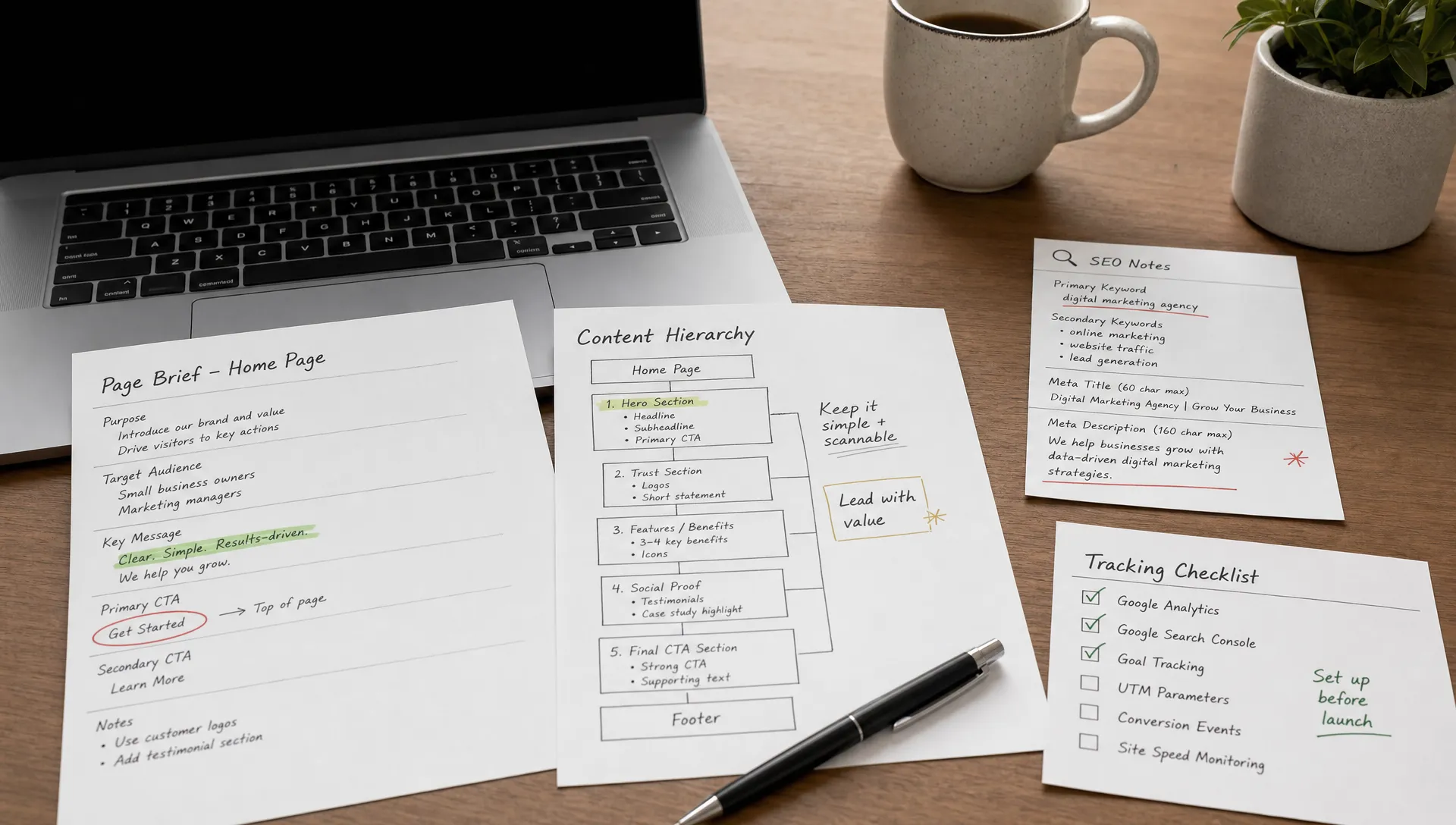
The homepage is the front door of the site. It is often the most visited page, and it must answer three questions within seconds: who you are, what you do, and why the visitor should trust you. It contains a clear value proposition (a headline that expresses the main benefit for the visitor), an overview of the services or offering, trust elements (testimonials, client logos, certifications), and a primary CTA that directs the visitor toward the desired action (contact, booking, quote). The homepage is not an exhaustive brochure: it is a guide that directs the visitor toward the detail pages. For more on optimizing this page, our guide to CRO covers the conversion principles to apply.
The about page is the second most visited page on most brochure websites. Visitors want to know who is behind the company before reaching out. This page presents the company's history, the team (with real photos if possible), the values, the mission, and what differentiates the activity from the competition. It should be authentic and concrete, not an empty corporate writing exercise. Visitors are looking for proof of seriousness and reasons to trust, not slogans.
The services page describes what the company offers. Each service or offering should be presented with a clear title, a description of the benefits for the client (not just a list of features), and ideally a CTA that enables the next step (request a quote, book a call, download a resource). If the company offers several distinct services, it can be worth creating a separate page per service to improve SEO and navigation clarity.
The portfolio page provides concrete proof of work. It shows examples of completed projects, case studies, before/after comparisons, or photos of deliverables. It is an important conversion lever because it answers the visitor's implicit question: "Can this company actually do what it promises?" For service providers (agencies, consultants, tradespeople), this page is often decisive in the decision to make contact. You can see a concrete example of this type of page in our portfolio.
The contact page must be simple, direct, and accessible from any page on the site (via the navigation menu and CTAs within the content). It contains at minimum a contact form (with as few fields as possible), an email address, and depending on the activity, a phone number, a physical address, and a map. The form is the primary conversion point of a brochure website: it must work perfectly on all devices and deliver messages reliably.
In France, legal notices are mandatory on every professional website. They must include company identification information (company name, registered office, SIRET number, publication director, hosting provider). A privacy policy is also mandatory as soon as the site collects personal data (contact form, cookies, analytics). These are not exciting pages, but they are legally essential and their absence can result in penalties.
Depending on the activity and objectives, several pages can enrich the brochure website. A blog allows publishing regular content for SEO and attracting organic traffic over the long term. A FAQ page answers common prospect questions and reduces repetitive inquiries. A testimonials page gathers client reviews to strengthen credibility. A pricing page, if the pricing model lends itself to it, qualifies prospects upfront and reduces unnecessary exchanges. These pages are not essential at launch, but they can be added progressively as needs emerge.
The price of a brochure website varies enormously depending on the option chosen, the level of customization, and content production. Giving a single number would be misleading, but it is possible to provide indicative ranges that help set expectations.
The first option is DIY with a builder like Wix or Squarespace. The cost is low: a subscription between 10 and 40 euros per month, plus a domain name (10 to 15 euros per year). This is the most economical option at the start, but it comes with limitations in terms of design customization, advanced SEO, and scalability. For a freelancer or micro-business that needs a simple, quick online presence, it can work. For a company that wants to stand out visually or has SEO ambitions, the limitations show up quickly.
The second option is hiring a freelancer for a WordPress site with a theme. The budget generally falls between 500 and 3,000 euros depending on the number of pages and level of customization. The result is more professional than DIY, but WordPress involves recurring costs that are often underestimated: hosting (50 to 200 euros per year), technical maintenance (WordPress, theme, and plugin updates), and occasional interventions when a plugin creates a conflict or security vulnerability. Our article on website maintenance costs details these expense items.
The third option is a custom site with an agency, typically on Webflow or custom WordPress. The budget in many cases falls between 3,000 and 15,000 euros depending on the project's complexity: number of pages, fully custom design, content production (writing, photography, video), integrated SEO, and third-party integrations (CRM, email marketing, analytics). This is the highest upfront investment, but also the one that produces the best result in terms of quality, performance, and long-term maintenance costs. For a detailed breakdown of Webflow pricing and the real cost of a site, our dedicated article covers each plan and its implications.
Recurring costs should also be factored into the calculation. A domain name costs between 10 and 15 euros per year. Hosting is included with Webflow (starting from 14 to 23 dollars per month for a site with CMS), but paid separately for WordPress (50 to 200 euros per year depending on the provider). Maintenance is minimal on Webflow (no plugin updates, no server to manage), but can represent several hundred euros per year on WordPress if you include updates, backups, and technical issue resolution. These recurring costs are often underestimated and should be included in the total budget over 24 months to compare options honestly.
| Option | Price range | Included | Recurring costs | Best suited for |
|---|---|---|---|---|
| DIY builder (Wix, Squarespace) | €0 – €500 | Template, hosting, SSL | €10 – €40/month + domain | Freelancers, micro-businesses, simple presence |
| Freelance WordPress | €500 – €3,000 | Custom theme, main pages, basic SEO | Hosting + domain + plugin maintenance | Small businesses, moderate budget, standard needs |
| Custom agency (Webflow) | €3,000 – €15,000 | Custom design, SEO, content, responsive, design system | $14 – $49/month (hosting included) + domain | SMBs, startups, businesses wanting a performant, scalable site |
The platform choice is one of the most structuring decisions of the project, because it determines what will be possible (and what will be constraining) for the years ahead. Here is an honest comparison of the main options.
WordPress is the most widely used CMS in the world. Its strength is flexibility: thousands of themes and plugins can address almost any need. Its weakness is maintenance. WordPress requires regular updates (CMS, theme, plugins), external hosting to manage, and constant vigilance on security. A WordPress site with too many plugins can also become slow. For someone who wants maximum flexibility and is willing to invest in maintenance, WordPress remains a solid option. For a detailed comparison, our article on Webflow vs WordPress covers the strengths and weaknesses of each platform.
Wix is designed for non-technical users. Its drag-and-drop editor is intuitive, the templates are ready to use, and going live is fast. It is a viable option for a freelancer or micro-business that needs a simple online presence and has no advanced SEO ambitions. Its limits show up when you want a truly custom design, advanced technical SEO, or when the site needs to evolve toward more complex features. For an overview of no-code website builders, our comparison helps position each option.
Squarespace offers a good compromise between design and ease of use. The templates are polished and the result looks clean without design effort. It is suited for portfolios, photographer websites, and small service businesses that want an elegant site without technical complexity. Its limits are similar to Wix: restricted customization, decent but not advanced SEO, and little flexibility for specific needs.
Framer is a design-oriented tool that allows creating sites quickly with a polished visual result. It is particularly suited for landing pages and small presentation sites. However, its CMS is more limited than Webflow's, and it is less suited for sites with substantial structured content or that need to evolve significantly over time. For a detailed comparison, our article on Webflow vs Framer covers the differences.
Webflow is the platform we recommend for professional brochure websites that need to be performant, scalable, and easy to maintain. The design is 100% custom with no visual limitations. SEO is native and advanced (tags, automatic sitemap, 301 redirects, customizable robots.txt). Hosting is integrated with a global CDN, automatic SSL, and optimized performance. There are no unstable plugins and no server maintenance. Marketing teams can modify content independently via the Editor. And the Client-First methodology ensures clean, scalable code that any Webflow developer can pick up. To discover the platform in detail, our complete Webflow guide covers everything you need to know.
| Platform | Customization | SEO | Maintenance | Indicative price (site + hosting) | Best suited for |
|---|---|---|---|---|---|
| WordPress | High (themes + plugins) | Good (via Yoast, Rank Math plugins) | Regular (updates, security, plugins) | €500 – €5,000 + separate hosting | Moderate budget, flexible needs, technical team available |
| Wix | Limited (templates) | Basic | Minimal (all-in-one) | €10 – €40/month (all-inclusive) | Freelancers, micro-businesses, simple presence |
| Squarespace | Medium (polished templates) | Decent | Minimal (all-in-one) | €15 – €50/month (all-inclusive) | Portfolios, small businesses, polished design without effort |
| Framer | High (design) | Decent | Minimal | €0 – €30/month + creation | Landing pages, small design sites, designers |
| Webflow | Full (custom design) | Advanced native (tags, sitemap, 301, robots.txt) | Minimal (no plugins, hosting included) | $14 – $49/month + custom creation | SMBs, startups, performant and scalable professional sites |
The first mistake is waiting for everything to be perfect before launching. A brochure website is never "finished": it evolves with the activity, visitor feedback, and observed results. Postponing the launch indefinitely while waiting for the perfect text, the ideal photo, or the extra feature delays the acquisition of online visibility and credibility. The best approach is to launch a solid site with the essential pages, then iterate based on data and feedback.
The second mistake is neglecting responsive design. The majority of web traffic comes from mobile devices, and a site that does not display correctly on a smartphone loses visitors and Google rankings. Responsive should not be a final project step: it must be considered from the design phase, ideally with a mobile-first approach. A site that looks stunning on desktop but is unreadable on mobile is a site that fails for the majority of its visitors.
The third mistake is ignoring SEO from the start. A site without search optimization generates no organic traffic. SEO foundations should be laid from the design phase: clear page structure, optimized title tags and meta descriptions, images with alt tags, loading performance, and coherent internal linking. Adding SEO after the fact is always more costly and less effective than integrating it from the beginning. For projects that require a redesign of an existing site, SEO is even more critical because the accumulated traffic capital must be preserved.
The fourth mistake is overloading the site with features at launch. A chatbot, a booking system, a client portal, a blog, a newsletter, an interactive gallery: each added feature increases complexity, budget, and timeline. The right approach is to start with the essential pages and must-have features, then add the rest progressively based on actual needs.
The fifth mistake is confusing social media with a website. A Facebook page, an Instagram profile, or a LinkedIn account do not replace a brochure website. You do not control social platforms (rules change, algorithms evolve, accounts can be suspended), they do not offer the same level of professional credibility as a website, and they do not enable organic search visibility on Google. A brochure website is the only online space over which you have full control, and your social media channels should direct traffic toward it.
The sixth mistake is not budgeting for content. A site with polished design but hastily written text, generic stock photos, or lorem ipsum does not convert. Content production (copywriting, professional photography, potentially video) is an investment that directly conditions the site's effectiveness. Good content on an average design converts better than a perfect design with mediocre content.
The seventh mistake is choosing the platform based solely on the upfront price. The cheapest option at launch is not always the cheapest over 24 months. A WordPress site at 500 euros that requires 300 euros per year in maintenance and hosting costs more over two years than a Webflow site at 3,000 euros whose hosting is included and maintenance is nearly nonexistent. The right calculation is the total cost of ownership over two to three years, not the creation price alone. Our article on website redesign pricing details this total cost logic.
The eighth mistake is forgetting legal notices and GDPR compliance. In France, every professional website must display legal notices, and as soon as it collects personal data (form, cookies), a privacy policy and cookie consent banner are required. Ignoring these obligations exposes the company to penalties and sends a signal of negligence to informed visitors.
The first best practice is to start simple and iterate. Launch your site with the essential pages, solid content, and a clean design. Analyze the results (traffic, bounce rate, conversions) and improve progressively by adding content, optimizing pages that perform, and fixing those that do not. A brochure website is a living project, not a finished one.
The second best practice is to approach design as a functional tool, not purely as an aesthetic exercise. Design guides the visitor toward the action: it highlights the value proposition, creates a clear visual hierarchy, and makes the CTA obvious. A "pretty" site that does not convert is a functional failure. Aesthetics should serve usability and conversion.
The third best practice is to think mobile-first. Starting the design with the mobile version forces you to prioritize essential content and make the hardest hierarchy decisions right from the start. The desktop version then uses the additional space to enrich the experience, not to add clutter.
The fourth best practice is to integrate SEO from the design phase. This means structuring pages with hierarchical headings (H1, H2, H3), writing optimized meta titles and descriptions for each page, adding alt tags to all images, optimizing loading times, and setting up coherent internal linking between pages. SEO is not an optional add-on: it is a foundation.
The fifth best practice is to produce real content from launch. The text should reflect your actual activity, with a professional tone and concrete information. Photos should show your team, your workspace, or your completed work, not generic stock images. Content is what gives the visitor a reason to contact you rather than a competitor.
The sixth best practice is to add trust elements. Client testimonials, recognizable client logos, certifications, and activity figures (when they are real) strengthen trust and make the decision to reach out easier. A brochure website with no social proof asks the visitor for an extra leap of faith.
The seventh best practice is to measure results. Google Analytics and Google Search Console are free and allow you to track traffic, visitor sources, most viewed pages, bounce rate, and conversions. Without data, it is impossible to know whether the site is meeting its objectives and what improvements to make.
A brochure website is the foundation of a business's online presence. It does not need to be complex to be effective: the essential pages (homepage, about, services, portfolio, contact), solid content, a functional design, and SEO foundations laid from the start are enough to create a site that attracts visitors and converts prospects.
The keys to a successful brochure website are preparation (content and structure before design), choosing the right platform based on the budget and actual needs, and an iterative approach (launch, measure, improve). The platform comparison shows that each option has its strengths, but for a professional brochure website that needs to be performant, scalable, and easy to maintain, Webflow is today the most suitable platform.
If you are considering creating or redoing your brochure website and want custom support from concept to launch, you can get in touch with us for an initial conversation. We will start from your objectives and budget to build a site that truly represents your activity.