The cheapest website builder can cost more in the long run
Development
•
X min
•
Published on
09.09.2026
•
Updated on
01.10.2026

If you searched for website builder cheapest, you are probably trying to control cost, not buy the weakest option. This guide shows how to compare builders by total cost, not only subscription price, so you can avoid cheap choices that later create SEO, conversion, migration and maintenance costs.
The cheapest platform can be the right choice for a temporary page, a validation project or a very small site with no complex marketing needs. It becomes risky when the website is expected to support lead generation, content publishing, tracking, campaigns, recruitment or investor confidence.
A business website is not just a published page. It is a marketing system with content, structure, analytics, integrations, editing workflows and maintenance needs. The decision should match that system.
A cheap plan solves one visible problem: the monthly subscription.
That is only one layer of website cost. The bigger question is how much work the platform creates before launch and after launch. If the builder slows your team, blocks SEO decisions or forces a rebuild after a few months, the low entry price was not the real price.
For a CEO, CMO or founder, the cost of a website builder should be assessed against business use. Can the marketing team publish without breaking pages? Can the site rank technically? Can it support campaign landing pages? Can it integrate with your CRM, forms, analytics and automation stack?
Total cost of ownership is the full cost of using, maintaining and changing a website over a defined period. For a website, it includes subscription fees, design work, development work, content operations, SEO setup, integrations, support, rebuild risk and internal time.
A website builder cheapest comparison only works if it includes those hidden costs. A low monthly plan is not cheap if every small change requires workarounds, manual fixes or a freelancer who must rebuild sections from scratch.
If your shortlist includes both Webflow and WordPress, compare the full ownership model with our 24-month cost breakdown for Webflow and WordPress. The useful question is not which platform has the lowest advertised price. It is which setup costs less to run for your team and goals.
The visible platform fee is rarely where expensive surprises come from.
Low-cost builders often reduce upfront decisions. That can help at first, but it may also limit layout control, SEO structure, CMS flexibility or integration depth. Those limits become costs when the business grows beyond a simple online presence.
A cheap builder can make the first version fast if you accept a standard template and limited customization. The cost appears when your brand, messaging and conversion paths need more precision than the template allows.
Marketing teams often pay for this later through redesign work, duplicated landing pages or manual edits that create inconsistent pages. If the site needs to reflect a serious B2B offer, design control matters because it affects clarity, trust and conversion.
SEO cost is not only about keywords. It depends on clean HTML structure, indexable content, editable metadata, redirects, canonical control, internal linking, performance and scalable content architecture.
Google Search Central explains that search engines need to crawl, render and understand page content and links. If a builder hides too much technical control or creates messy page structures, your team may need technical cleanup before content work can perform.
For a deeper platform evaluation, use our guide on choosing a website builder with SEO built in. SEO should be part of the selection process before the site is built, not a repair project after launch.
A website rarely works alone. Forms may need to send leads to a CRM, trigger emails, qualify prospects, sync event registrations or connect with analytics tools.
Some low-cost builders offer basic integrations, but basic is not always enough. If your team later needs no-code automations, third-party tools or structured data flows, the price difference can move from platform cost to implementation cost.
Maintenance cost depends on the builder model. Some platforms include hosting and security as part of the package. Others depend on plugins, themes, updates or developer support.
The website builder cheapest route becomes expensive when the team saves on the monthly plan but spends more on fixes, monitoring, updates, plugin conflicts or rebuilds. A cheap setup can still be sensible, but only if the operational model matches your internal capacity. For a list of recurring tasks to budget for, see our website maintenance guide.
The table below summarizes the cost layers behind a low monthly plan. Read each row from left to right: what looks cheap, what can become expensive, and what to verify before you commit. It works as a quick screening tool before a deeper comparison.
| Cost layer | What looks cheap at first | What can become expensive later | What to check before choosing |
|---|---|---|---|
| Subscription | Low monthly plan | Paid add-ons, higher tiers, feature limits | Needed features over the next 12 to 24 months |
| Design | Template included | Brand inconsistency, low conversion clarity, redesign work | Layout control, responsive behavior, reusable components |
| SEO | Basic metadata fields | Indexing issues, weak content structure, redirect cleanup | Technical SEO controls and CMS flexibility |
| Operations | Simple editor | Manual publishing, broken pages, slow campaign execution | Editor roles, CMS workflows, repeatable landing pages |
| Migration | No migration cost at launch | Rebuild, content transfer, SEO risk, tracking reset | Export options, URL control, redirect management |
Use a simple framework before comparing plans.
The goal is not to reject cheap options. The goal is to understand what must stay cheap after launch: publishing, optimization, maintenance and future changes.
Use this framework after a website builder cheapest shortlist has been created. Score each option from 1 to 5 for each criterion, then discuss the gaps before choosing.
Scoring each option on the same five criteria keeps the discussion objective. The table clarifies what a low score and a high score look like in practice, so that two people reviewing the same builder reach comparable conclusions. Use it as a shared reference during your shortlist review.
| Criterion | Question to ask | A low score means | A high score means |
|---|---|---|---|
| Business purpose | What must the site achieve in the next 12 months? | The site is a placeholder with no clear goal | The site has a defined goal tied to leads, hiring or credibility |
| Marketing autonomy | Can the team publish and edit without developer help? | Every change needs a technical workaround | Editors work safely inside a defined design system |
| SEO control | Can we manage metadata, URLs, redirects and structure? | Technical SEO depends on plugins or manual fixes | Core SEO settings are editable and documented |
| Integration depth | Do forms, CRM and analytics connect without custom work? | Key tools need fragile workarounds | Integrations are native or tested before launch |
| Change cost | How often will the site change, and who pays for it? | Each update creates extra cost or risk | Updates are quick, repeatable and low risk |
A low-cost builder can pass this test for a simple company site. It can fail quickly for a scale-up with multiple offers, a content strategy and regular campaign execution.
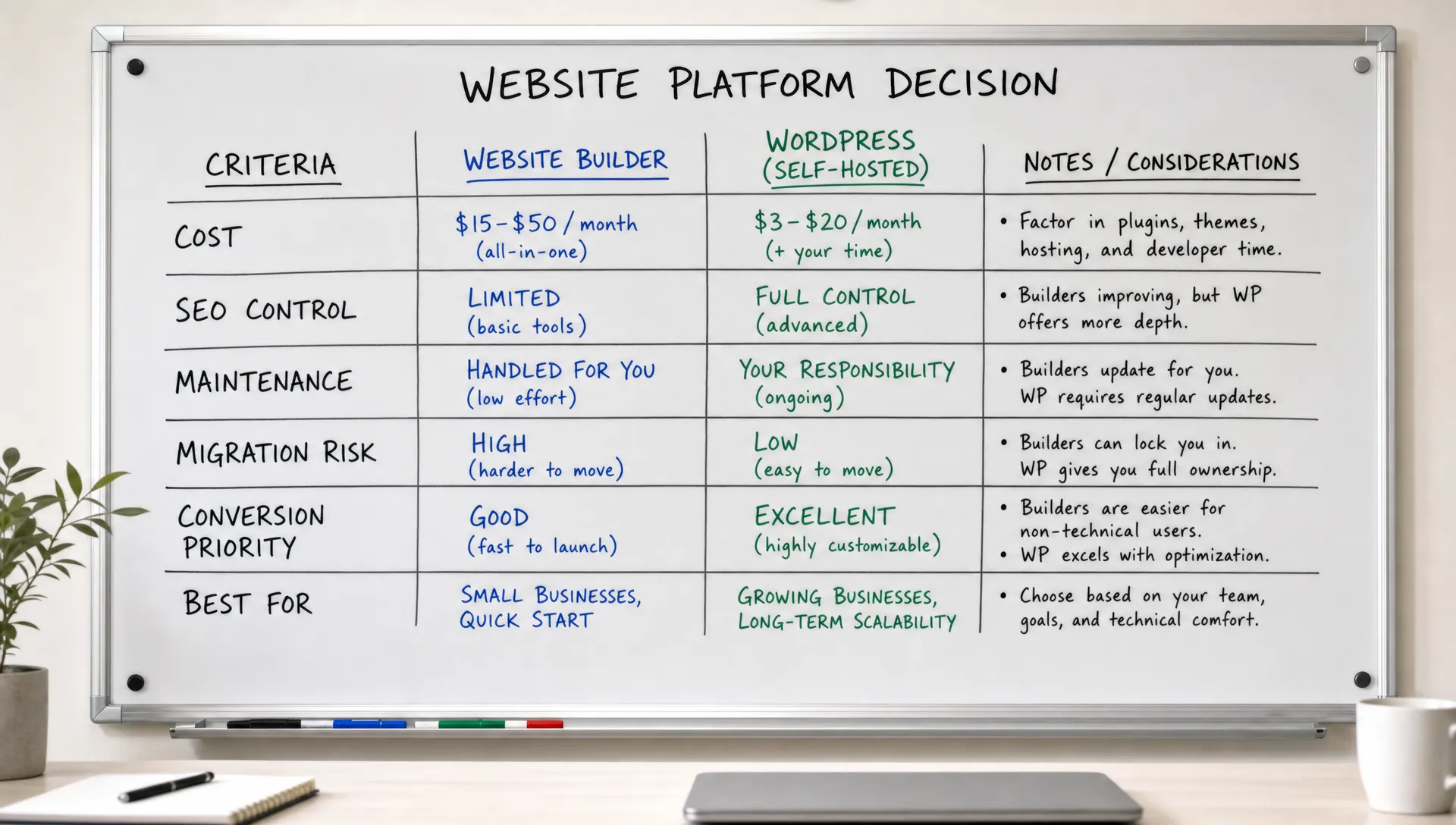
There are cases where low cost should lead the decision.
If the website is not a core growth channel, a cheaper builder can be practical. The key is to choose it knowingly and keep the scope simple. Cheap works when the business does not need deep customization, advanced CMS logic or complex integrations.
A cheap website builder can be appropriate for a one-page validation site, a temporary event page, a personal portfolio, a local presence with limited updates or a pre-launch project where the offer may change soon.
In those cases, the main objective is speed and cost control. You can accept design limits because the site is not yet carrying complex acquisition or conversion responsibilities.
Set boundaries early. Use a small number of page templates, define one clear navigation structure and avoid adding tools that the platform does not handle cleanly.
Also document the basics: domains, analytics access, form destinations, page URLs and key content blocks. If the site later needs to move, this documentation reduces migration friction.
Cheap becomes risky when the site is tied to revenue, recruitment or brand trust.
A B2B website often needs to communicate positioning clearly, support long buying cycles and help marketing teams test messages. If the builder makes that work slow or inconsistent, the business pays through internal time and missed execution.
If your team publishes regularly, runs paid campaigns, targets organic traffic or needs a structured CMS, the platform should support repeatable operations. A site that depends on manual duplication and fragile templates will slow your team.
If the website must connect to CRM workflows, lead scoring, email automation or analytics events, integration quality matters. Cheap platforms can still work, but the required workflow should be tested before commitment.
The most common hidden cost is rebuild risk. A site may start cheap, then become impossible to scale without moving to another platform.
Migration cost includes redesign, development, content transfer, redirects, analytics setup, QA and temporary SEO risk. If migration is likely within 12 months, the cheaper first choice may not be cheaper at all.
For the method, read our guide on SEO redesign and migration without losing traffic. For the budget side, the website redesign cost guide explains what a rebuild typically involves.
Migration work is made of several separate cost items, and each one can be larger than expected. The table below lists them so that you can include them in the budget from the start. If a move is likely within a year, these lines belong in the comparison next to the subscription price.
| Migration cost item | What it covers | Why it is often missed |
|---|---|---|
| Redesign | Rebuilding layouts and components on the new platform | Teams assume the existing design can be copied |
| Development | Rebuilding templates, CMS structure and interactions | Custom behavior rarely transfers automatically |
| Content transfer | Moving pages, posts, images and metadata | Volume and cleanup work are underestimated |
| Redirects and URLs | Mapping old URLs to new ones | URL changes are discovered after launch |
| Tracking and analytics | Recreating tags, events and conversion goals | Reporting gaps appear weeks later |
| QA and SEO monitoring | Testing pages, forms and rankings after launch | Temporary traffic loss is not planned for |
Most expensive website decisions come from incomplete evaluation, not from choosing a specific tool.
The website builder cheapest option can be suitable, but these mistakes make it harder to judge properly.
Run this checklist before signing up, buying a template or asking someone to build on a platform.
The checklist is intentionally practical. If you cannot answer several of these questions, pause the decision and clarify the website scope first.
If the site is a growth asset, the cheapest subscription should not drive the decision alone. It can still be part of the decision, but it should not outweigh performance, maintainability and execution speed.
A simple estimate is more useful than a precise one.
For each option, add the subscription over 24 months, the one-time cost of design and build, the yearly cost of maintenance and support, and the cost of internal time spent on updates. Then add a reserve for a possible migration. The result will not be exact, but it shows which option stays reasonable when the site grows.
Internal time deserves a real value. If a marketing manager spends two extra hours on each page update, that time has a cost even if no invoice is issued. Compare options with the same assumptions, otherwise the cheapest plan will always look better than it is.
A good comparison starts with requirements, not platform names.
Create three scenarios: simple launch, marketing site and scalable growth site. Then compare each builder against those scenarios instead of debating features in isolation.
The same logic applies when you compare providers. Our guide on how to compare web development services without wasting budget shows how to look beyond the headline price.
Choose a cheap builder if you need a basic site with a few pages, limited edits and no serious SEO dependency. Keep the design simple and avoid complex integrations.
The success metric is whether the site clearly explains the offer and can be launched without pulling too much internal time from the team.
Choose a platform with stronger design, CMS and SEO control if the website supports campaigns, lead generation or content publishing. The marketing team should be able to move quickly without damaging the design.
This is where Webflow, Framer or a well-managed WordPress setup can make sense depending on team skills, budget and maintenance expectations. The Webflow pricing guide explains which plan fits which type of site, and the overview of Webflow alternatives helps if you are unsure about the platform itself.
Choose based on operating model. A scale-up site may need reusable sections, structured CMS collections, localization, integrations, performance discipline and ongoing optimization.
At this stage, price matters, but governance matters more. A cheap builder that creates inconsistent pages and fragile workflows will cost more than a cleaner setup built for repeatable execution.
The three scenarios lead to different priorities, which is why one platform rarely fits all of them. The table summarizes the goal, the priorities and the main risk of each scenario. Identify your current scenario first, then check whether the builder you are considering matches it.
| Scenario | Main goal | What to prioritize | Risk of choosing on price alone |
|---|---|---|---|
| Simple launch | Publish a clear page quickly | Speed, clarity of the offer, low cost | Low, if the scope stays small |
| Marketing site | Support campaigns, leads and content | Design control, CMS, SEO settings, editing workflow | Slow execution and inconsistent pages |
| Scalable growth site | Support several offers, teams and markets | Governance, reusable sections, integrations, performance | Early rebuild and fragile workflows |
Is the website builder cheapest option ever the right choice? Yes. It can be the right choice for a temporary page, early validation project, personal site or simple business presence with limited updates and no complex SEO needs.
What is the biggest hidden cost of a cheap website builder? The biggest hidden cost is usually internal time or rebuild risk. If the platform slows editing, limits SEO or cannot support integrations, the business pays later through fixes and migration work.
Should startups always avoid cheap website builders? No. Early startups can use cheap builders to validate messaging and publish quickly. The risk appears when the same temporary setup becomes the main growth website without being reassessed.
How do I know if a website builder is too limited for my business? It is too limited if your team cannot publish pages safely, manage structured content, control SEO basics, connect key tools or update the site without repeated technical help.
Is Webflow cheaper than WordPress or Framer? It depends on the site scope, team workflow, maintenance model and required integrations. The better comparison is total cost over time, not only the platform subscription.
When should I involve an agency before choosing a builder? Involve an agency when the website is tied to acquisition, positioning, SEO, investor trust, recruiting or sales support. Early input can prevent platform decisions that create rebuild costs later.
If website builder cheapest is your starting point, use it as a budget signal, not as the final decision rule.
The right platform is the one that fits your next stage of work: publishing, optimization, integrations, maintenance and growth. A cheap builder can be a smart choice for a narrow scope. It becomes costly when it forces slow execution, weak SEO foundations or an early rebuild.
Your next step is simple: define what the website must do in the next 12 months, then compare builders against that operating model. If you want a second opinion before committing, start with a focused website audit with BeBranded.