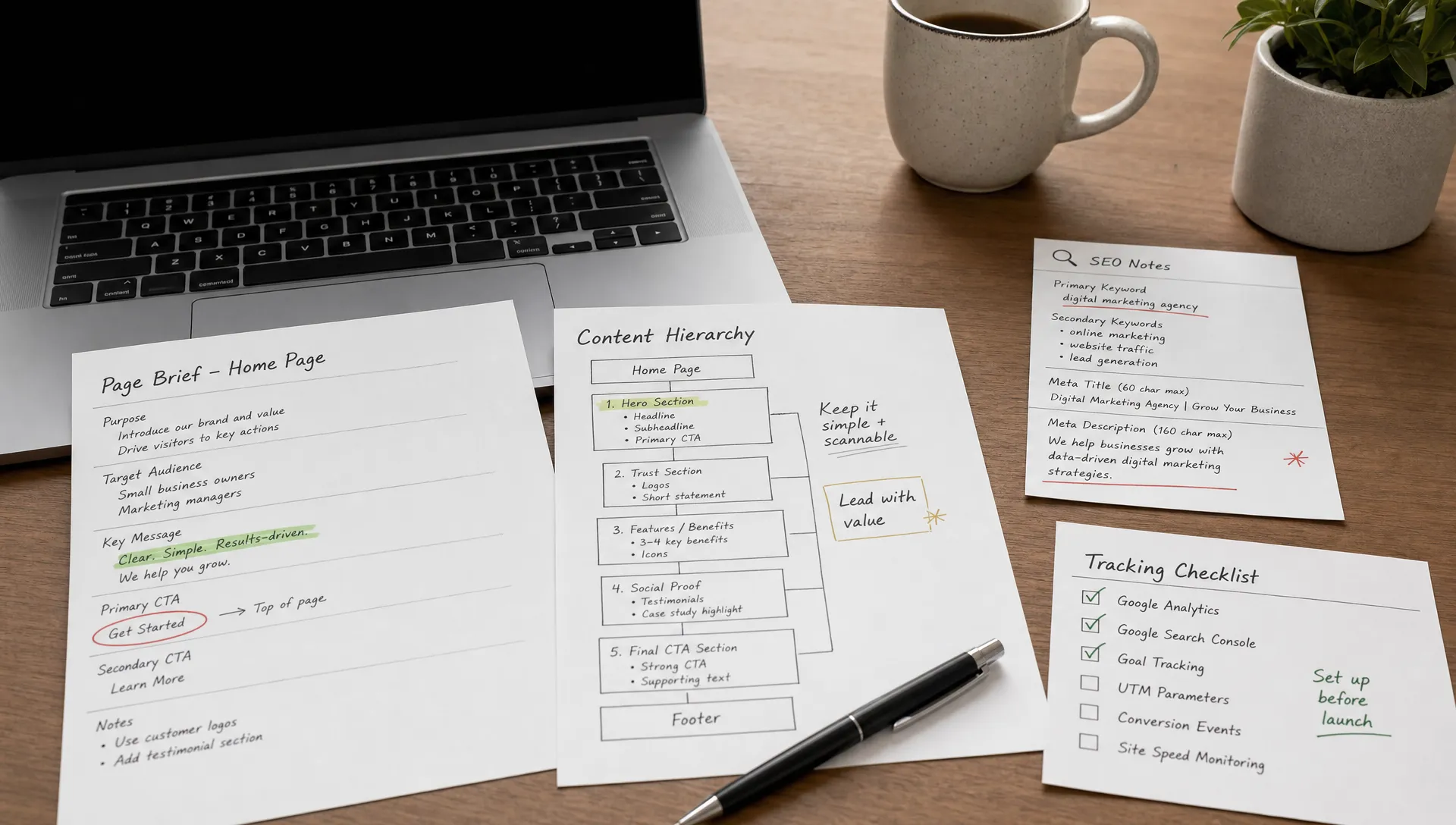
Webflow pricing 2026: plans, costs & what you'll really pay
Webflow
•
X min
•
Published on
19.02.2026
•
Updated on
16.09.2026
Webflow plans start at $14/month. In practice, the actual budget for a website depends on much more than the subscription: plan type, add-ons, domain, integrations, maintenance, and most importantly the cost of design and development if you're not doing everything yourself.
The problem: Webflow's pricing grid is split across several plan families, with options that stack on top of each other. Without a clear explanation, you can easily end up on a plan that's too expensive or, conversely, stuck with limits you didn't anticipate.
This article gives you a complete, up-to-date picture (February 2026) of what Webflow actually costs. By the end, you'll know which plan to choose, what costs to plan for, and how to budget a realistic Webflow project.
A standard Webflow website costs between $23 and $39/month in subscription fees. The total budget (design + dev + tools) ranges from a few hundred dollars for DIY to $2,000–15,000+ with a Webflow agency, depending on complexity. This guide breaks down every line item.
Webflow has two pricing layers that stack: Site plans (per website, hosting included) and Workspace plans (for building and collaboration). For a typical business site you mainly pay for a Site plan; roughly $14–$39 per month, plus a Workspace plan if you need more projects or collaborators. Below is the quick view (always confirm current rates on webflow.com).
What you'll really pay also includes optional add-ons (localization, extra bandwidth) and, if you work with an agency, the one-off build cost. For most SMBs the realistic all-in is the Site plan (~$14–39/mo) plus the initial design & build.
Before looking at prices, you need to understand how Webflow structures its offerings. There are two distinct plan families, and confusing them is one of the most common mistakes.
A Site plan is the subscription you pay to publish a website on a custom domain (e.g., yourcompany.com). It covers hosting, bandwidth (the volume of data your site can transfer to visitors each month), number of pages, and access to the CMS (the content management system that lets you create blog posts, product pages, etc. without touching code).
You pay one Site plan per website. If you have two sites (a marketing site + a separate blog), you pay two Site subscriptions.
A Workspace is your working environment inside Webflow. It's where you create, organize, and manage your site projects. The Workspace plan determines how many people can work together, how many staging sites (unpublished sites in development) you can have, and which collaboration features are available.
You pay a Workspace plan per user (called a "seat").
In practical terms: if you're working solo and managing a single site, the free Workspace (Starter) is enough. You only need a paid Workspace if you're working as a team, managing multiple projects, or you're a freelancer/agency with clients.
Mistake 1: confusing Site plans and Workspace plans. Some people assume a paid Workspace includes hosting. It doesn't. Even with a Growth Workspace at $49/month per user, you still need to purchase a Site plan for each published site. The two costs stack.
Mistake 2: getting a paid Workspace when you don't need one. If you're a founder or marketing manager and you're hiring an agency or freelancer to build your site, you generally don't need a paid Workspace. Your provider works in their own Workspace, then transfers the site to you. You only need to pay for the Site plan.
Webflow offers four main Site plans (excluding e-commerce). All prices below are in USD, billed annually. Monthly billing is more expensive (expect roughly 20–30% more).
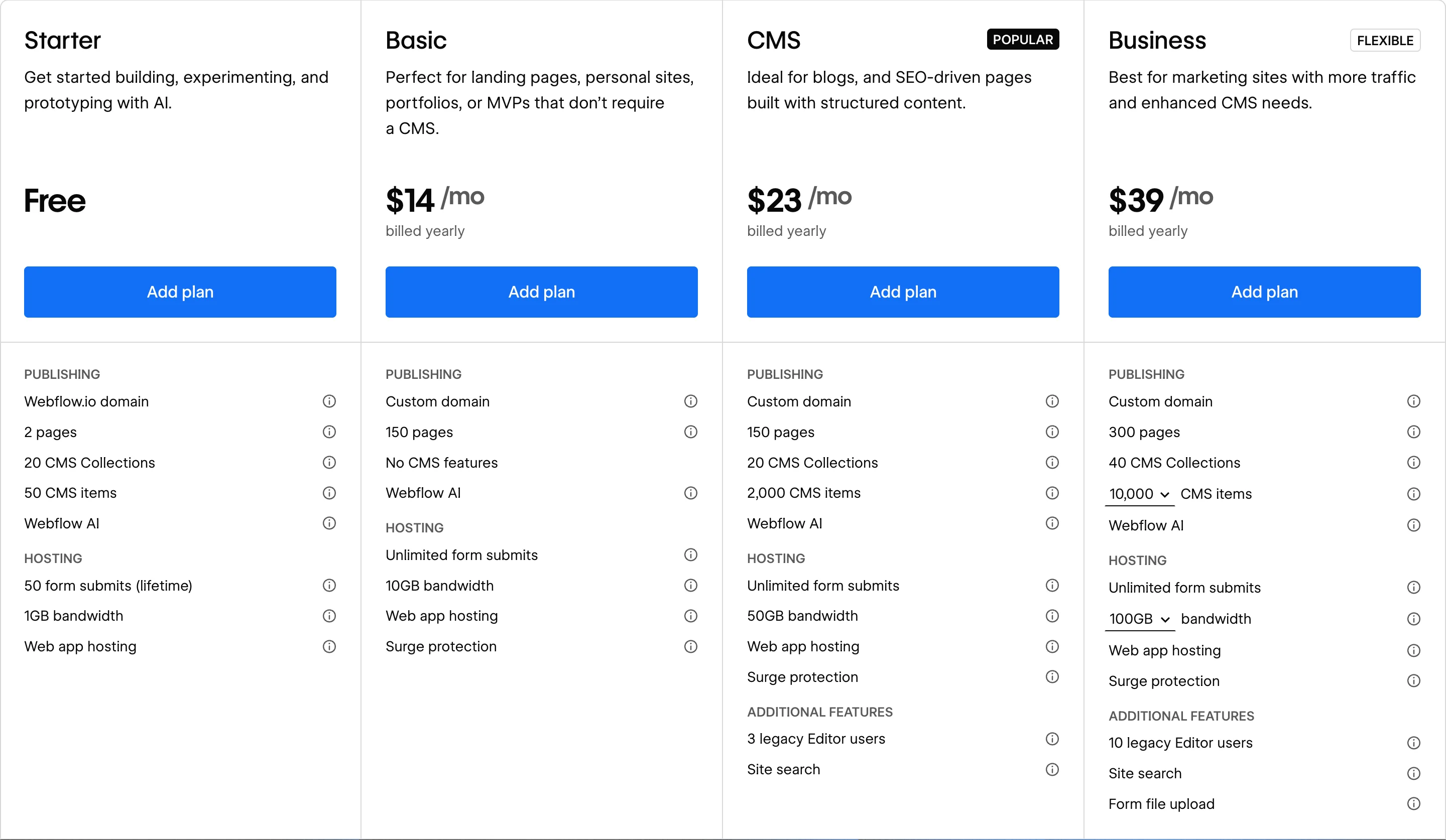
The free plan lets you explore Webflow and prototype. Your site will be hosted on a webflow.io subdomain (e.g., mysite.webflow.io), you can't connect your own domain name, and the "Made in Webflow" badge is displayed.
It's useful for getting familiar with the tool or for getting client approval on a mockup. It's not a production plan.
The Basic plan lets you publish a site on your own domain, with up to 150 static pages (pages with fixed content, as opposed to dynamic pages generated by the CMS). It includes 10 GB of bandwidth, unlimited form submissions, and basic SEO tools (301 redirects, sitemap, meta tags).
However, there's no CMS access at all. No blog, no dynamic product pages, no collections.
If you need a brochure site of a few pages without content that needs regular updating (a portfolio, a landing page, a one-page site), Basic is enough.
This is the plan most Webflow sites use. It unlocks the CMS with 20 collections and 2,000 items (a CMS "item" is a piece of content: a blog post, a team member profile, a case study, etc.). Bandwidth goes up to 50 GB, and you get access to Site Search and 3 legacy Editor seats (users who can edit content without touching the design).
If you have a blog, a resource center, or you want your marketing team to update content without involving a developer, this is the plan to choose.
The Business plan includes everything in CMS and adds capacity: up to 300 pages, 40 collections, between 10,000 and 20,000 CMS items, and configurable bandwidth from 100 GB to 2.5 TB. It also includes form file uploads and 10 Editor seats.
Pricing varies depending on the CMS items / bandwidth combination you choose. The minimum is $39/mo (10,000 items, 100 GB). The maximum goes above $1,000/mo for the highest configurations.
This plan makes sense if your site generates significant traffic (tens of thousands of visits per month), if you have a large volume of content, or if you need features like form file upload.
Webflow also offers dedicated e-commerce plans, which layer on top of Site plans.
The 2% transaction fee on the Standard plan is on top of payment processor fees (Stripe or PayPal). If your sales volume exceeds a few thousand dollars per month, the Plus plan quickly pays for itself since it removes these fees.
For a serious online store with a substantial catalog, Shopify is often a better fit than Webflow. Webflow e-commerce works best for sites that sell a handful of products alongside a marketing or content site. Our article on the benefits and limitations of Webflow e-commerce covers when it makes sense.
The free Workspace (Starter) is enough in many cases. Here are the paid plans, for reference.
When you need one: you have an internal team of 2–3 people working on the site (designers, marketers, devs). Or you're a freelancer/agency managing multiple client projects in parallel.
When you don't need one: you're a founder or marketing manager, you're hiring an external provider to build your site, and you don't work in the Webflow Designer yourself. In that case, the free Starter Workspace + a Site plan is all you need.
Note: additional seats (beyond the one included in the plan) cost $39/mo for a Full Seat or $15/mo for a Limited Seat (restricted to content editing), billed annually.
Beyond the Site subscription, Webflow offers add-on modules billed separately, per site.
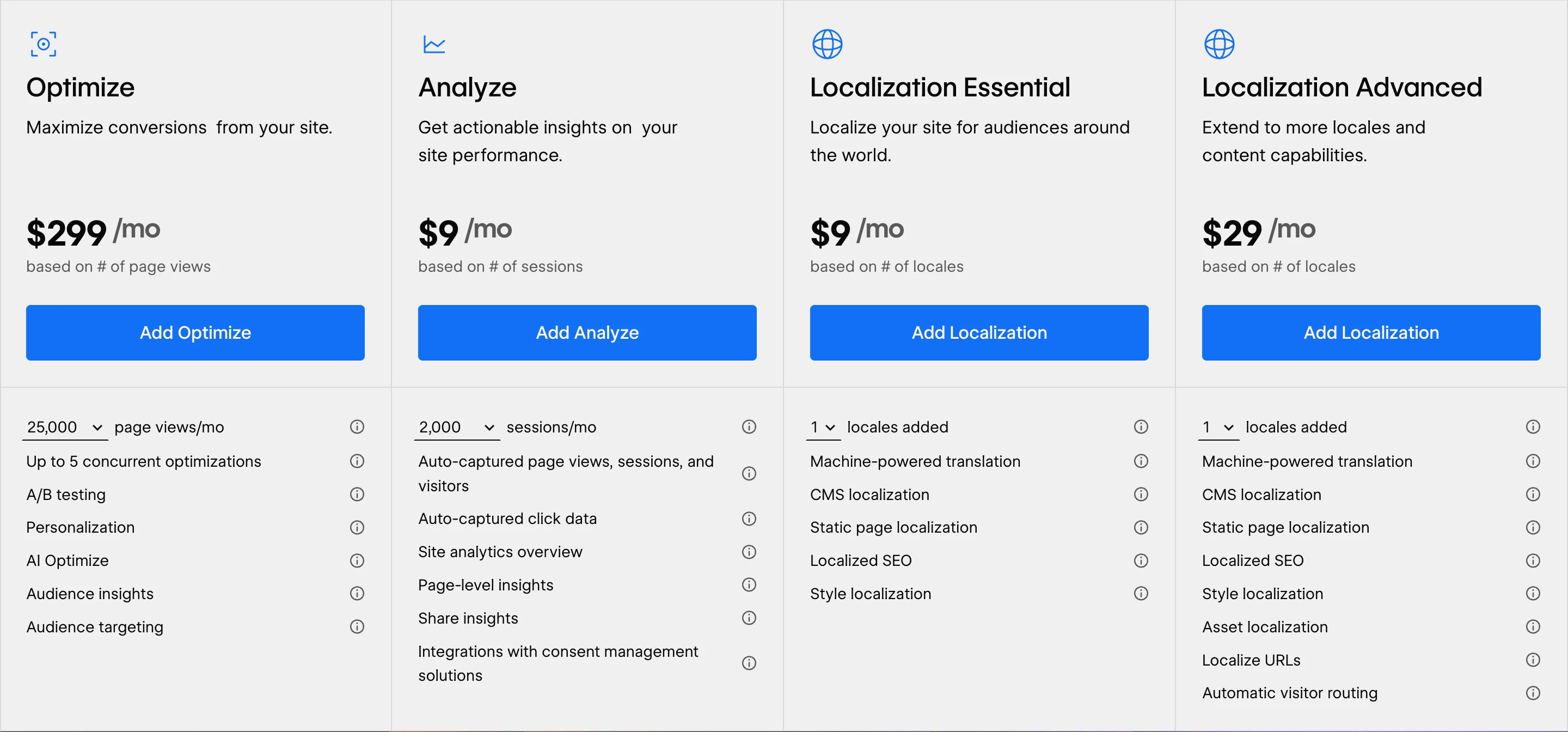
This is Webflow's A/B testing and personalization tool. It lets you test different versions of a page to see which converts better. Pricing depends on page view volume (starting at 25,000 page views/mo for $299).
Category: optional. Most sites don't need it. It's only relevant if you have enough traffic and an active CRO (conversion rate optimization) strategy. For lower-cost A/B testing, third-party tools like VWO or AB Tasty can be considered.
Webflow's native analytics tool. It automatically captures page views, sessions, clicks, and offers per-page insights. Pricing depends on session volume (starting at 2,000 sessions/mo for $9).
Category: useful depending on context. If you already use Google Analytics or Plausible, you don't need it. It's handy if you want a simple dashboard directly inside Webflow, without installing third-party scripts.
Lets you translate your site into other languages directly in Webflow, with AI-assisted translation, localized SEO (hreflang tags, multilingual sitemap), and content management per locale. The Essential plan supports up to 3 languages.
Category: essential if you target multiple markets. If your site needs to exist in both English and French (or any other language pair), this is the simplest path in Webflow. The alternative would be managing two separate sites, which is more expensive and more complex.
Same features as Essential, plus: up to 10 languages, localized URLs (your-site.com/en/, your-site.com/fr/), automatic visitor routing, and asset localization (different images per language).
Category: useful if you have more than 3 languages or if international SEO is a major priority.
Beyond Webflow plans and add-ons, here are the expenses many projects underestimate:
Domain name: between $10 and $20/year for a standard .com. Purchased separately (Webflow lets you buy one directly through its interface, or you can use a registrar like Namecheap, GoDaddy, or Google Domains).
Professional email addresses: Webflow doesn't handle email. You need a separate service: Google Workspace (from $7.20/mo per user), Microsoft 365, or similar.
Form tools and CRM: Webflow's native forms are basic. For advanced forms (multi-step, conditional logic, file upload), many projects add Typeform, Tally, or a CRM like HubSpot. Costs vary from $0 to several hundred dollars per month.
Tracking and analytics: Google Analytics is free. Plausible (privacy-friendly) costs about $9/month. If you add advanced tracking (Google Tag Manager, Hotjar, Clarity), budget for setup time or a provider.
Cookie consent banner: mandatory in Europe, increasingly expected elsewhere. Solutions like CookieYes, Axeptio, or FlowConsent (built by BeBranded, free or $15/mo for the advanced version) should be factored in.
Automations: connecting Webflow to other tools (CRM, Slack, email marketing) usually goes through Zapier or Make. Free plans cover basic needs; beyond that, expect $20–50/month.
Maintenance and updates: this is the most commonly forgotten line item. A website needs regular updates: fixes, new pages, SEO adjustments, design tweaks. Without support, this falls on your shoulders. With a provider, budget between $200 and $3,000/month depending on scope.
The figures below are ranges based on 2026 Webflow pricing and rates commonly seen in the market. They provide an order of magnitude, not a quote.
You learn Webflow, build your site yourself, manage everything.
This scenario suits a freelancer or tech-savvy founder who wants an MVP or personal site. The cost is low, but the time investment is real: expect several dozen hours to learn Webflow and build a decent site.
Not included: custom design, advanced SEO optimization, complex integrations, ongoing maintenance.
You hire a freelancer or agency for a 5–10 page site with custom design, CMS content, and standard integrations.
This is the most common scenario for an SMB, a startup, or a website redesign project. The cost mainly varies based on the provider and the level of design customization.
At BeBranded, our packages cover this scope: the Launch package (1–4 page site, $3,500, delivered in 2 weeks) and the Business package (5–9 pages with CMS, full design system, on-page SEO, integrations, $11,500, delivered in 4 weeks). Each package includes training to make your team self-sufficient.
Not included: post-launch maintenance (beyond initial support), monthly updates, ongoing SEO strategy.
You already have a site, and you want to turn it into a growth engine: new landing pages, A/B testing, ongoing SEO optimization, advanced tracking, regular adjustments.
This scenario applies to companies that treat their website as a growth tool, not a business card. The biggest expense here isn't the Webflow subscription. It's the human time invested in iterations.
At BeBranded, the Growth package ($3,100/mo, no commitment) covers 4 dedicated days per month: consulting, SEO, design, development, A/B testing, and a monthly performance report. See more of our services on our website.
Not included: content production (article writing, visual creation), advertising budgets, third-party SaaS tools beyond the basics.
Webflow isn't always the best option. Here's an honest comparison across five criteria that matter for making a decision.
In summary: Webflow is particularly strong for marketing sites, content-driven brochure sites, and projects where design quality and marketing autonomy are priorities. WordPress remains relevant for very high-volume content projects or highly specific plugin needs. Framer is an interesting alternative, especially for its ease of onboarding. Shopify is the obvious choice if e-commerce is your core business.
Answer these questions to identify the plan that fits your situation.
1. Does your site have a blog or dynamic content (articles, case studies, product pages)?
No → Basic ($14/mo) may be enough.
Yes → CMS minimum ($23/mo).
2. Do you have more than 2,000 content items to manage?
No → CMS.
Yes → Business (from $39/mo).
3. Does your site get more than 50,000 visits per month?
No → CMS.
Yes → Business (for bandwidth).
4. Do you need to sell online?
No → Standard Site plan.
Yes, a few products → E-commerce Standard ($29/mo).
Yes, large catalog → E-commerce Plus ($74/mo) or consider Shopify.
5. Does your site need to exist in multiple languages?
No → No need for the Localization add-on.
Yes, 2–3 languages → Localization Essential ($9/mo).
Yes, more than 3 languages → Localization Advanced ($29/mo).
6. Do you have a team working on the site (designers, devs, marketers)?
No, just one person → Workspace Starter (free).
Yes, 2–3 people → Core ($19/seat/mo) or Freelancer ($16/seat/mo).
Yes, larger team → Growth ($49/seat/mo) or Agency ($35/seat/mo).
7. Do you need ongoing support (SEO, design, updates)?
No → Make sure you still have a minimum maintenance plan.
Yes → Budget a dedicated monthly spend (or explore a retainer like BeBranded's Growth package).
The Webflow subscription itself is rarely the main expense. For a brochure site with a blog, the CMS plan at $23/mo (about $276/year) covers the needs of most businesses. The real budget is in design, integrations, and especially ongoing maintenance.
Three things to remember. First: start with the minimum plan that matches your current needs. Webflow lets you upgrade at any time, with prorated pricing. Second: don't underestimate ancillary costs (domain, email, tools, support). Third: if your website is a growth tool and not just a digital business card, budget a monthly spend for continuous iteration.
If you're still unsure which plan to choose or want a precise estimate for your project, you can book a quick call with our Webflow agency. We'll help you identify the right setup, no strings attached.