How to design your own website with a clear content plan
Development
•
X min
•
Published on
26.08.2026
•
Updated on
20.09.2026
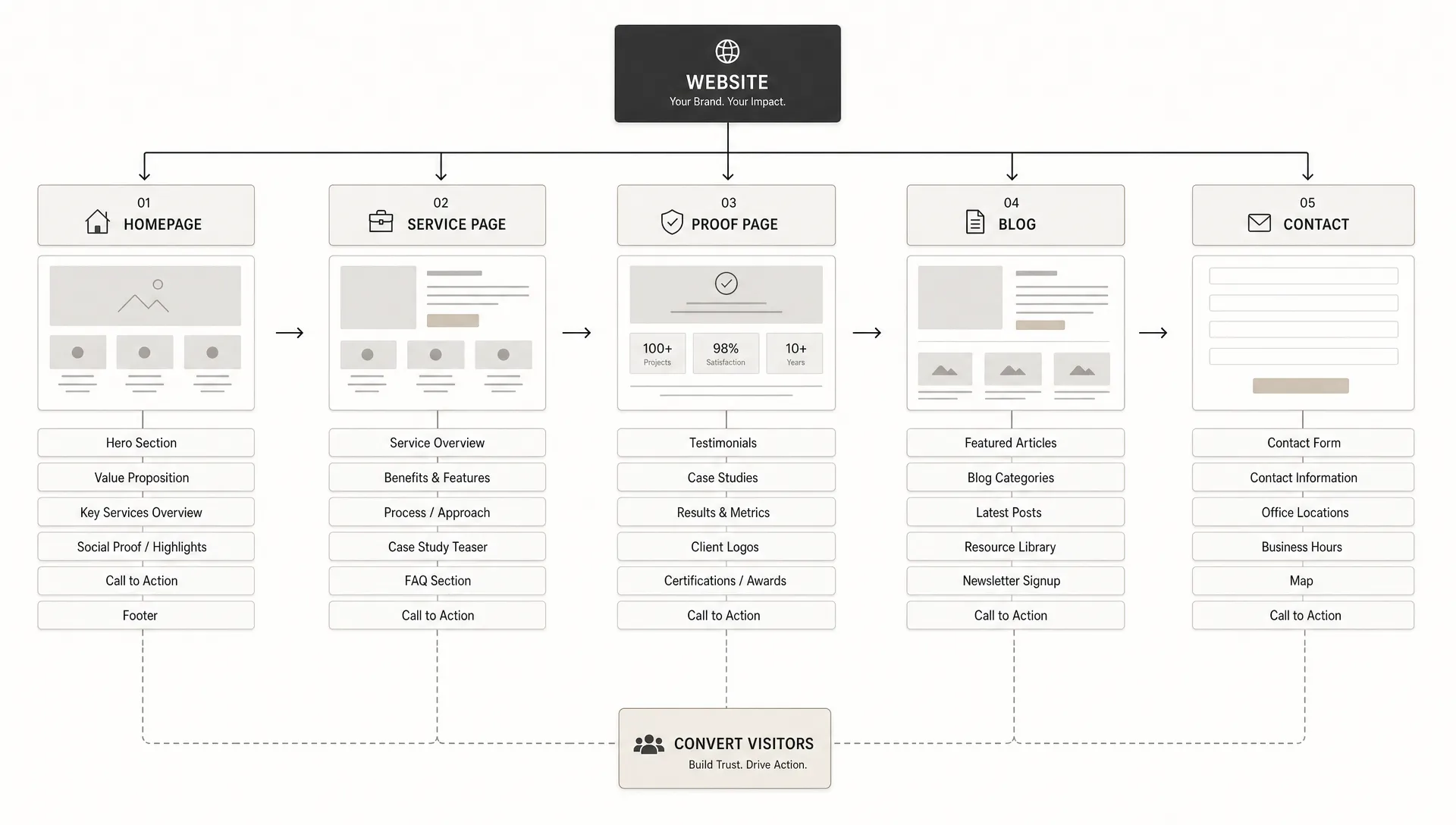
If you want to design your own website, the first decision is not the color palette, the homepage animation or the platform. The first decision is what the website must say, to whom and in what order.
A clear content plan gives your design process direction. It helps you decide which pages you need, what each page must achieve, what proof to show and which action a visitor should take next. Without that plan, even a clean website can become hard to use, hard to update and weak at converting the right visitors.
This guide gives you a practical framework to plan your content before you design, whether you are building the site yourself or preparing a brief for a designer, Webflow developer or internal team. If you need to formalize that brief, this guide on how to write an effective website requirements document covers the sections a solid brief should include.
A website content plan is the working document that connects business goals, audience needs and page-level messaging before design begins.
It should define your audience, core pages, page objectives, message hierarchy, proof points, calls to action and CMS needs. It is not a full copy deck or a design system. It is the plan that tells the design what it needs to support.
For a CEO, CMO, marketing manager or founder, this matters because website design is a business tool. If the content plan is weak, the design process becomes subjective. If the plan is clear, every section has a reason to exist.
Before you design your own website, decide what decision the visitor should be ready to make after reading it.
For many business websites, the answer is not simply “contact us.” A visitor may need to understand your offer, compare you with alternatives, trust your experience, see relevant proof or decide whether your pricing range is realistic before they are ready to speak with sales.
Choose one primary outcome for the website, then choose one primary outcome per key page. A homepage can guide visitors to the right path. A service page can explain fit and value. A case study can reduce risk. A contact page can make the next step clear. For a closer look at building each page around the choice a visitor is actually making, see this guide on how to design a website around the decisions buyers need to make.
If you are still defining the bigger site architecture, BeBranded has a separate guide on how to start a website with the right structure before you move into page planning.
A practical website content plan can be built with five decisions. Work through them before opening your website builder or design file.
Start by naming the specific visitor groups the website must serve. Avoid broad labels like “businesses” or “startups” if they do not help you make decisions.
A founder evaluating a first serious website does not need the same information as a CMO replacing an underperforming site. One may need clarity and confidence. The other may need technical reliability, SEO continuity, content governance and conversion paths.
Write down what each audience already knows, what they still need to believe and what could stop them from taking action.
Most websites repeat the same page labels without questioning whether each page has a clear job. Home, about, services, blog and contact can work, but only if each page earns its place.
A better method is to describe the job first, then choose the page type. For example, “explain the offer to a qualified buyer” may become a service page. “Support SEO and educate early-stage prospects” may become a blog or resource hub. “Reduce risk for enterprise buyers” may become case studies or proof pages.
This approach keeps the website structure lean and prevents your navigation from becoming a storage cabinet for every internal idea. This guide on website structure that helps users and Google find the right pages goes deeper into how page-level jobs translate into navigation and internal linking.
Message hierarchy is the order in which a page presents information. It controls what visitors understand first, second and third.
For a homepage, the hierarchy usually starts with who you help, what problem you solve, how your approach works and why the visitor should trust you. For a service page, it may start with the outcome, then explain the process, deliverables, proof and next step.
Do not start with internal company language. Start with what the visitor is trying to understand.
Proof is not limited to testimonials. It can include project examples, client logos, certifications, screenshots, process detail, before and after comparisons, founder expertise, technical explanations or clear constraints.
The right proof depends on the decision you are asking visitors to make. If you sell a complex B2B service, a vague testimonial may not be enough. Visitors may need to see your method, your standards and your ability to handle similar constraints.
A good content plan assigns proof to specific pages instead of scattering it randomly across the site.
A conversion path is the sequence of steps that moves a visitor from interest to action. It should feel natural, not forced.
For example, a homepage might send early visitors to a service page, then to a case study, then to a consultation form. A resource article might lead to a related guide or relevant service page. A pricing page might lead directly to a booking form.
Each key page should answer two questions: what does the visitor need next, and what action should be easy to take from here?
| Planning decision | What to define | Why it matters |
|---|---|---|
| Audience | Who the page is for and what they already know | Prevents generic messaging |
| Page job | The role of each page in the buying journey | Keeps the structure focused |
| Message hierarchy | The order of key ideas on the page | Makes the content easier to understand |
| Proof | Evidence that supports the claim | Reduces perceived risk |
| Conversion path | The next step for the visitor | Turns interest into action |
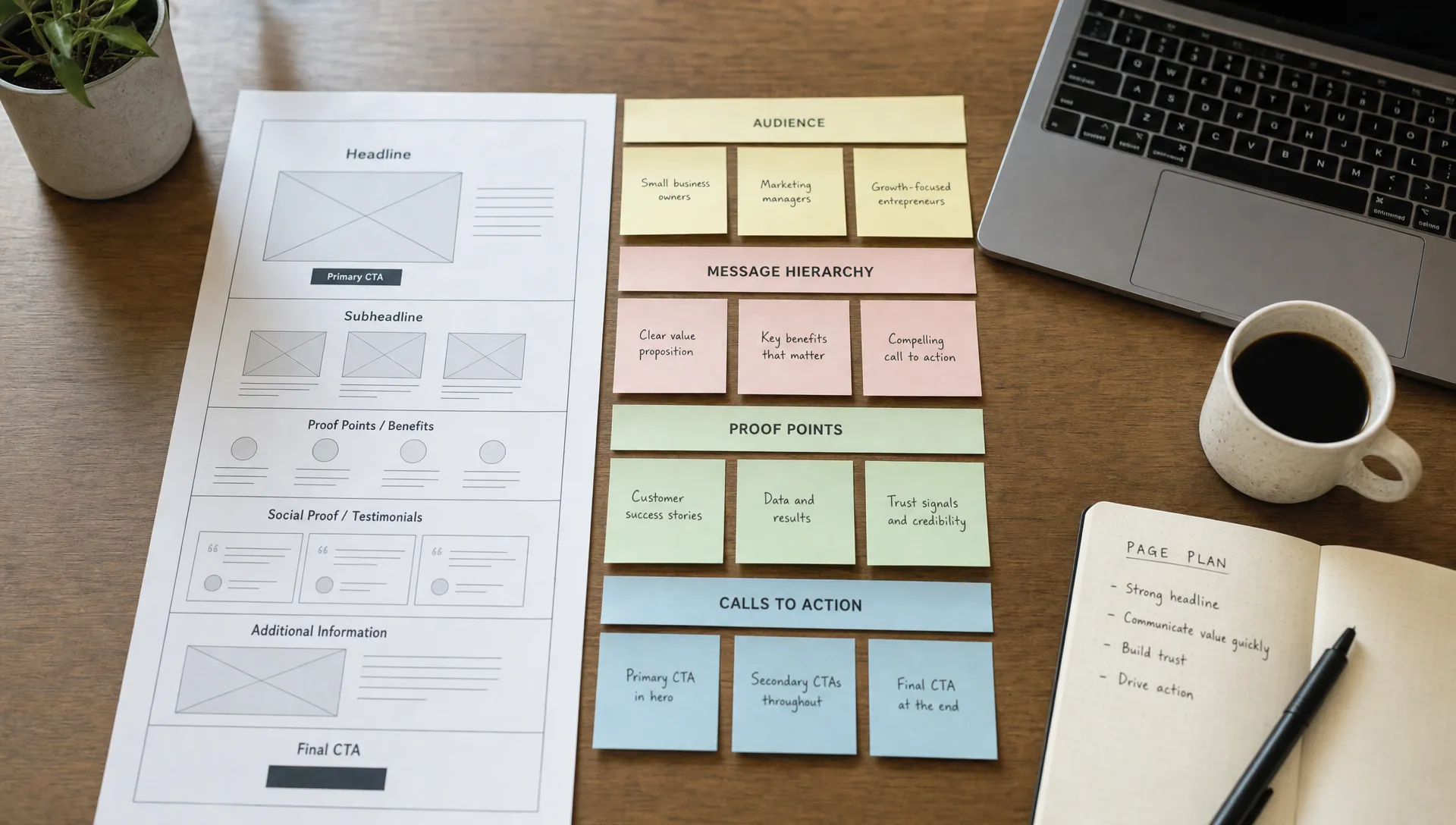
Once the framework is clear, translate it into page-level content blocks. This is where the website starts to become design-ready.
Your homepage should not try to say everything. It should help the right visitors understand what you do, why it matters and where to go next.
A strong homepage content plan usually includes a clear hero section, a short explanation of the offer, audience or use-case paths, key benefits, proof, process overview and a focused call to action. The exact order depends on the complexity of your offer.
If your website supports multiple services or buyer types, the homepage should guide visitors rather than overload them.
Service and product pages need more depth than the homepage. They should explain the problem, the outcome, the approach, what is included, what makes the offer credible and who it is best suited for.
Avoid building these pages around feature lists only. Features matter, but decision-makers also need to understand the business value, implementation effort, risk and next step.
For a more complete view of what a serious business site needs to include, use this guide on what a professional website for business should include as a reference while planning your pages.
If SEO is part of your growth plan, your content plan should include your CMS structure early. Do not add a blog at the end as an afterthought.
Decide which content types you need, such as articles, case studies, resources, landing pages or comparison pages. Then define the fields each content type needs. For example, a case study may need industry, challenge, solution, results, services used and project visuals. The table below shows how this breaks down for a few common content types.
| Content type | Core fields to define | Typical use |
|---|---|---|
| Article or blog post | Title, category, author, summary, body, SEO meta, FAQ | Support SEO and educate early-stage prospects |
| Case study | Industry, challenge, solution, results, services used, project visuals | Reduce risk for enterprise buyers |
| Landing page | Headline, offer, proof, primary call to action, form | Support paid campaigns |
| Comparison page | Options compared, criteria, verdict, call to action | Support late-stage research |
If your CMS content keeps sprawling as you add fields and content types, this guide on how to use Webflow content management without CMS clutter covers how to keep a growing collection manageable.
Google’s SEO Starter Guide recommends making content easy for users to navigate and understand. That starts with clean structure, descriptive page titles, useful internal links and pages that answer real search intent.
Design should make the content easier to understand. It should not hide weak messaging behind decoration.
Start with low-fidelity wireframes before visual design. Put real headings, real section labels and draft calls to action into the layout. This quickly reveals whether the page has a clear flow or whether the content is trying to do too much.
Keep layouts consistent across similar pages. If every service page has a different structure, users have to relearn the site each time. Consistency also makes CMS management easier as the website grows.
Design mobile sections early, not at the end. Many teams approve desktop layouts first, then discover that headings are too long, sections are too dense or forms are awkward on smaller screens.
Most website planning issues appear before development starts. Avoid these mistakes and the build becomes cleaner.
Use this checklist before you move from planning into design or development. This guide on setting up a website: the checklist before you launch pairs well with it once you move from content planning into pre-launch QA.
| Step | What to define |
|---|---|
| 1. Business outcome | The primary business outcome for the website |
| 2. Audience segments | Main audience segments and their buying stage |
| 3. Core pages | Core pages, each with one assigned job |
| 4. Page messages | The main message each page must communicate |
| 5. Proof | The proof needed to support each key claim |
| 6. Calls to action | One primary call to action per key page |
| 7. Internal links | Internal links that should guide visitors between pages |
| 8. CMS content types | CMS content types and the fields each one needs |
| 9. Draft headings | Real headings, drafted before the page layout |
| 10. Mobile review | The mobile experience, reviewed before final development |
If one of these items is unclear, pause before building. A short planning delay is easier to fix than a finished website that needs structural changes.
Designing your own website can make sense when the scope is simple, the offer is clear and the site does not carry heavy revenue expectations.
A founder building a first landing page may be able to move fast with a no-code tool, a focused message and a small number of pages. In that case, the content plan is still useful because it prevents the build from drifting.
Bringing in help makes more sense when the website supports lead generation, SEO, paid campaigns, investor perception, hiring or a complex service offering. It also helps when you need Webflow or Framer implementation, technical SEO setup, CMS architecture, automation or a visual system that can scale.
The table below summarizes a few common situations and the approach that usually fits best.
| Situation | Best approach | Why |
|---|---|---|
| Simple scope, one clear offer, no heavy revenue pressure | Build it yourself with a no-code tool | A focused content plan keeps a self-build from drifting |
| Website supports lead generation or paid campaigns | Bring in a partner or specialist | Conversion paths and tracking need more rigor |
| SEO and organic growth are a priority | Bring in technical or SEO help | Structure, internal linking and technical setup compound over time |
| Investor-facing or hiring-facing site | Bring in help | Perception and credibility carry more weight |
| Complex CMS or multi-service catalog | Bring in help for CMS architecture | Poor structure becomes expensive to fix later |
If your team is comparing priorities before a build, this guide on website design and development priorities can help you decide where to focus first.
A content plan is not a one-time document. Once the website is live, treat it as a reference you update whenever a new page, campaign or CMS content type is introduced.
Review it every quarter alongside your analytics. If a page is not moving visitors toward the outcome you defined, the message hierarchy or the proof on that page is usually the first place to look, not the visual design.
Keeping the plan current also makes it easier to brief a designer, developer or agency later, since the reasoning behind each page is already written down instead of living only in someone’s memory.
What is the first step to design your own website? The first step is to define the website’s primary business goal and the audience it must serve. Design choices should come after you know what the site needs to communicate and what action visitors should take.
Do I need all website copy before starting the design? You do not need final copy, but you do need a clear content plan, draft headings and section-level messaging. Designing with placeholder text often leads to layouts that do not fit the real content.
How many pages should a new business website have? The right number depends on your offer, audience and sales process. A focused business website may only need a homepage, service pages, proof pages and contact page. Add more pages only when they serve a clear visitor need.
How does a content plan help with SEO? A content plan helps SEO by aligning pages with search intent, improving structure, clarifying headings and making internal links more intentional. It also helps avoid thin or duplicate pages.
Should I choose Webflow, Framer or another platform first? Choose the platform after you understand the site structure, CMS needs, design requirements and maintenance expectations. The right tool depends on how the website will be used and managed.
A clear content plan makes website design easier because it turns subjective choices into practical decisions. You know who the website is for, what each page must do, what proof belongs where and how visitors should move toward action.
Before you design your own website, create the plan first. If you want an execution partner to turn that plan into a Webflow or Framer website, BeBranded can help you move from structure to launch with a clear process.