How to use Webflow content management without CMS clutter
Webflow
•
X min
•
Published on
14.08.2026
•
Updated on
31.08.2026

Webflow content management gets messy when a site grows faster than its content model. New collections are added for every campaign, fields are created for edge cases, and editors stop trusting the CMS because they no longer know where content belongs.
The goal is not to use fewer Webflow CMS features. The goal is to make every collection, field, and workflow serve a clear publishing purpose. This article gives you a practical way to keep Webflow content management clean without slowing down marketing execution.
If your team is still aligning on platform fundamentals, clarify what Webflow is built to do. If your question is more about collection mechanics, keep the full guide to Webflow CMS collections open as a technical reference while you apply the cleanup method below.
CMS clutter is usually a structure problem, not a design problem.
CMS clutter is the accumulation of collections, fields, templates, and workflows that no longer map to how content is created, reused, searched, or maintained. It can exist even when the front end looks clean.
In Webflow, clutter often starts with reasonable decisions. A landing page needs a custom content block. A campaign needs a special resource type. A team member adds a field for one temporary use case. Over time, those decisions become hard to explain.
The practical cost is editorial friction. When marketers cannot tell whether content belongs in Resources, Blog, News, or Insights, publishing slows down and errors become more likely.
Before you create or rename anything, map how your team publishes.
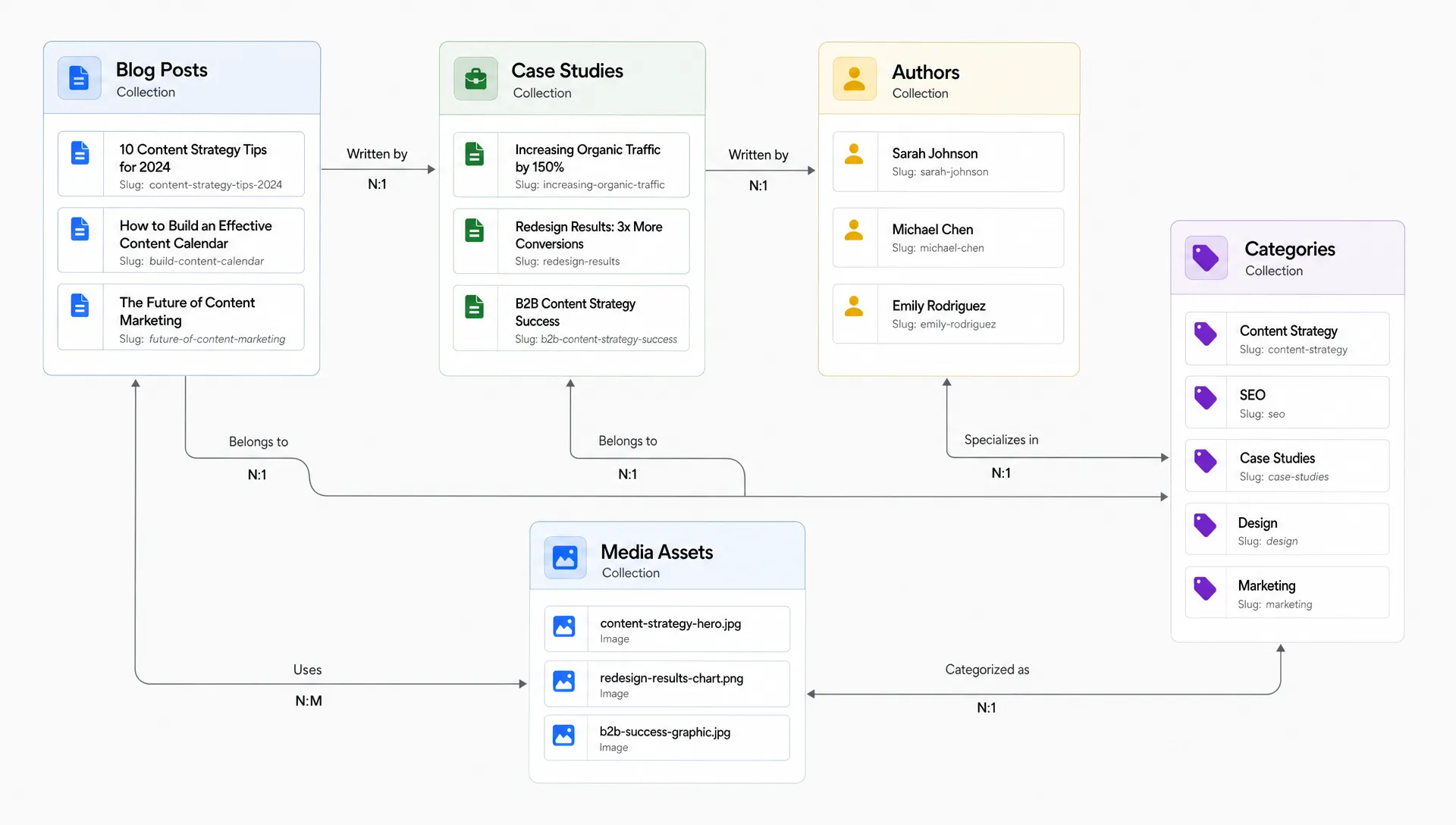
A content model is a plain language description of your reusable content types, their fields, their relationships, and their lifecycle. It should answer simple questions: what do we publish, who owns it, where does it appear, and when should it be updated or archived?
For most marketing sites, the model includes repeatable objects such as articles, case studies, authors, categories, team members, integrations, events, or resources. A one-time page may not need the CMS at all.
If your marketers need to move quickly, the CMS must reflect real workflows, not internal design history. That is one operational reason Webflow works well for marketing teams when the site is structured with governance from the beginning.
Use this framework before adding a collection, field, or template.
This method keeps the CMS focused on publishing operations. It also prevents the common mistake of treating Webflow CMS as a storage cabinet for every piece of content a company has ever produced.
Before you design a content model, know what your Webflow plan actually allows. Collection, item, and field limits vary by plan, and hitting them mid-project usually means an unplanned upgrade or a rushed restructure.
The table below summarizes the limits that matter most for a lean CMS. Treat them as guardrails, not targets: a clean site rarely gets close to the ceiling, because clutter is a structure problem, not a capacity problem.
| Plan | Collection items | Collections | Fields per collection | Collection Lists per page |
|---|---|---|---|---|
| CMS plan | 2,000 | 20 | 30 | 40 |
| Business plan | 10,000 | 40 | 30 | 40 |
If your roadmap already points toward thousands of items or dozens of collections, plan the upgrade path early. Reworking a content model after you hit a plan ceiling costs more than sizing it correctly from the start.
A collection should represent a reusable content object.
A collection is justified when multiple items share the same field set and can be rendered through the same template or listing logic. Blog posts, authors, case studies, locations, and integrations are clear examples.
Do not create separate collections only because content appears in different places. A homepage featured resource, a resource library card, and a related article block can often draw from the same Resources collection if the fields and filters are designed correctly.
References matter here. If author details, customer logos, category names, or partner data appear across the site, they should usually live once and be referenced where needed. Duplicating that data across multiple collections creates avoidable maintenance work.
Every field is an editor decision.
A simple rule works well: if a field does not affect rendering, filtering, SEO, personalization, or workflow, do not add it. Low-value fields make the CMS look flexible, but they often create uncertainty for the people using it.
Start with the stable fields that define the content object. For an article, that might include title, slug, summary, author, category, featured image, body content, meta title, meta description, and publish date. Add optional fields only when there is a repeated use case.
Rich text fields are useful, but they should not become a layout system. If editors are using rich text to build complex page sections manually, the CMS model is probably compensating for missing components or unclear templates.
The table below lists the field types most relevant to a lean CMS, and where each one tends to go wrong.
| Field type | Best use | Risk if misused |
|---|---|---|
| Reference | One related item, such as an author or a category | Overused for one-off relationships that never repeat |
| Multi-reference | Several related items, such as tags or linked services | Used as a workaround for missing structure instead of a real relationship |
| Option | A fixed, controlled list of choices | Duplicated as free text, which breaks filtering and consistency |
| Rich text | Long-form formatted content | Turned into a layout system instead of a content field |
| Switch | A simple yes/no condition, such as "featured" | Multiplied into several near-duplicate fields instead of one clear one |
Dynamic pages should make publishing predictable.
A clean dynamic template handles normal variation with optional sections, conditional visibility, and clear fallback behavior. It should not require editors to understand layout exceptions every time they publish.
Class naming and component structure matter as much as fields. A disciplined approach such as Client-First structure in Webflow development helps keep templates understandable when the CMS grows, especially when it is backed by a documented design system that keeps components and tokens consistent across collections.
Media clutter is common because assets are often added quickly during campaigns.
Decide how images, videos, thumbnails, and downloadable files should be named, compressed, hosted, and reused. If each editor follows a different approach, the CMS becomes harder to maintain even if the collection structure is correct.
If you publish video-heavy resources or tutorials, decide how media will be hosted before adding fields. For technical options, the process for adding video to Webflow without YouTube is useful when CMS items need self-hosted media rather than embedded YouTube elements.
A clean CMS will not stay clean without rules.
CMS governance is the set of decisions that define who can create content, who owns each collection, how fields should be used, and when old content should be updated or removed. It does not need to be heavy, but it does need to be explicit. Pair it with a regular website maintenance routine so CMS reviews happen on the same cadence as technical and content upkeep.
The table below clarifies who is responsible for what, and how often each role should be involved.
| Role | Responsible for | Typical cadence |
|---|---|---|
| Collection owner | Approving new fields, archiving old items, resolving naming conflicts | Ongoing |
| Content editor | Publishing within the existing structure, flagging unclear fields | Weekly or per campaign |
| Webflow developer | Structural changes: new collections, field types, template logic | Per project or quarterly review |
| Marketing lead | Deciding whether a request needs new structure or fits existing fields | Per request |
Assign each collection an owner. The owner decides whether new fields are justified, whether older items should be archived, and whether a campaign request requires a new structure or can use existing fields.
Document rules in plain English. New editors should understand what each collection is for, what each field means, and what should not be added without review. If your team is new to Webflow editing, a practical getting started with Webflow guide can help align terminology before governance decisions are made.
During larger updates, AI-assisted workflows can speed audit steps, but they do not replace judgment. The Webflow and Claude connector can support tasks such as bulk content updates and checks, provided your team already has a clear model for what should change.
Most CMS clutter comes from a few repeatable decisions.
The fix is not always a rebuild. Often, the right move is to rename fields, merge similar collections, document rules, and remove unused options.
Use this checklist before your next website update or campaign launch.
| # | Item to check |
|---|---|
| 1 | Confirm that every collection represents a repeatable content object. |
| 2 | Identify collections that exist only for old campaigns or one-time pages. |
| 3 | Review every field and define what it controls on the site. |
| 4 | Remove fields that do not affect layout, SEO, filtering, content logic, or workflow. |
| 5 | Replace duplicated text data with reference fields where the same information appears in multiple places. |
| 6 | Standardize category, tag, and status naming. |
| 7 | Check whether dynamic templates are forcing editors to make layout decisions. |
| 8 | Add clear placeholder text or field descriptions where editors often hesitate. |
| 9 | Define who owns each collection and who can approve structural changes. |
| 10 | Archive outdated CMS items that are no longer useful for users or search. |
| 11 | Document the difference between CMS content, static pages, and reusable components. |
| 12 | Review the CMS after major campaigns, redesigns, migrations, or content strategy changes. |
A clean CMS is not a smaller CMS by default. It is a CMS where every part has a reason and every editor can understand that reason quickly.
Cleanup is enough when the current model is mostly correct.
If your collections still represent the right content objects, keep the structure and improve naming, fields, templates, and governance. This is usually faster and less risky than a rebuild.
A rebuild becomes reasonable when several collections represent the same content object, dynamic templates cannot support current publishing needs, or editors avoid the CMS because it is too hard to use. At that point, a Webflow developer can scope the new structure alongside your existing content model. It is also worth considering before a redesign, SEO migration, or major repositioning project.
Do not rebuild because the CMS looks untidy. Rebuild when the structure blocks publishing speed, content quality, search optimization, or future website changes.
What is Webflow content management? Webflow content management is the way a Webflow site stores, structures, edits, and publishes reusable content through CMS collections, fields, references, and dynamic pages.
How do I know if my Webflow CMS has clutter? Common signs include duplicate collections, unexplained fields, inconsistent categories, old campaign content, and editors asking where content should go before every update.
Should every marketing page be built with the Webflow CMS? No. The CMS is useful for repeatable content. A one-time landing page or highly custom page may be cleaner as a static page with reusable components.
What is the right number of fields in a Webflow CMS collection? There is no universal number. A collection should have only the fields required for rendering, filtering, SEO, content relationships, and editorial workflow.
Can I clean a Webflow CMS without redesigning the website? Yes. Many CMS improvements can be handled through field cleanup, collection consolidation, naming rules, better references, and editor documentation.
How often should a Webflow CMS be audited? Audit it when publishing workflows change, after major campaigns, before redesigns, and whenever editors start bypassing the CMS because it feels unclear.
Clean Webflow content management comes from firm structural decisions: what is repeatable, who owns it, where it appears, and when it should be updated or archived.
Your next step is to run a focused CMS structure audit with BeBranded before your next redesign, campaign cycle, or CMS migration.