Is Webflow still relevant in 2026?
Webflow
•
X min
•
Published on
16.04.2026
•
Updated on
23.08.2026
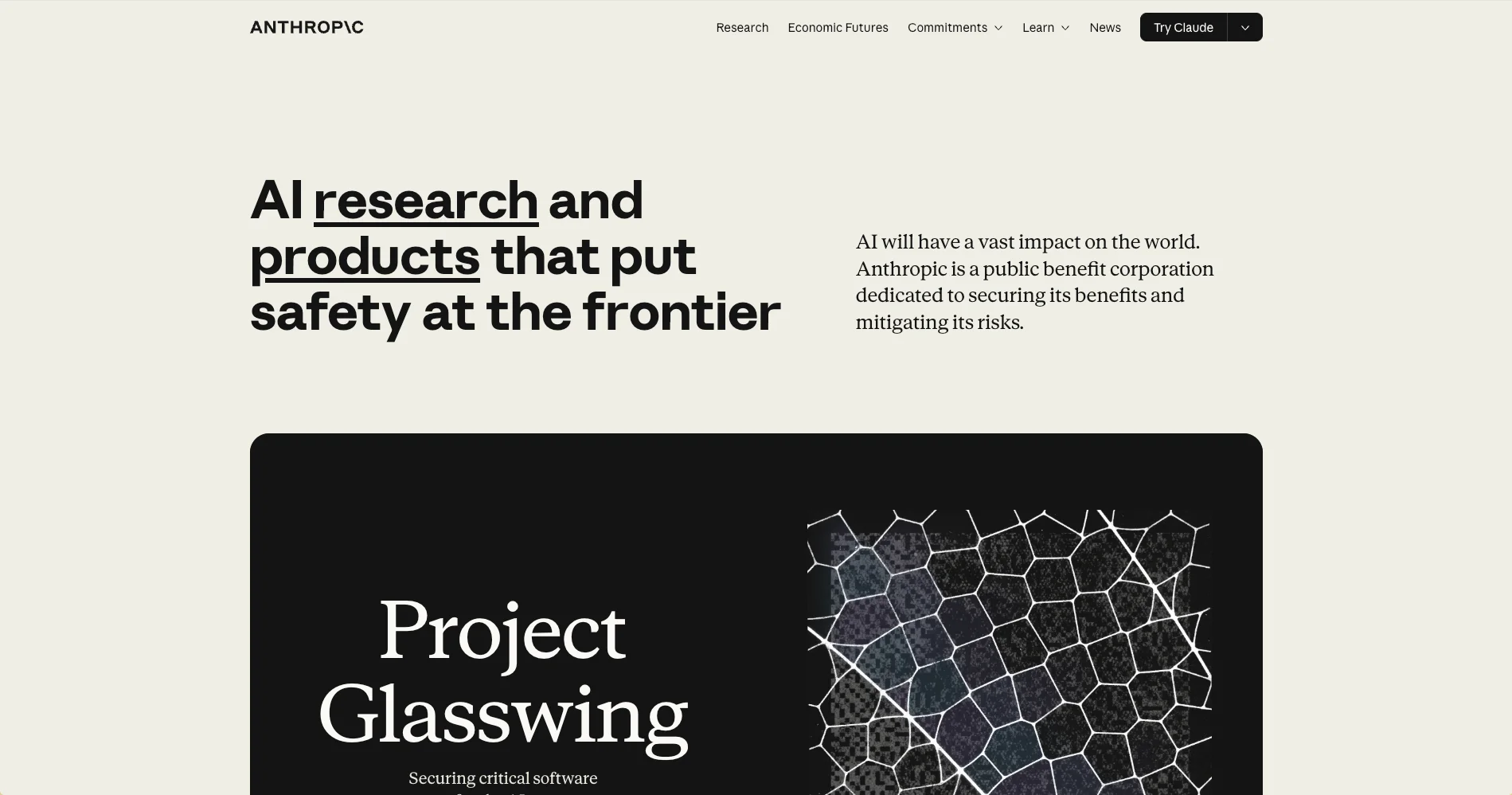
Yes Webflow is still highly relevant in 2026. For personal sites, portfolios, and quick MVPs, AI site builders like Bolt, Lovable, and v0 are often faster, but Webflow stays essential the moment a team needs to collaborate on, publish, and grow a site over several years.
Anthropic, the company that created Claude and valued at around 380 billion dollars as of February 2026, uses Webflow for its anthropic.com site. The personal website of Dario Amodei, co-founder and CEO of Anthropic, is also built on Webflow. This is no accident. The fundamental difference between the two approaches: an AI builder produces a site, Webflow produces an infrastructure.
The fact is striking. If a company whose AI models could literally generate a complete site in minutes still chooses Webflow for its official site, it is not a technological accident. It is a strategic choice. And it raises a broader question: in 2026, with the explosion of AI site builders (Bolt, Lovable, v0, Framer AI, Forge) promising to deliver a site in minutes, is Webflow still relevant?
The short answer: yes, but not for everyone. This article takes a full look at the question without overselling Webflow or dismissing AI. Who the AI builders are, what they do well, what they do not do, why a company like Anthropic chooses Webflow, and most importantly how to decide for your own project.
Anthropic has the technical and financial means to do pretty much anything. The company could build a fully custom site with a dedicated engineering team. It could also generate a site entirely with its own AI models, in-house. It does not. Why?
Because a corporate website is not a technical project. It is a communication tool managed by multiple people. At Anthropic, the brand team, marketing team, product team, and content team all need to be able to contribute to the site. Creating a new product page, publishing a blog post, updating a careers section, launching a new campaign: this work cannot depend on a developer for every modification. Webflow allows this orchestration across profiles, with clear permissions and a CMS accessible to non-technical users.
The job posting for "Web Engineer, Brand Design" at Anthropic is telling. The role includes "own the development of Anthropic.com" and "refine our content publishing workflows and expand the capabilities of our CMS for authors and creators across the organization." In plain terms: the role is about evolving the publishing infrastructure, not rebuilding the site every time. This is exactly what Webflow enables.
Let us add a detail that is not anecdotal: Dario Amodei's personal site is also on Webflow. A simple one-page site, yes, but the choice is revealing. If Anthropic's CEO had considered Webflow outdated, there would be no reason to use it for his own site. In February 2026, Anthropic even launched an official MCP connector with Webflow, allowing Claude to directly manage a Webflow site from its interface. Anthropic does not see Webflow as a legacy technology. Anthropic sees Webflow as a lever for a team.
Let us acknowledge it honestly: in 2026, a contrary narrative circulates widely. On Reddit (r/webflow, r/webdev, r/nocode), on X/Twitter, on LinkedIn, articles and threads regularly declare the "death" of Webflow, Framer, and WordPress in the face of AI site builders.
The arguments are familiar. AI builders generate a complete site in minutes from a prompt, while a Webflow site requires days or weeks of work. Webflow's learning curve is deemed too steep. Webflow's pricing rose in a controversial way in 2025-2026, particularly on CMS plans. The core argument: if AI produces a site in 15 minutes, why spend days in Webflow?
This narrative should not be brushed aside. It touches a real point: for certain projects, AI builders are indeed faster and cheaper. But it conflates two very different things: building a site quickly, and managing a site over time. These are two distinct problems that require distinct tools.
Before explaining where AI builders hit their limits, we need to acknowledge what they do well. For a personal site, a portfolio, an MVP to validate an idea, a one-shot landing page for an event, a solo micro-business, or an internal project with no long-term stakes, AI builders are excellent.
Unbeatable speed, low cost (often 20 to 100 euros per month for a subscription), zero technical barrier. A single person can launch a site in an afternoon with no development skills. For these use cases, speed and simplicity clearly outweigh long-term maintainability. BeBranded is not anti-AI. The agency uses AI in its own workflow (MCP to accelerate certain tasks, writing assistance, prototyping), and recognizes these tools for what they are: effective accelerators on specific use cases.
The problem arises when these tools are pushed beyond their zone of relevance. When you try to build a structured corporate website with an AI builder, the limits quickly appear.
This is the central section. AI builders produce a site. They do not produce an infrastructure. The difference is fundamental, and it does not appear on delivery day. It appears six months later.
An AI-generated site is a one-off deliverable. It looks good on the day it is generated. Then come the real needs of a company that lives: adding a feature, creating a new blog post, redesigning part of a section, launching a landing page for a campaign, letting a new team member modify a page. Each of these actions reveals the limits of the initial tool.
AI builders generally do not produce a clear naming convention (no Client-First or equivalent), no documented design system, no structured CMS, no collaboration workflow. CSS classes are random, components are not reusable, the structure is not transferable to another developer. The result: the site becomes hard to maintain, impossible to evolve as a team, and every non-trivial modification requires either a full-time developer or a partial rebuild.
This is the difference between "producing an artifact" and "building a system." An artifact solves an immediate need. A system allows a team to work over time.
Webflow is not just a design tool. It is a team platform. This distinction is the key to understanding why Webflow remains relevant in 2026, and why Anthropic, among other structured companies, continues to use it.
The Webflow Editor is a simplified interface that lets marketing teams create articles, edit text, and publish pages without touching the code or the design. A writer can update a page, an SEO lead can optimize titles, a content manager can publish an article, without risking breaking anything. This separation between design (reserved for designers and developers in the Designer) and content (accessible to everyone in the Editor) is what enables a structured team to work efficiently on a site.
Webflow Components allow creating a library of reusable blocks (hero, feature list, pricing table, CTA section) that anyone on the team can assemble to create a new page. A product manager who wants to launch a landing page for a feature does not need to start from scratch. They take existing components, combine them, and publish. This ability to ship new pages fast, without rebuilding the design each time, is a major operational advantage.
Webflow offers differentiated access levels (Editor, Content Editor, Designer, Developer) that allow giving each person the right level of control. The writer only has access to content. The designer has access to the Designer to modify layouts. The developer has access to custom code and integrations. This granularity prevents accidents and enables real collaboration across profiles.
With a methodology like Client-First, every Webflow project follows the same conventions, the same structure, the same classes. A new team member can pick up the project and understand the structure in a few hours. An external agency can step in without having to rediscover everything. This standardization is what makes scalability possible, for the company and for the agency supporting it.
A well-structured Webflow site evolves. Pages are added, sections are modified, new campaigns are launched, new tools are integrated. For years. An AI site, on the other hand, gets rebuilt. After 12 to 18 months, it is simpler to rebuild everything than to modify what exists. This longevity difference completely changes the economic calculation.
An argument you hear often is that Webflow is "outdated" by AI builders. The reality is different: Webflow is integrating AI into its product rather than being disrupted by it.
In 2025-2026, Webflow launched several major evolutions. The Webflow AI Site Builder generates an initial site structure from a prompt, but in a real Webflow project that is 100 percent editable afterward. The AI Assistant integrated in the Designer accelerates certain construction tasks. The official Claude connector via MCP (February 2026) allows managing a Webflow site in natural language from the Claude interface.
In parallel, Webflow's infrastructure migrated to Cloudflare to improve global performance. The next-gen CMS (April 2026) significantly increases capabilities: up to 40 Collection Lists per page, 10 nested lists, 3 levels of CMS depth. Variables and conditional visibility enable more flexible designs without duplication.
Webflow now positions itself as a "website experience platform" combining visual design, CMS, managed hosting, AI-assisted building, localization, analytics, optimization, and collaboration. It is not a tool that resists AI. It is a tool that absorbs it.
The question is not "AI or Webflow." The question is "which infrastructure for which use." The table below summarizes the cases where AI builders suffice, and those where Webflow is recommended.
| Project type | AI builders sufficient | Webflow recommended | Why |
|---|---|---|---|
| Personal site / portfolio | Yes | Optional | No collaboration or long-term maintenance stakes |
| MVP to validate an idea | Yes | No | Speed wins over structure |
| One-shot landing page (event, short campaign) | Yes | Optional | Short lifespan, no need for a CMS |
| Multi-page SMB site | Borderline | Yes | Need for CMS, SEO, regular updates |
| Corporate site with marketing team | No | Yes | Multi-profile collaboration, permissions, editorial CMS |
| E-commerce site | No | Yes (or Shopify depending on volume) | Product catalog, payments, integrations |
| Brand site (strong image, intentional design) | No | Yes | Custom design, no "pretty by default" |
| Multilingual site | No | Yes | Webflow Localization, hreflang, editorial management |
| Site with strong SEO stakes | No | Yes | Fine control of technical SEO, regular content publishing |
The table clarifies the logic. AI is enough for short, solo, low-stakes projects. Webflow becomes necessary as soon as infrastructure, collaboration, and duration come into play.
A pattern recurs frequently in 2026 in agency communities and forums. A company builds its site with an AI builder to save time and money. Six to twelve months later, it comes back to an agency because the site is not maintainable, the marketing team cannot contribute, SEO never took off, and every modification requires an external developer.
The initial calculation (saving on site creation) produces the opposite result: the cost of rebuilding to move from an AI site to a structured platform like Webflow is often higher than the cost of doing it right from the start. The more months pass and the more content, pages, and customizations accumulate on the AI base, the more complex the migration becomes. For companies that know from the start they will need an active marketing team, polished SEO, and a maintainable site, going directly with a structured platform is more cost-effective over two to three years.
To choose the right provider in these cases, our guide on choosing a Webflow Partner agency covers the criteria to evaluate.
If the majority of answers is "yes," Webflow is probably the right choice. If the majority of answers is "no" and it is a fast, solo project, an AI builder may be enough.
Anthropic does not use Webflow because they do not know how to do anything else. They use it because it is the right tool for a team managing a site over time. The company that builds some of the most advanced AI models in the world chose a visual no-code platform for its official site, because the choice of a website tool is not made on raw technical power, but on the ability to orchestrate a team and maintain a system over time.
The question "is Webflow still relevant in 2026" has a clear answer: yes, for projects where infrastructure matters more than initial time-to-live. AI builders are excellent tools for fast, solo projects with low long-term stakes. Webflow remains the reference platform for teams building a site over several years. The two approaches are not opposed, they correspond to different uses.
BeBranded builds Webflow sites designed for teams: Client-First methodology, reusable components, CMS accessible to non-technical users, optimized SEO from day one, integrations with business tools. If you have a project that needs to last and evolve, you can see examples in our portfolio, or get in touch with us for an initial conversation.