


The essentials · 30-second read
Xano is a hosted backend: database, APIs, logic and hosting. Free plan for testing. Essential $85 a month, Pro $224 a month (annual billing); $99 and $249 monthly.
- A hosted backend: Postgres database, API and MCP builder, background tasks, file storage and hosting, built visually, in XanoScript or with an AI agent.
- Free plan for development and testing, limited to 10 API requests per 20 seconds. Essential: $85 a month on annual billing ($99 monthly). Pro: $224 a month ($249 monthly). Custom on quote.
- Works with any front end that calls an API: WeWeb, FlutterFlow, Webflow, Bubble, Framer, React or Next.js.
- Our verdict: a solid backend when the team does not want to run servers; if your team codes, Supabase is usually cheaper and more open.
Summarize this page with AI
Xano is the backend behind a large share of no-code applications: when a WeWeb, FlutterFlow or Webflow front end needs real data, real users and real business rules, Xano is often what answers its API calls. In 2026 it has repositioned itself as a backend for AI-built software too. This review explains what Xano does, what each plan costs, where it fits and where it does not, and how it compares with Supabase, the backend we use ourselves.
01What is Xano?
Xano describes itself as "one backend platform to build, run and govern AI-built software". In plain terms, it gives you everything that runs on the server side of an application, hosted and managed for you: a PostgreSQL database, an API builder, an MCP builder, background tasks, file storage, authentication, versioning and monitoring. You never touch a server.
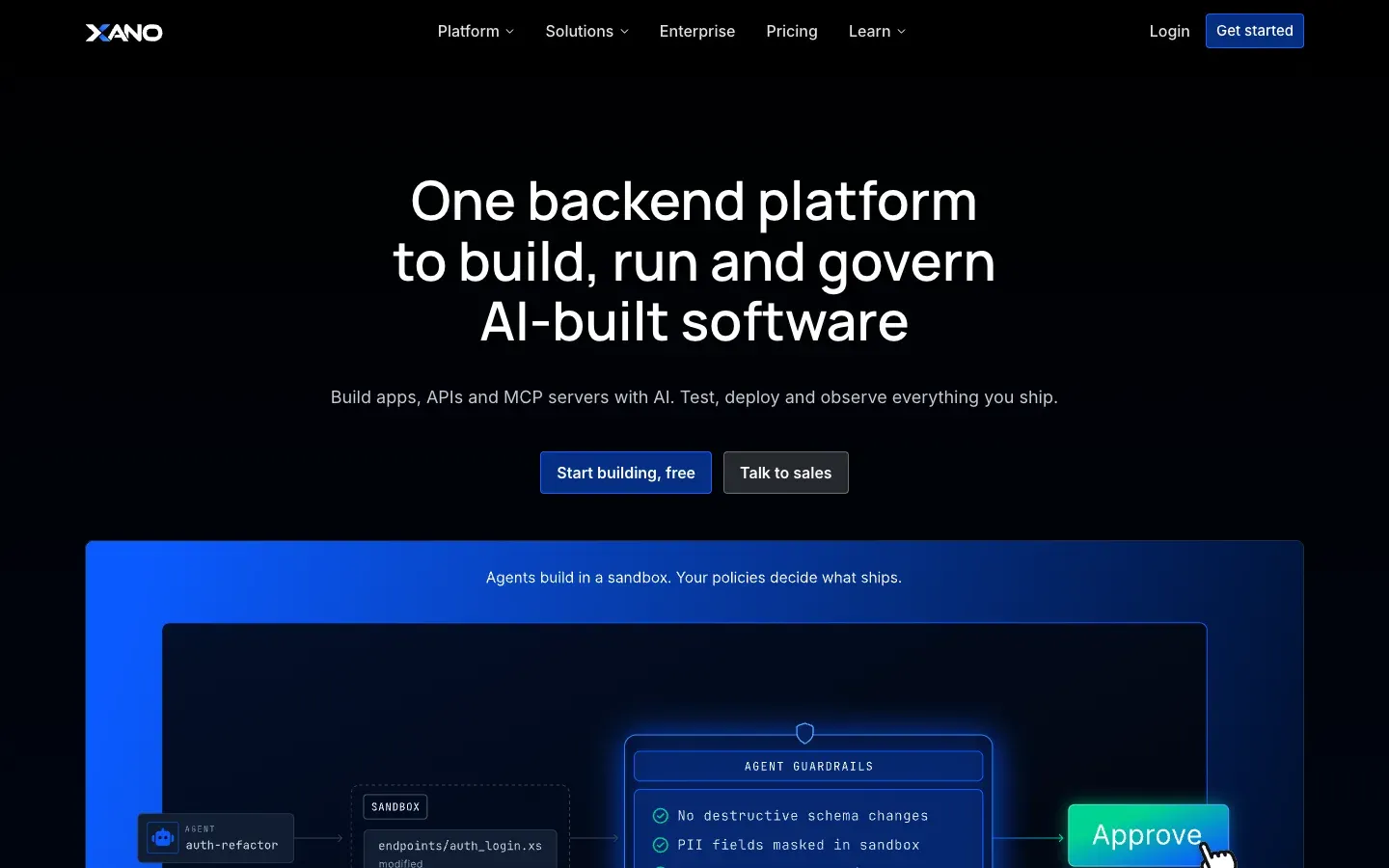
There are three ways to build in Xano. The visual editor lets you assemble endpoints as a "function stack" of steps (query a table, check a condition, call an external API, return a response). XanoScript is a text language for the same logic, useful for version control and review. And AI agents such as Claude, Cursor or ChatGPT can build in Xano through its MCP server, with access to the documentation and live validation. Whatever the method, Xano hosts the result, generates OpenAPI documentation, and lets any front end call it.
This short walkthrough from Xano shows the starting point, the database:
02How we look at Xano at BeBranded
We do not run Xano in our own stack. Our site runs on Next.js, Payload CMS and a PostgreSQL database hosted on Supabase, and we write code with AI assistance. Xano comes up when we scope a web app or an MVP for a client and help choose the backend.
- We recommend Xano when the client's team will maintain the app without developers, the front end is built in a no-code tool (WeWeb, FlutterFlow), and the logic is real: roles, workflows, calculations, third-party APIs. Xano keeps that logic readable for non-developers and removes server management.
- We advise against it when the app is mostly a nice interface on a spreadsheet: Softr or Glide on top of Airtable is faster and cheaper.
- We suggest Supabase and code when someone on the team writes code or works with an AI coding assistant. Direct SQL, open source and a lower entry price usually win in that case.
Our article Bubble vs WeWeb explains why a separate backend like Xano matters when you choose WeWeb as your front end.
03Key features
- PostgreSQL database: tables and relations, unlimited records on paid plans, and direct database access depending on the plan.
- API builder: REST endpoints assembled from functions, with automatically generated OpenAPI (Swagger) documentation.
- MCP builder and Xano MCP: publish MCP servers for AI tools, and let AI agents build your backend.
- XanoScript: the same logic as text, for diffs, reviews and AI generation.
- Background tasks and middleware: scheduled jobs, with sub-minute schedules on Pro.
- Authentication and permissions: user auth, and a role and permission manager (RBAC) on Pro.
- Branching, versions and rollback: sandbox environments from the CLI, workflow tests, instant rollback.
- Monitoring: request history, tracing, performance insights and audit logs.
- Hosting choices: Xano's cloud by default, self-hosting on AWS, Azure, GCP or on premises on Custom plans.
04Use cases
A no-code SaaS or marketplace
A founder builds the interface in WeWeb or FlutterFlow and needs users, subscriptions, permissions and business rules. Xano stores the data, exposes the endpoints and runs the logic. The founder can hand the project to another no-code developer later, because the logic is visible in the editor. Expect to move to a paid plan as soon as real users arrive: the Free plan's rate limit will not hold.
A client portal on an existing website
A services company wants clients to log in and see their projects, documents and invoices. Xano holds the data and the access rules, and the portal is a WeWeb app or a Webflow site with Wized on top. For simple cases, an all-in-one tool is quicker; Xano makes sense when the portal pulls data from several systems. Our client portal service covers both approaches.
A backend for an AI-built front end
Teams who generate interfaces with Lovable, Bolt or v0 still need somewhere to put data and rules. Xano lists these tools among its front ends and offers its MCP server so the same AI agent can build the backend. The benefit: a backend with tests, versions and rollback instead of logic scattered in generated front-end code.
An API layer between internal systems
An operations team wants one clean API in front of a CRM, an ERP and a few spreadsheets. Xano calls the external APIs, transforms the data and exposes simple endpoints to other tools or to n8n and Make automations. This is close to what our integrations and API work covers.
Agencies managing several client backends
Xano's Pro plan includes Xano Link, which publishes one workspace to many client workspaces, and an Agency add-on handles client management and invoicing. Useful for agencies that resell the same backend template, as long as each client accepts being on Xano.
05Integrations
Xano works with any front end that can call an API. Its site names WeWeb, FlutterFlow, Webflow, Bubble, Framer, Replit, Lovable and Bolt, plus React, Next.js and mobile apps. On the build side, it connects to AI coding tools (Claude, Cursor, Copilot, Codex, Gemini, VS Code) through its MCP server and CLI. Inside function stacks, you can call any external REST API, so payment, email or CRM services connect through their own APIs. Paid plans also allow several data sources (three on Essential) and direct database connections.
06Xano pricing in 2026
Prices checked on xano.com/pricing on 17 November 2026. Amounts are shown with a $ sign (the page does not name the currency or say whether tax is included), per month. The page has a monthly/yearly switch; the headline prices are the yearly ones.
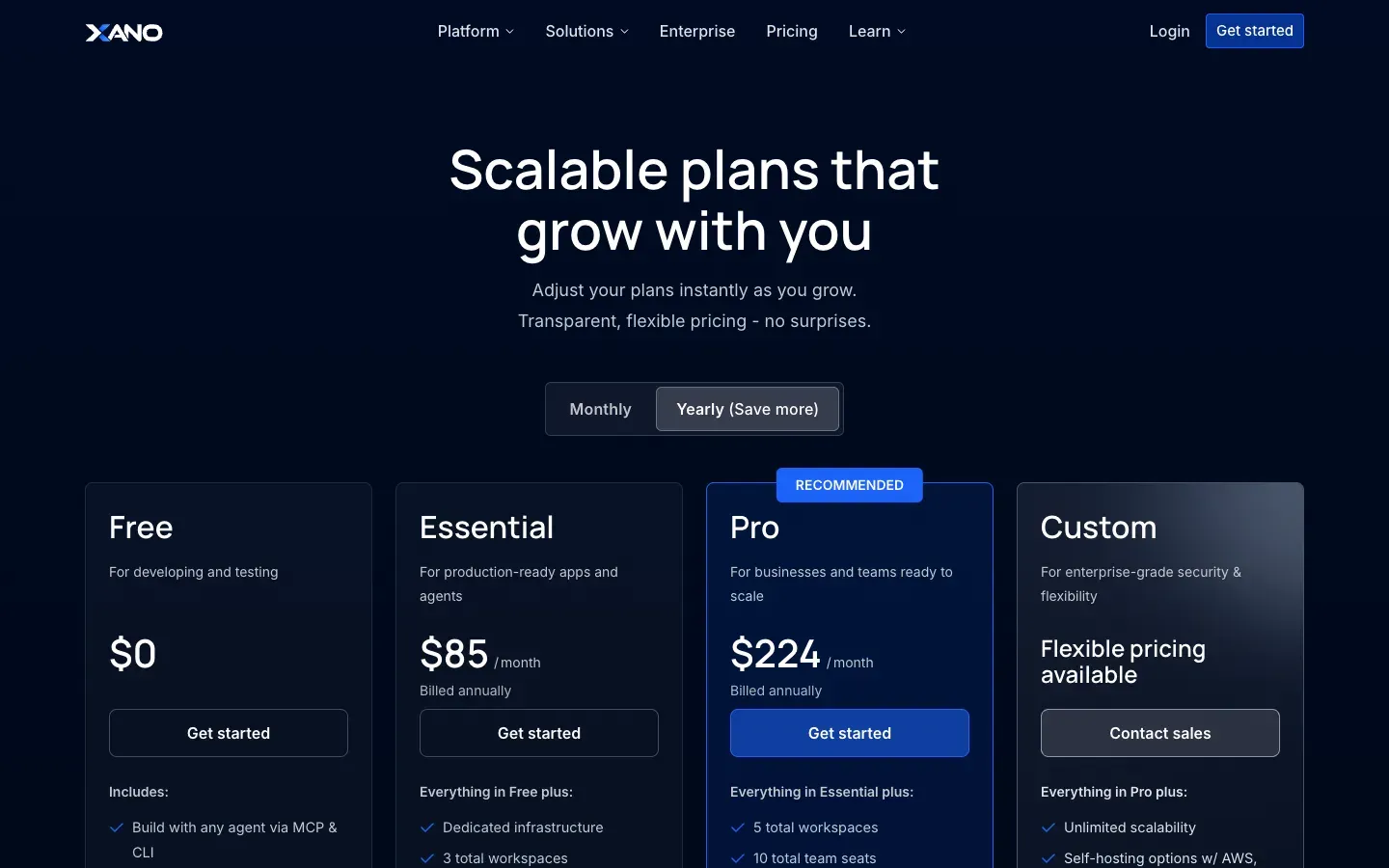
| Plan | ||||
|---|---|---|---|---|
| Free | Annual billing $0 | Monthly billing $0 | Workspaces and seats 1 workspace, 1 seat | Main limits and features 100,000 records, 1 GB database, 10 API requests per 20 seconds, US hosting only, no backups |
| Essential | Annual billing $85 a month | Monthly billing $99 a month | Workspaces and seats 3 workspaces, 5 seats | Main limits and features Unlimited records, 10 GB database, 100 GB files, no rate limit, branching, 7-day backups |
| Pro | Annual billing $224 a month | Monthly billing $249 a month | Workspaces and seats 5 workspaces, 10 seats | Main limits and features 25 GB database, 250 GB files, load balancer, RBAC, Redis caching, Xano Link, 14-day backups |
| Custom | Annual billing On quote | Monthly billing On quote | Workspaces and seats Custom | Main limits and features Self-hosting, SSO, dedicated IP, high availability, HIPAA and HDS included |
Add-ons listed on the page: CPU and autoscale boost at $180 a month (Pro), extra storage at $5 to $10 a month for 5 to 10 GB, and enhanced security (HIPAA with a business associate agreement) at $500 a month. Extra workspaces and seats are available as add-ons on Essential and Pro, without a listed price. Upgrades apply immediately; downgrades apply at the next billing cycle, and you can cancel at any time.
Is Xano free? Yes, for building and testing. The Free plan has no time limit, but its rate limit of 10 API requests per 20 seconds, US-only hosting and the lack of backups rule out production use. A real app starts at Essential, $85 a month on annual billing.
07Pros and cons
Advantages
- Server-side logic you can read and change without writing backend code.
- A real PostgreSQL database with unlimited records on paid plans.
- Branching, workflow tests, versions and rollback: rare in no-code tools.
- Front-end agnostic: switch from Webflow to WeWeb or to custom React without rebuilding the backend.
- Built for AI agents with its MCP server and XanoScript.
- Strong compliance list (SOC 2 Type II, ISO 27001, GDPR, HIPAA and HDS options).
Drawbacks
- The jump from $0 to $85 a month is steep for a side project.
- The Free plan is too limited to test real traffic.
- Logic built in Xano is not portable: leaving means rewriting the API layer.
- A separate front end is always needed, so two tools to learn and pay for.
- Good backend thinking (data model, security, performance) is still required; no-code does not remove it.
08Our verdict
Who it's for
- No-code teams building a real product with WeWeb, FlutterFlow or Bubble front ends.
- Startups that want a production backend without hiring a backend developer.
- Agencies delivering several client apps on the same backend pattern.
- Teams using AI coding tools that want a governed backend with tests and rollback.
Who it's not for
- Simple internal tools on a spreadsheet: Softr or Glide on Airtable are faster.
- Developers comfortable with SQL and code: Supabase gives more control for less.
- Budget side projects that need to stay free in production.
- Companies that require open-source software they can host without a Custom contract.
09Xano alternatives
| Tool | |||
|---|---|---|---|
| Xano | Best for No-code backend with visual logic | Free plan Yes, testing only | Paid from $85 a month (annual) |
| Supabase | Best for Open-source Postgres backend for developers | Free plan Yes, 2 projects | Paid from $25 a month |
| Firebase | Best for Google's backend for mobile and real-time apps | Free plan Yes | Paid from Usage-based |
| Backendless | Best for Visual backend with its own UI builder | Free plan Yes | Paid from Paid plans |
| Bubble | Best for Front end and backend in one no-code tool | Free plan Yes | Paid from Paid plans |
| Directual | Best for No-code backend with visual scenarios | Free plan Yes | Paid from Paid plans |
Our rule: choose Xano when the logic is complex and nobody codes. Choose Supabase when someone codes or works with an AI assistant, Bubble when you want one tool for the whole app, and Firebase for mobile apps deep in the Google ecosystem. If the app is your core business, a custom web app on an open stack avoids lock-in.
10Xano vs Supabase
Both are hosted backends on PostgreSQL, but they target different builders. Xano hides the database behind a visual editor: you build endpoints step by step, and the business logic lives in Xano. Supabase exposes the database: it generates APIs from your tables, handles auth and storage, and you write logic in SQL, database functions or edge functions. It is open source, so you can also host it yourself.
On price, Supabase Pro starts at $25 a month per organisation (with compute billed per project), while Xano starts at $85 a month on annual billing. On skills, Xano asks for less code but more time in its editor; Supabase asks for SQL and some code, which AI coding assistants now write well. We chose Supabase for our own site because we work in code. For a client team that will never open a code editor, Xano remains the more comfortable choice.
11Getting started with Xano
- Model the data first. List the tables, relations and who can see what before creating endpoints. Changing the model later is the expensive part.
- Build on the Free plan, deploy on a paid one. The rate limit and the lack of backups make Free a sandbox, not a host.
- Use branching and workflow tests from the start, even on small projects: they are included from Essential.
- Secure every endpoint. Check authentication and ownership on each request; a visual editor does not do it for you.
- Choose the region before you store personal data, and plan how you would export it.
Our guide on how to select the right no-code tools lists the questions to ask before committing, and our project scoping work helps decide between Xano, Supabase and custom code.