


The essentials · 30-second read
Algolia is hosted search as a service. Free plan: 10K search requests a month. Grow and Grow Plus start at $0 and bill usage beyond quotas. Elevate is custom.
- Algolia indexes your products, articles or records and answers search queries in milliseconds, with typo tolerance, facets, synonyms, ranking rules and AI ranking.
- Free plan: 10,000 search requests a month, 1 application, 7 days of analytics. Grow and Grow Plus start at $0 a month and bill usage beyond their quotas; Elevate is on quote with an annual contract.
- Developers integrate it through an API and front-end libraries; marketers then tune results, merchandising and synonyms from a dashboard.
- Our verdict: the reference when search drives revenue or engagement; overkill for a 30-page site where built-in or database search is enough.
Summarize this page with AI
Most site searches fail the same way: a typo returns nothing, filters are missing, and the best product sits on page three. Algolia exists to fix that. It is a hosted search engine you plug into a website, a store or an app, and it is one of the tools listed in our public toolbox. This guide explains what Algolia does in 2026, what each plan really includes, how its usage-based pricing works, and when we would point a client to something simpler.
What is Algolia?
Algolia is a search and discovery platform delivered as a service. You send it your content (products, articles, help pages, listings, records) as JSON objects, Algolia builds an index, and your interface queries that index through an API. Answers come back in milliseconds, ranked by relevance, with typos tolerated, synonyms applied and filters ready to use. Algolia now presents itself as an "AI search and retrieval platform", and claims more than 18,000 customers in over 150 countries on its home page.
The key difference with a search box built on your CMS or database is control. With Algolia you decide which attributes are searchable, how results are ranked, which products are pinned for a given query, which synonyms apply, and you see in analytics what people search for and when they find nothing. Developers do the integration once; marketers and merchandisers then adjust relevance without touching code.
How we look at Algolia at BeBranded
Algolia is part of the toolbox we list publicly. It is one of the options we put on the table when a client project needs search that goes beyond what the platform provides. Our own site runs on Next.js, Payload CMS and PostgreSQL, and we size search to the need rather than adding a service by default. Our rule of thumb:
- We recommend Algolia when search is part of the business: an online store with thousands of products and filters, a content library, a marketplace, a documentation hub or a SaaS product where users look for their own records. In those cases, relevance, speed and analytics have a direct effect on sales or support load.
- We advise against it for a showcase site, a blog with a few dozen articles or a small catalogue. Navigation, good categories and the native search of the CMS do the job, and a database full-text search on Supabase or PostgreSQL covers many app needs without a second service to keep in sync.
- We plan for synchronisation from day one. The real work with Algolia is not the search bar, it is keeping the index in sync with the source of truth (CMS, store, database) through webhooks or scheduled jobs. We scope that as part of the integration work rather than as an afterthought.
Key features
- Instant search: results update as the user types, with prefix matching and typo tolerance.
- Faceting and filtering: filter by category, price, brand, date or any attribute, with counts per facet.
- Ranking rules: a configurable tie-breaking formula plus custom ranking on business attributes (popularity, margin, stock).
- Rules and merchandising: pin, boost, hide or bury results for specific queries; Grow allows 10 rules per index, Grow Plus and Elevate 10,000.
- Synonyms: manual synonyms on every plan, AI Synonyms on Grow Plus and above.
- Analytics: top searches, searches without results and click positions, kept 7 days on Free, 30 on Grow, 90 on Grow Plus and Elevate.
- Personalisation and AI ranking: results adapted to behaviour and reranked from conversion data, on Grow Plus and Elevate.
- NeuralSearch: keyword and vector search combined, on Elevate.
- Recommend: "frequently bought together", related items and trending items through the same platform.
- Crawler: indexes a website by crawling it, when you cannot push data through the API.
- Front-end libraries and API clients: InstantSearch and Autocomplete for building the interface, plus clients for the main back-end languages.
Use cases
Online store with a large catalogue
A store with thousands of references needs search that understands "tshirt", "t-shirt" and "tee", filters by size and colour, and lets the merchandising team push new collections. Algolia handles all of that and shows which queries return nothing, which often reveals missing products or wrong naming. What to know: keep stock and prices in sync, otherwise customers see items they cannot buy.
Content library or media site
A publisher, a school or a resource hub with hundreds of articles, videos and guides uses Algolia to make the archive findable by topic, author, format and date. Facets turn the search page into a browsing tool. The index usually contains a summary and metadata, not the full text of every article, which keeps records small.
Documentation and help centre
Software companies use Algolia so users find the right help page before opening a ticket. Search analytics then show which questions are not answered by the documentation. The Crawler is useful here when the docs are generated by a static site tool.
Search inside a SaaS product or a web app
In an application, users search their own data: clients, projects, invoices. Algolia supports secured API keys that restrict each user to their records, which avoids building a search engine in-house. For a web app with modest volumes, PostgreSQL full-text search is often enough; Algolia makes sense when the search experience is a selling point.
Marketplace or directory
A directory of providers, properties or jobs needs geo-search, filters and ranking that mixes relevance with business rules (sponsored listings, freshness). Algolia covers these with geo filters and custom ranking.
Integrations
Algolia is API-first: anything that can send JSON can feed an index. In practice, data reaches Algolia in four ways: the API clients from your back end, commerce connectors (Algolia offers integrations for platforms such as Shopify and other major commerce systems), the Crawler for sites you cannot change, and automation tools such as Make, n8n or Zapier for low-volume syncs from a CMS like Webflow. On the front end, InstantSearch and Autocomplete provide ready-made widgets for JavaScript and the main frameworks, including React for a Next.js site. Algolia's documentation also lists an MCP server, so an AI agent can query an index.
Algolia pricing in 2026
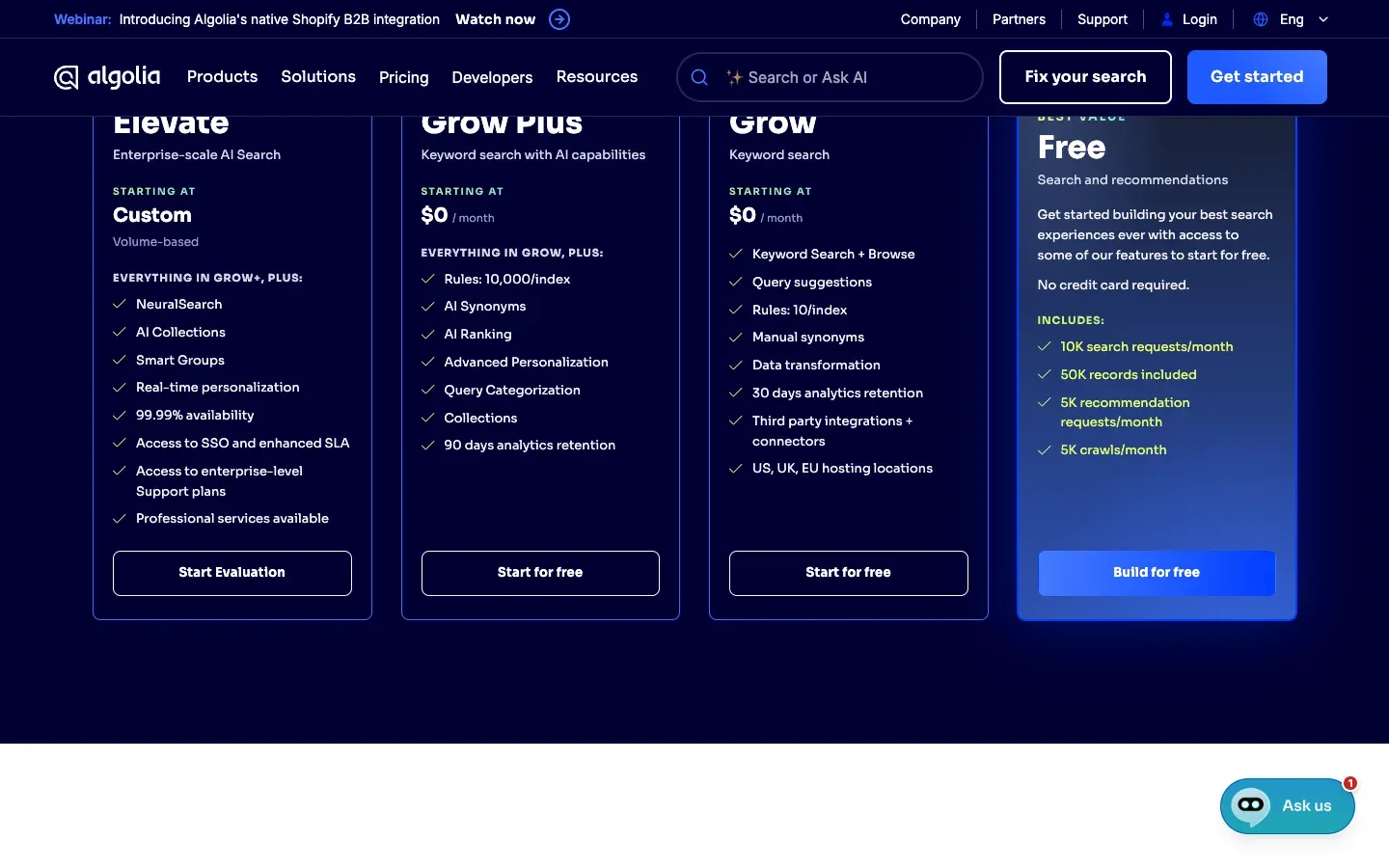
Prices checked on algolia.com/pricing on 17 November 2026, in US dollars. Grow and Grow Plus are billed monthly with no contract; Elevate requires an annual contract. Algolia's model is usage-based: you pay for consumption above each plan's included quotas.
| Plan | |||
|---|---|---|---|
| Free | Price $0, no credit card | Included usage 10K search requests a month, 50K records, 5K Recommend requests, 5K crawls | Highlights 1 application, 20 indices, 10 rules per index, 7 days of analytics |
| Grow | Price From $0 a month, then usage | Included usage 10K search requests and 100K records (per the FAQ), 10K Recommend requests, 10K crawls | Highlights Keyword search, query suggestions, manual synonyms, 50 indices, 30 days of analytics |
| Grow Plus | Price From $0 a month, then usage | Included usage Same quotas as Grow | Highlights AI Synonyms, AI Ranking, advanced personalisation, query categorisation, 10,000 rules per index, 90 days of analytics |
| Elevate | Price Custom, annual contract | Included usage Negotiated volume | Highlights NeuralSearch, AI Collections, real-time personalisation, 10 applications, 99.99% availability, SSO, enterprise support |
Beyond the quotas, Recommend costs $0.60 per extra 1,000 requests and the Crawler $0.80 per extra 1,000 crawls. Extra records are billed on the maximum number of records reached. The page does not display a unit price for extra search requests, so estimate your monthly search volume and ask Algolia for a quote before committing; volume discounts exist on annual contracts.
Is Algolia free? Yes, for small projects: 10,000 search requests a month, one application and basic analytics, with no time limit and no card. Keep in mind that a search-as-you-type box can send several requests per visitor, so a busy site reaches the free quota faster than its visitor count suggests. Debouncing input and caching popular queries keeps usage under control.
Pros and cons
Advantages
- Very fast results and a polished search-as-you-type experience out of the box.
- Fine control over relevance, merchandising and synonyms, usable by non-developers.
- Search analytics that show what users want and where content is missing.
- Mature front-end libraries and well-documented APIs.
- A free plan large enough to prototype and to run small projects.
- AI features (ranking, synonyms, NeuralSearch) on top of a proven keyword engine.
Drawbacks
- Usage-based pricing is harder to predict than a flat fee, and the unit price of extra searches is not shown publicly.
- The best AI features sit on Grow Plus and Elevate, and Elevate requires an annual contract.
- One more service to keep in sync with your CMS, store or database.
- Data lives on a third-party platform, which matters for some compliance reviews.
- Overkill for small sites, where navigation and native search are enough.
Our verdict
Who it's for
- Online stores where search and filters drive conversion.
- Publishers, schools and resource hubs with large libraries of content.
- SaaS companies and marketplaces that want product-grade search without building it.
- Documentation and support teams trying to reduce tickets.
Who it's not for
- Showcase sites and small blogs.
- Teams without a developer to set up indexing and synchronisation.
- Projects with strict self-hosting requirements, which point to an open-source engine.
- Budgets that need a fixed monthly price with no usage variation.
Algolia alternatives
| Tool | ||
|---|---|---|
| Algolia | Type Hosted search as a service | Best for Search that drives revenue, with marketer-friendly controls |
| Meilisearch | Type Open-source engine, self-hosted or cloud | Best for Developers who want fast search with a simple setup |
| Typesense | Type Open-source engine, self-hosted or cloud | Best for Typo-tolerant search with predictable hosting costs |
| Elasticsearch or OpenSearch | Type Open-source search and analytics engines | Best for Very large or complex search, logs and analytics |
| PostgreSQL full-text search (Supabase) | Type Database feature | Best for App search on modest volumes, no extra service |
| Native platform search (Shopify, Webflow) | Type Built into the platform | Best for Small catalogues and showcase sites |
Our rule: start with what your platform or database already provides. Move to Algolia when search becomes a feature your users or your revenue depend on, and you want marketers to tune it without developer time. Choose an open-source engine when self-hosting or cost predictability matter more than ready-made merchandising tools. If you are unsure, a short project scoping session is usually enough to decide.
Algolia vs Meilisearch
Meilisearch is the alternative developers mention most. Both deliver instant, typo-tolerant search with facets. Algolia's edge is the layer around the engine: merchandising rules, A/B testing, detailed analytics, personalisation, AI ranking and enterprise support, all usable by non-technical teams. Meilisearch's edge is that it is open source: you can host it yourself, keep data on your own servers and pay for infrastructure rather than usage, or use its managed cloud. For a product team with developers and simple relevance needs, Meilisearch is often enough. For an e-commerce team that tunes search every week, Algolia's tooling saves time.
Getting started with Algolia
- List what users search for. Products, articles, records: decide which attributes are searchable, which are filters and which only display.
- Create a free application and push a sample of real data, not test data, so relevance can be judged.
- Configure searchable attributes and custom ranking before building the interface; these two settings do most of the work.
- Build the interface with InstantSearch or Autocomplete, and debounce queries to keep usage reasonable.
- Automate synchronisation from the source of truth with webhooks or scheduled jobs, and test deletions as well as updates.
- Read the analytics after two weeks: searches with no results are the quickest improvements. Our SEO and GEO team often uses those queries to plan new content too.