


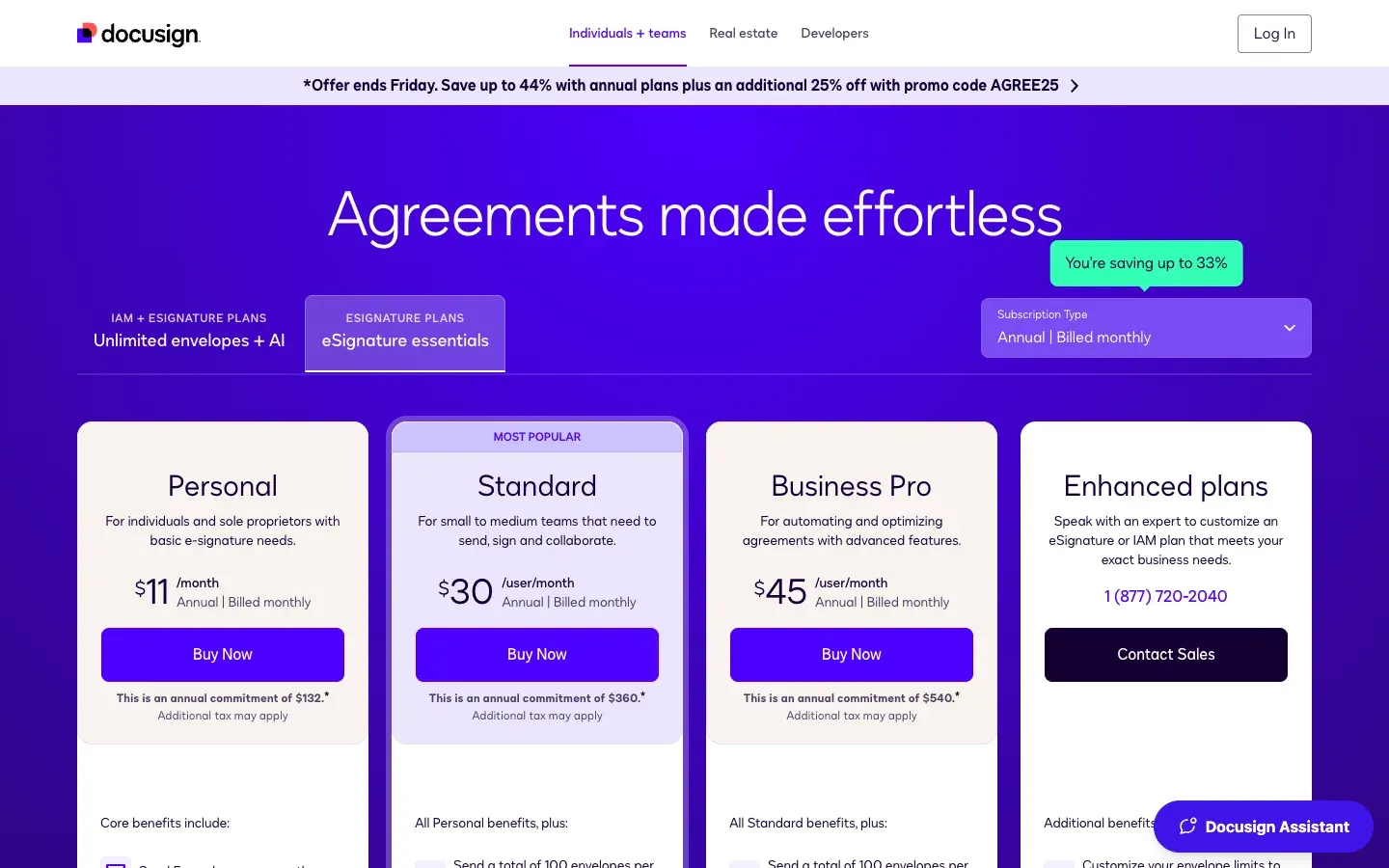
DocuSign is the best-known e-signature platform. US prices on an annual plan: Personal $11 a month, Standard $30 and Business Pro $45 per user a month, with envelope limits.
- DocuSign sends, signs and tracks agreements from any device, with an audit trail, and now sells eSignature as part of a wider Intelligent Agreement Management (IAM) platform.
- US prices on an annual plan billed monthly: Personal $11 a month (5 envelopes a month), Standard $30 and Business Pro $45 per user a month (100 envelopes per user a year).
- In France the same plans cost €9, €23 and €38 a month on an annual commitment; advanced and qualified eIDAS signatures need an Enhanced plan or a paid add-on.
- Our verdict: the reference for international, high-volume or Salesforce-heavy workflows; for everyday contracts in France, Yousign (now Youtrust) is often simpler.
Summarize this page with AI
DocuSign is the name most people think of when they hear "electronic signature". It is also more expensive and more complex than many teams expect, with envelope limits, several signature levels and a growing list of products around the signature itself. This page explains what DocuSign does in 2026, what each plan costs in the US and in France, how envelopes work, and when we recommend it rather than a European tool such as Yousign.
What is DocuSign?
DocuSign is an e-signature and agreement management platform. You upload a document, place signature, date and text fields, choose recipients and a signing order, and send it. Recipients sign from a browser or a phone without creating an account. DocuSign seals the document, records an audit trail of who did what and when, and stores the signed version.
The company now presents eSignature as one piece of its Intelligent Agreement Management platform, or IAM. Around the signature, it sells Contract Lifecycle Management (CLM), Agreement Preparation for drafting, Agreement Manager for finding and analysing existing contracts, Workflow Builder for no-code agreement processes, Web Forms, identity verification, electronic notarisation and AI agents. Its site claims 1.9 million customers, use by 95% of Fortune 500 companies and signing in 44 languages.
For most small and mid-sized companies, the question is simpler: do we need DocuSign's ecosystem, or just a reliable way to get contracts signed? The answer depends on your volume, your countries and the tools around the signature.
How we look at DocuSign at BeBranded
DocuSign is not part of our own toolbox, and we do not claim to run our agency on it. It comes up when a client's process ends with a signature: a quote accepted on a website, an onboarding form, a supplier contract, a lease. Our job is then to choose the signature tool and connect it to the rest of the workflow.
- We recommend DocuSign when the client already works in Salesforce or another tool with a mature DocuSign integration, signs with partners in several countries and languages, or needs bulk sending, payments during signing or contract lifecycle features.
- We usually suggest a European alternative such as Yousign for French or European SMEs that sign everyday contracts and want prices excluding VAT in euros, a free plan and clear eIDAS levels.
- We build the workflow around it in an automation or integrations and API project: a form or a CRM stage creates the envelope, the signed document goes back to the right folder, and the next step starts on its own. For a customer area, signing can also sit inside a client portal.
Key features
- eSignature: send, sign and track documents from any device, with reusable templates and signing order.
- Audit trail and secure storage: a record of each action and centralised storage of agreements.
- Templates and team sharing: reusable templates on every plan, shared with the team from Standard.
- Custom branding and delegated signing: from Standard.
- Web forms and bulk sending: mobile-friendly forms that feed agreements, and one-to-many sending (Business Pro).
- Payments during signing and data validation: collect a payment and check fields as signers type (Business Pro).
- Identity verification and SMS delivery: a few free credits on Standard and Business Pro, then paid per use.
- Advanced and qualified signatures: AES and QES under eIDAS on Enhanced plans, and a qualified signature add-on on European plans.
- APIs and webhooks: eSignature REST API, Connect webhooks, SDKs and a free sandbox.
- IAM products: CLM, Agreement Manager, Workflow Builder and AI agents for larger organisations.
Use cases
Sales contracts and quotes
A sales team sends a contract once a deal reaches the final stage. With the Salesforce integration or an automation, the envelope is created from the CRM with the customer's data, and the deal moves forward when the contract is signed. What to know: count your envelopes, since each sending counts against the plan limit, even if the customer never signs.
HR onboarding
HR teams send employment contracts, policies and forms to new hires. Templates and signing order save time, and the audit trail helps if a document is challenged later. What to know: some HR documents in Europe may call for an advanced signature level, so check with your legal adviser.
Forms that end in a signature
Business Pro's web forms collect information and generate an agreement to sign, for example a registration, a membership or a rental application. What to know: if the form already lives on your website, it is often simpler to keep the form there and send the data to DocuSign through the API or an automation tool.
Embedded signing in a product
A SaaS or a marketplace wants users to sign without leaving the app. The eSignature REST API supports embedded signing, and Connect webhooks tell your back end when a document is completed. What to know: API production plans are priced separately from the eSignature plans listed below, so ask for a quote before you design the feature.
International agreements
A company signs with customers or suppliers in several countries. DocuSign's 44 signer languages and its global presence help here. What to know: legal requirements differ by country, so choose the signature level for each type of document rather than for the whole company.
Integrations
DocuSign says it offers more than 1,000 pre-built integrations, and its App Center lists them. Salesforce has a dedicated product for generating documents from Salesforce data (listed in the Enhanced plans). Developers get the eSignature REST API, Web Forms, Workflow Builder, Agreement Manager and Admin APIs, SDKs, MCP connectors and Connect, a webhook service that notifies your system when an envelope changes status. Automation tools such as Zapier and Make also offer DocuSign connectors, which is often enough to link a website form or a CRM without custom code.
DocuSign pricing in 2026
Prices checked on docusign.com (US eSignature pricing page) on 17 November 2026, in US dollars. The amounts shown are for an annual plan billed monthly; the page claims savings of up to 33% compared with monthly plans, but the monthly-plan prices were not readable in the text we checked, so we do not list them. The page does not say whether taxes are included.
| Plan | ||||
|---|---|---|---|---|
| Personal | Price (annual plan, billed monthly) $11 a month | Per year $132 | Envelopes 5 a month | What it adds Storage, AI-assisted summaries, reusable templates, 1,000+ integrations |
| Standard | Price (annual plan, billed monthly) $30 per user a month | Per year $360 per user | Envelopes 100 per user a year | What it adds Shared templates, real-time comments, custom branding, delegated signing, 5 SMS and 5 ID checks (one-time) |
| Business Pro | Price (annual plan, billed monthly) $45 per user a month | Per year $540 per user | Envelopes 100 per user a year | What it adds Web forms, bulk sending, payment collection, interactive fields, real-time data validation |
| Enhanced plans | Price (annual plan, billed monthly) On quote | Per year On quote | Envelopes Custom | What it adds Central admin, 24/7 support, SSO, document generation from Salesforce, advanced and qualified signatures |
On the French page, the same plans cost €9, €23 and €38 a month on an annual commitment (€108, €276 and €456 a year); that page does not state whether prices include VAT. European pages also list paid add-ons: qualified signatures (EU QES) from €10 per recipient, SMS or WhatsApp delivery from €0.35 per send and identity verification from €2.35 per attempt. On monthly plans, Standard and Business Pro include up to 10 envelopes per user per month. Annual plans bought on docusign.com can be refunded within 30 days, once per customer.
Is DocuSign free? No. There is no free plan for regular sending in the pricing pages we checked. The home page offers a free trial, but its length is not stated on the pages we read. The cheapest option is Personal at $11 a month on an annual plan, limited to 5 envelopes a month and meant for one person. Developers can test the API for free in a sandbox before going live.
Pros and cons
Advantages
- The best-known name in e-signature, which reassures signers and legal teams.
- Signing from any device without an account, in 44 languages.
- More than 1,000 integrations and a deep Salesforce integration.
- Complete APIs, webhooks and a free sandbox for embedded signing.
- A path to advanced and qualified signatures, CLM and agreement analytics as needs grow.
- Business Pro features such as payments, bulk sending and web forms in the same tool.
Drawbacks
- Envelope limits: 100 per user per year on Standard and Business Pro annual plans.
- More expensive than European alternatives for simple, everyday contracts.
- Advanced and qualified eIDAS signatures require an Enhanced plan or paid add-ons.
- No free plan for regular use, only a trial.
- API production pricing is not public on the eSignature page.
- The IAM product range is broad and can be hard to read for a small team.
Our verdict
Who it's for
- Companies that sign with customers, partners or employees in several countries.
- Sales teams working in Salesforce or another CRM with a mature DocuSign integration.
- Organisations that need bulk sending, payments during signing or web forms.
- Software teams that want to embed signing in their product with a well-documented API.
Who it's not for
- Freelancers and small teams that sign a few documents a month and want a free plan.
- French and European SMEs that mainly need eIDAS levels and prices excluding VAT in euros.
- High-volume senders on a tight budget, who will hit envelope limits.
- Teams that only need to accept a quote online, which a simple form can sometimes handle.
DocuSign alternatives
| Tool | ||
|---|---|---|
| DocuSign | Best for Global agreements, Salesforce, embedded signing at scale | Model From $11 a month (annual plan), envelope limits |
| Yousign | Best for French and European SMEs, eIDAS levels | Model Free plan, paid plans in euros excluding VAT |
| Adobe Acrobat Sign | Best for Teams already standardised on Adobe and PDF workflows | Model Paid plans, see vendor pricing |
| Dropbox Sign | Best for Simple signing for teams that store files in Dropbox | Model Paid plans, see vendor pricing |
Our rule: choose DocuSign when signatures cross borders, when Salesforce is at the centre of sales, or when you need APIs and agreement management at scale. Choose Yousign for everyday contracts in France and Europe. If your need is mainly to collect a decision and a payment, a well-designed form connected to Stripe can be enough. Our guide to automating your website with AI shows how a signature fits into a wider workflow.
DocuSign vs Yousign
The headline prices look close: on their French pages checked on 17 November 2026, DocuSign shows €9, €23 and €38 a month on an annual commitment, and Yousign (now Youtrust) shows €9, €23 and €38 excluding VAT for One, Plus and Pro. The limits are what differ. DocuSign Standard and Business Pro include 100 envelopes per user per year on an annual plan, while Yousign Plus and Pro include unlimited signatures; Yousign also has a free plan with 2 signature requests a month.
DocuSign keeps the edge on reach and ecosystem: 44 signer languages, more than 1,000 integrations, a deep Salesforce offer and IAM products for contract management. Yousign keeps the edge on European focus: clear simple, advanced and qualified eIDAS levels, prices excluding VAT in euros and support in French. For a French SME signing quotes, leases and HR documents, Yousign is usually the simpler choice; for a group signing worldwide, DocuSign is the safer one.
Getting started with DocuSign
- Count your envelopes. Estimate how many documents you send per user per year, including reminders and resends, before choosing between Standard and Business Pro.
- Choose the signature level per document type with your legal adviser: simple for most commercial documents, advanced or qualified when risk or regulation requires it.
- Build templates for your most frequent documents, with fixed fields and signing order.
- Connect the source of the data, usually a CRM or a website form, through the native integration, Zapier, Make or the API.
- Decide where signed documents go: a shared drive, the CRM record or your own database, and automate that step.
- Test in the developer sandbox if you embed signing in a product, then request API pricing before launch. Our integrations and API team can scope it with you.